


Plugins that create chords and bass from your audio
Choose a plugin by what you want to do with the recording: write new backing, develop detected harmony, or turn a performance into bass.
Updated · Wingman 3.0
The short answer
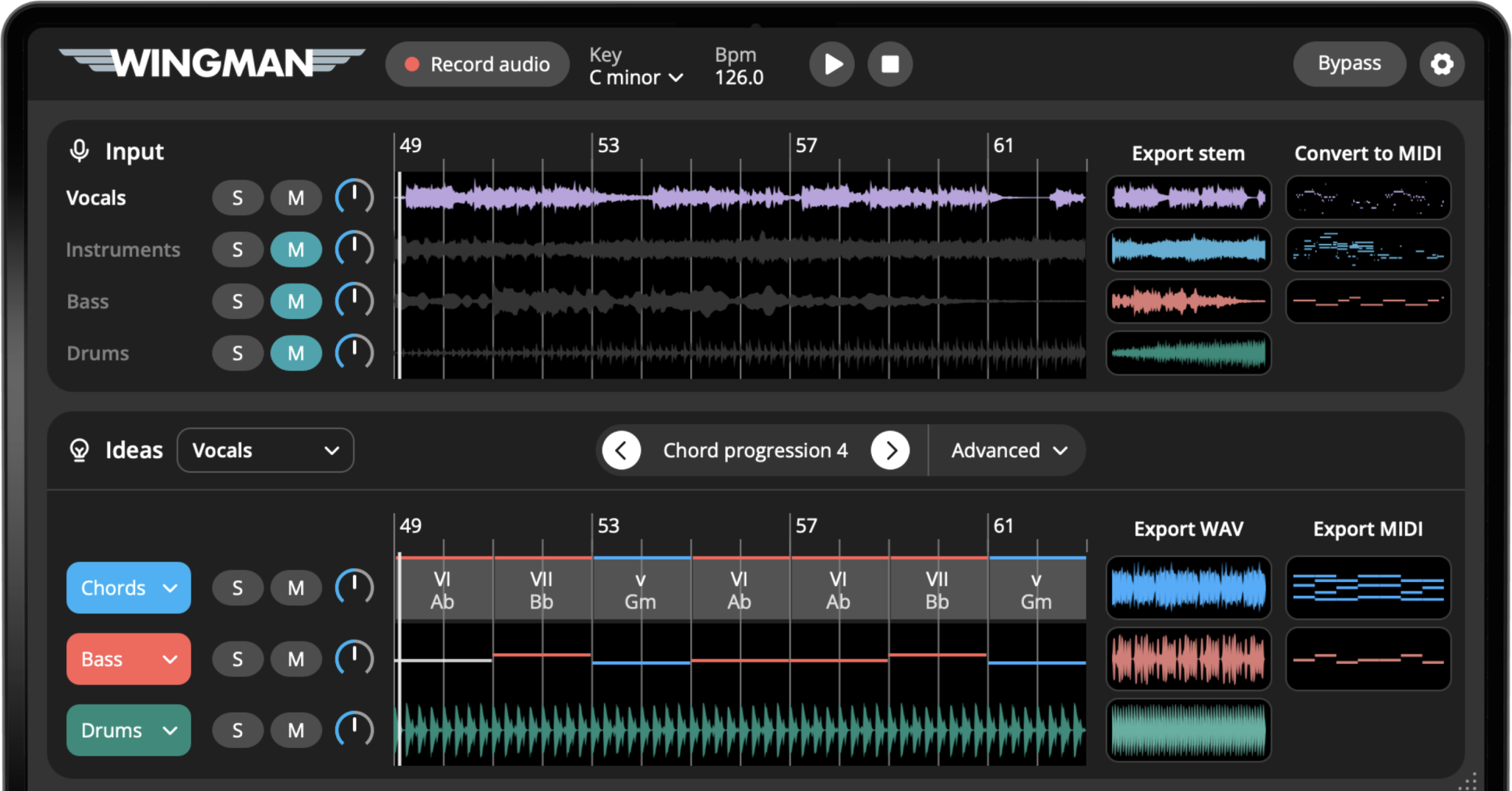
Wingman is a direct option when you have audio in your DAW and want new chord and bass ideas around it. Captain Plugins 8 suits writing a progression and connected musical parts from a key or chord idea. Scaler 3 suits a workflow built around detecting and developing harmony. EZbass is a focused bass instrument with audio-to-MIDI and groove tools. They overlap, but they do not turn the same input into the same result.
Watch the Wingman workflow
Open this section of the official Wingman 3 walkthrough. The demonstration uses Logic. This video shows Wingman’s workflow; it is not a comparison test.
Decide what you want from the recording
A singer has sent a vocal with no backing. You have a guitar loop that needs bass. Or a finished mix contains a phrase you want to use in a different arrangement. All three begin with audio, but the next musical decision is different.
- New accompaniment: write chords or bass that support a phrase.
- Transcription: recover notes that already exist in the recording.
- Stem separation: isolate audio parts such as a vocal or bass.
Transcribing a vocal gives you its melody. It does not automatically supply the chord progression you would choose underneath it. Separating a bass stem gives you the existing performance, not a newly written bassline. Decide which outcome you need before comparing tools.
Compare the starting point and result
| Tool | Starting point | Useful next step | Important distinction |
|---|---|---|---|
| Wingman 3 | Audio captured from your DAW | Audition new chords and bass against the recording, then edit and export | A suggested backing is a musical option, not a claim that these were the original chords. |
| Captain Plugins 8 | A key, scale or chord progression you choose and edit | Write chords in Captain Chords, connect Captain Deep for bass, and develop melody or drums with the other plugins | A composition workflow from chosen harmony; it is not the same as capturing a vocal and asking Wingman for accompanying chords. |
| Scaler 3 | Audio or MIDI for detecting harmony, or a progression you build | Develop chords and apply Motions for bass, melodies and other parts | Its harmony and arrangement workflow is broader than a single bass instrument. |
| Toontrack EZbass | Recorded performances, bass grooves, or drum/keyboard MIDI | Build and edit a bass performance | Audio Tracker is designed mainly for monophonic guitar or bass, plus rhythmic material; it is not a general full-mix chord detector. |
This comparison is published by Mixed In Key, the developer of Wingman and Captain Plugins. It summarizes the manufacturers’ documented workflows; it is not a head-to-head accuracy or sound-quality test.
Wingman: build around the audio already in your session
Wingman is designed for the moment when you have a vocal, loop or track section and need another musical part. Capture the phrase, compare chord ideas while the original plays, then shape the bass underneath the chosen harmony. Its chord and bass ideas can be exported as MIDI or WAV.
For a vocal-led track, begin with the held notes and the ends of phrases. Does the backing leave room for the lyric? Does a chord change support the melody, or arrive halfway through a note that wanted to stay settled? A useful suggestion still needs those decisions from you.
Follow the vocal-to-chords workflow when the vocal is the part you want to keep. If you already have the harmony, go straight to building the bassline.
Captain Plugins: compose from a progression
Captain Plugins 8 is a useful choice when you want to write the harmony yourself. Start with a key and scale in Captain Chords, choose or build a progression, then edit its rhythm and voicing. Connect Captain Deep to create a bassline that follows those chords. Captain Melody and Captain Beat help develop the other parts of the arrangement.
The starting point matters. If you already have a vocal recording and want backing ideas that respond to it, Wingman is the more direct route. If you want hands-on control over a progression and connected parts, Captain gives you a composition workflow to build from.
See the Captain Plugins overview and the Captain Deep guide, or compare the two workflows in Wingman vs Captain Plugins.
Scaler 3: develop the harmony and arrangement
Scaler 3 detects chords, keys and scales from audio or MIDI. Its arrangement tools include lanes for chords, melody, bass and phrases; Motions turn a progression into different musical performances. These features make it a relevant option when you want to explore harmony and develop several related parts.
Compare it using the same phrase you would use in your project. Check whether the detected harmony is a useful starting point and whether you prefer developing parts from a chord track. Confirm current features and formats on the official Scaler 3 page.
EZbass: focus on the bass performance
EZbass combines a sampled bass instrument, editable MIDI grooves and Audio Tracker. Toontrack documents converting recorded guitar, bass or rhythmic performances into MIDI, and generating matching bass from drum or keyboard MIDI.
This is a different emphasis from asking for an entire backing around a vocal. If bass articulation and performance are the main job, it belongs on the shortlist. Match your source to the documented input: a clear single-note performance is a different test from a dense finished song. See Toontrack’s Audio Tracker explanation before choosing the workflow.
Use the same musical test for each tool
- Choose one useful phrase. A short section with an audible melody or harmonic movement makes it easier to hear why a suggestion works.
- Define the part you want to keep. Decide whether the vocal, chords, rhythm or original bass is the reference. Changing everything at once makes comparison difficult.
- Compare at similar volume. Begin with a simple sound so a bigger preset does not decide which notes are better.
- Listen across the phrase boundary. A part can work inside a loop but fail at the entry into the chorus or at the final held note.
- Check the exported result. Confirm timing and note lengths in the DAW, and choose a sound that belongs in the arrangement.
Keep a version with fewer notes. If the denser version is better, you should be able to hear what the extra movement contributes. If it only fills every gap, the simpler part may serve the track more clearly.
What changes when the source is a full mix?
A full mix contains several competing clues. The sung melody, chord instruments and bass may suggest different note choices, while effects can blur the phrase. Start with a stem or a simpler section when you can. If you separate the recording, audition the result for bleed and artifacts before relying on it.
When replacing a bassline, mute the old bass where possible. Layering the new line over it can create misleading clashes even when either part works alone. Our stem separation guide explains how to prepare the material.
Choose the workflow that solves your next task
If the recording is your starting point and you want a new backing, explore Wingman. If you want to write a progression and build connected chord, bass and melody parts, explore Captain Plugins. For detecting and developing harmony with arrangement tools, compare Scaler. If the missing piece is a detailed bass performance, investigate EZbass.
You do not need every type of tool for one song. Choose the next part the song needs, get it working with the original audio, and return to the arrangement.
Common questions
Can a plugin suggest chords from a vocal recording?
Yes. Wingman offers chord ideas based on captured audio. Treat a suggestion as a possible accompaniment and listen against the whole vocal phrase; a melody can support more than one progression.
Will audio-to-MIDI create a new bassline?
Audio-to-MIDI estimates notes already in a recording. Writing a new bassline is a separate musical step, even when a tool combines both workflows.
Which of these is the best plugin?
There is no single winner for every source or goal. Choose by the part you need, how you prefer to edit it, and whether the result works in your own session. No comparative benchmark was performed for this article.
Explore Wingman 3
Build chords, bass and other parts around the audio in your DAW.