


How to Separate Stems for a Remix in Wingman
Find the part you want to keep, check the separation through the whole phrase and build the new arrangement around that stem.
Updated · Wingman 3.0
How to Separate Stems for a Remix in Wingman
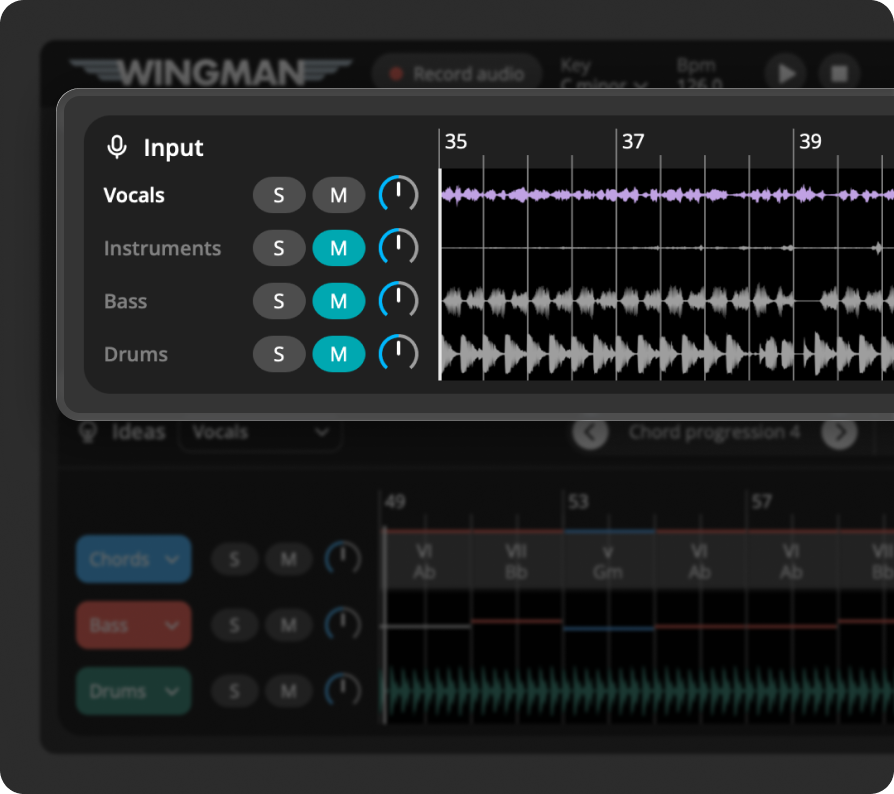
Capture the track or section in Wingman 3.0 and review its separated audio parts. Solo the vocal, drums, bass or instruments to choose the material for your remix. Listen for artifacts and bleed before exporting. You can build new chords around a vocal or convert musical material to MIDI, but those are separate choices after separation.
See the workflow in Wingman 3
Follow the relevant part of the official walkthrough, then use the steps below with your own audio.
Watch this section in the official Wingman 3 walkthrough. The demonstration uses Logic; the musical controls are shown inside Wingman.
When to use this workflow
Use this workflow when you want to isolate parts of a track or sample before creating a remix. Instead of working with the full mix, you can focus on the vocal, bass, drums, or instruments separately.
Good starting points
- A full song
- An acapella source track
- A sample or loop
- A remix reference
- An audio file with vocals or instruments
What you can create
- Vocal-based remix ideas
- New chords around a vocal
- Basslines from an isolated part
- MIDI ideas from stems
- New arrangements in your DAW
What you need before you start
Wingman 3.0 installed as a plugin inside a supported DAW.
A track, loop, sample, or audio file loaded on a DAW track.
A section of audio that contains the part you want to isolate or build from.
Distinguish the original drums from a new drum part
A separated drum stem comes from the audio you recorded. Wingman 3’s Drums channel supplies a new part you can audition by genre or through the suggested options.
If the aim is to replace the original groove, mute its drum stem before choosing a new kit. Compare the new drums with the retained vocal, bass or instruments, and listen for bleed or separation artifacts in those stems. This keeps you from judging two drum arrangements playing on top of one another.
How to separate stems for a remix
Add the track or sample to your DAW
Start by placing the audio you want to remix on a track in your DAW. This can be a full song, loop, sample, or any audio section you want to split into stems.
Choose a section that contains the elements you care about most, such as a vocal hook, drum groove, bassline, or instrumental phrase.
Record the audio into Wingman
Add Wingman to the track and use Record Audio to capture the section you want to work with. Wingman uses this recording to create stems and musical suggestions.
Work from the captured phrase in Wingman 3
Check the source audio, then audition only the parts you need. Keep listening to the original phrase as you refine the result.
Separate the audio into stems
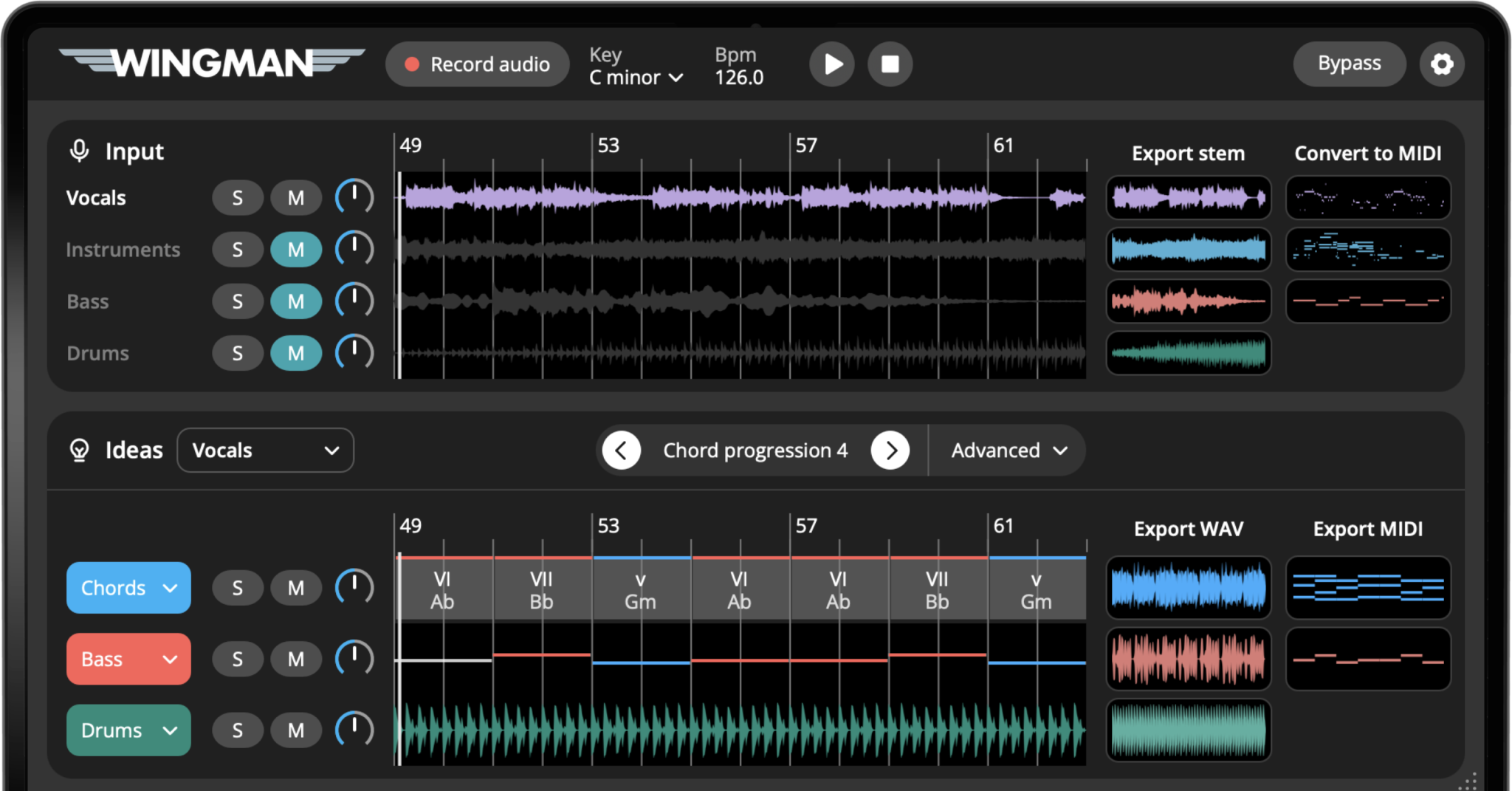
Use Wingman’s stem separation tools to split the audio into parts such as vocals, bass, drums, and instruments. This lets you work with the individual pieces of the original audio instead of the full mix.
Once the stems are created, listen through each part and decide which one is most useful for your remix.
Choose the stem you want to build from
Solo the part you want to keep and audition the full phrase, including quiet sections and note endings. Separation can leave bleed or artifacts, so choose a source that works in the new mix rather than expecting a perfect studio stem.
Generate chords or basslines from the stem
Once you choose the stem you want to build from, explore chord and bassline ideas in Wingman. This is useful when you want to create a new harmonic direction around a vocal, instrument, or loop.
Convert a stem to MIDI if needed
If you want to edit a musical part more deeply, convert the audio to MIDI. This can help you rebuild a melody, create a new instrument layer, or use part of the original track as the foundation for a new idea.
MIDI gives you more control over notes, timing, sound design, and arrangement.
Export the stems back into your DAW
Export the separated stems from Wingman and drag them back into your DAW. You can arrange the vocal, drums, bass, or instruments on separate tracks and start building your remix.
Build a new arrangement around the stems
Keep the selected stem aligned in your DAW, then develop the backing around its phrasing. Review verses and hooks separately. Add chords or bass only where they help the arrangement, and keep the original source for timing reference.
Tips for better results
Start with the most important stem
If the remix is vocal-focused, build around the vocal. If the remix is groove-focused, start with the drums or bass. This keeps the new idea connected to the part that matters most.
Use stems as creative material
You do not need to use every stem. Sometimes the best remix comes from keeping one strong element and replacing everything else.
Export stems before arranging
Once the stems are separated, export them into your DAW so you can mute, cut, rearrange, process, and mix each part independently.
Frequently asked questions
Yes. Wingman can separate audio into stems, including vocals, bass, drums, and instruments, so you can isolate the vocal or other parts of a track.
Yes. You can export separated stems from Wingman and bring them back into your DAW for editing, arranging, and mixing.
Yes. After separating stems, you can use a specific stem, such as the vocal or instruments, as the basis for new chord and bassline ideas.
Yes. Stem separation is useful for remixing because it lets you isolate the parts you want to keep, replace, process, or rebuild.
Yes. Wingman can help convert audio to MIDI, which is useful when you want to edit a musical part from a stem in your DAW.
Turn stems into new remix ideas.
Use Wingman to separate vocals, bass, drums, and instruments, then build new chords, basslines, MIDI, and arrangements around them.
Updated