


How to Create a Bassline From Chords in Wingman
Choose the chord progression first. Audition bassline ideas underneath it, then check the register and rhythm with your kick and vocal.
Updated · Wingman 3.0
How to Create a Bassline From Chords in Wingman
With a chord progression in Wingman 3.0, audition bassline ideas that support the harmony. Compare simple movement with busier options, then choose a rhythm and sound that leave room for the kick. This creates a new supporting part; it is different from converting an existing recorded bassline to MIDI.
See the workflow in Wingman 3
Follow the relevant part of the official walkthrough, then use the steps below with your own audio.
Watch this section in the official Wingman 3 walkthrough. The demonstration uses Logic; the musical controls are shown inside Wingman.
When to use this workflow
Use this workflow when you already have chords, but the track still feels unfinished. A good bassline can make the chord progression feel more grounded, rhythmic, and connected to the drums.
Good starting points
- A chord progression
- A vocal with matching chords
- A remix idea
- A loop that needs low-end support
- An unfinished beat or track section
What you can create
- Basslines that follow the chords
- Simple root-note bass parts
- More rhythmic bass grooves
- Bass ideas for remixes
- MIDI or WAV bass parts for your DAW
What you need before you start
Wingman 3.0 installed as a plugin inside a supported DAW.
A chord progression in Wingman, either generated from audio or created as part of your workflow.
A track context such as drums, vocal, melody, or loop so you can judge how the bassline fits.
Leave room for the chord rhythm and the kick
The Wingman 3 walkthrough pairs a busy chord rhythm with a simpler bass rhythm. Audition bass presets, adjust the octave and compare rhythm options, including On Chord Change.
Then check the bass with the kick. If you use the new Drums channel, mute the original drum stem first when you want to replace it. A new kit can change which bass notes feel crowded, so make the final choice with both parts playing.
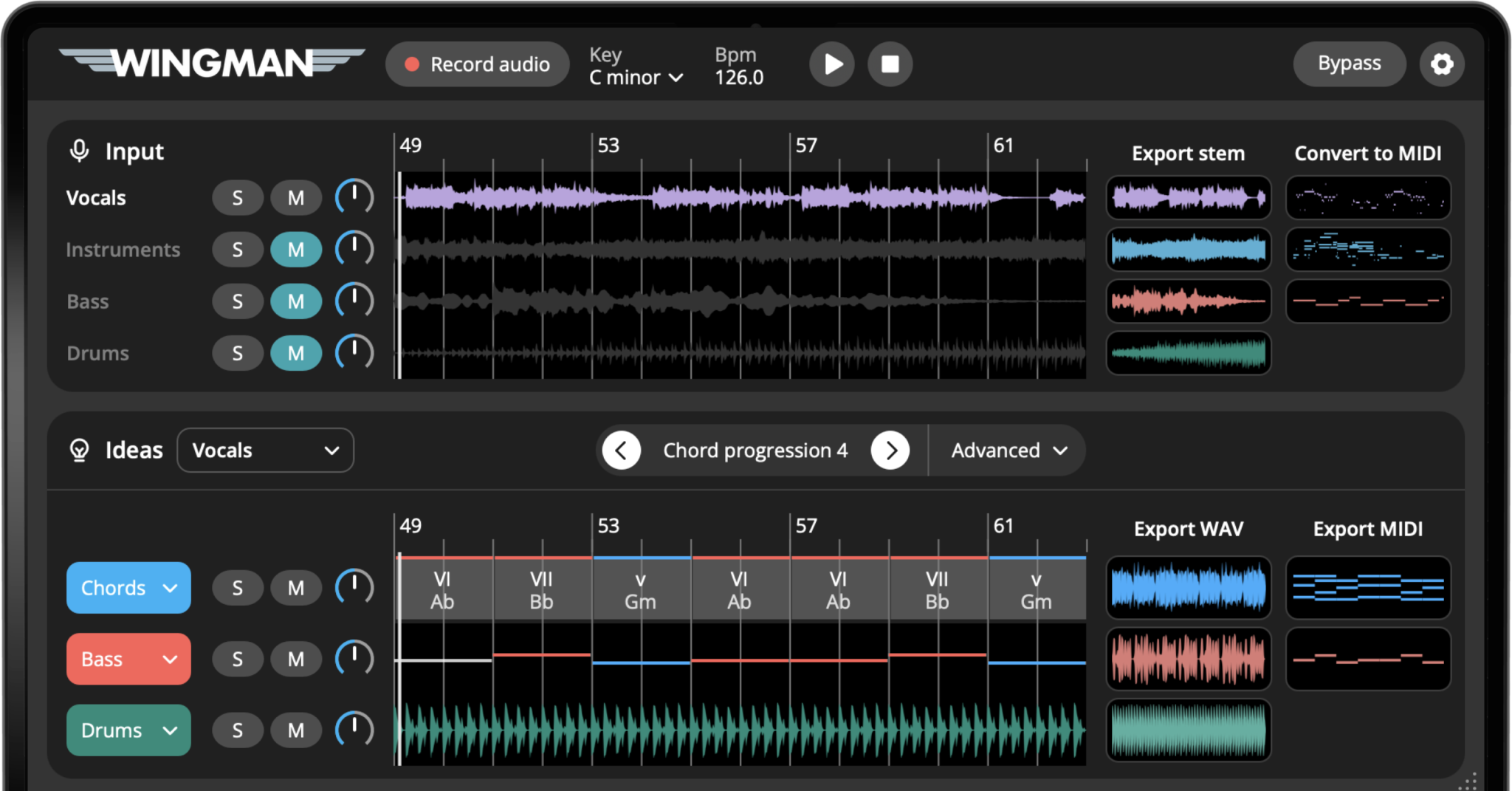
How to create a bassline from a chord progression
Start with a chord progression
Begin with a chord progression inside Wingman. This can come from a melody, vocal, acapella, loop, or any other audio idea you used as a starting point.
Before creating the bassline, make sure the chords already feel right emotionally and harmonically.
Generate a bassline that follows the chords
Use Wingman to generate a bassline based on the chord progression. The bassline should support the harmony and make the progression feel more grounded.
Listen to the bassline with the chords
Play the bassline together with the chord progression. Listen for whether the low-end feels connected to the harmony or if any moments feel too tense, empty, or crowded.
The bassline does not need to play constantly. Space can make the groove feel stronger.
Try different bassline directions
Audition a few bassline options. Some basslines may closely follow the chord roots, while others may add more movement between chords.
Choose the version that supports the track best. A dance track may need a more driving bassline, while a vocal-focused track may need more space.
Shape the bass rhythm
Try the available bass rhythm options with the kick and chords playing. Check where notes start and stop, and leave gaps when the low end becomes crowded. Export MIDI for finer timing and note edits in your DAW.
Choose the right bass sound
Change the bass sound to fit the style of the track. A sub bass can keep the low-end clean, a reese bass can add movement, and a plucky bass can make the rhythm feel more defined.
You can use Wingman’s built-in sounds or your own VST synths if you want to hear the bassline through your favorite instruments.
Check the bassline against the full track
Listen to the bass through the whole phrase with the vocal, drums and chords. Check register, note changes and sustained overlaps with the kick. If you change the progression, review the bass again rather than assuming the previous part still fits.
Export the bassline into your DAW
Once the bassline feels right, export it as MIDI or WAV and continue producing in your DAW.
Export MIDI if you want to keep editing the notes or change the bass sound later. Export WAV if you want to capture the sound and move quickly into arranging or mixing.
Tips for better basslines
Let the bass support the chord progression
The bassline should make the chords feel stronger, not distract from them. If the harmony feels unclear, simplify the bass movement.
Use rhythm to create energy
The notes are only part of the bassline. Rhythm, spacing, and timing are what make the bass feel locked into the track.
Keep the vocal in mind
If the track has a vocal, avoid basslines that are too busy under important vocal phrases. Simpler bass movement can leave more space for the vocal.
Frequently asked questions
Yes. Wingman can help create basslines that follow a chord progression and fit the musical context of your track.
Not always. Root-note basslines are a good starting point, but a bassline can also add passing notes, rhythm, and movement between chords.
Yes. You can adjust the rhythm, choose different sounds, export the bassline as MIDI, and continue editing it in your DAW.
Yes. You can use Wingman’s built-in sounds or your own VST synths when shaping the bassline.
Yes. You can export the bassline as MIDI or WAV and continue producing with it in your DAW.
Create a bassline that supports your chords.
Use Wingman to turn chord progressions into basslines, rhythms, and low-end ideas you can finish in your DAW.
Updated