


Wingman vs Captain Plugins: choose by your starting point
Both help you write music. The practical question is what you already have in the project and which part you want to build next.
Updated · Wingman 3.0
The short answer
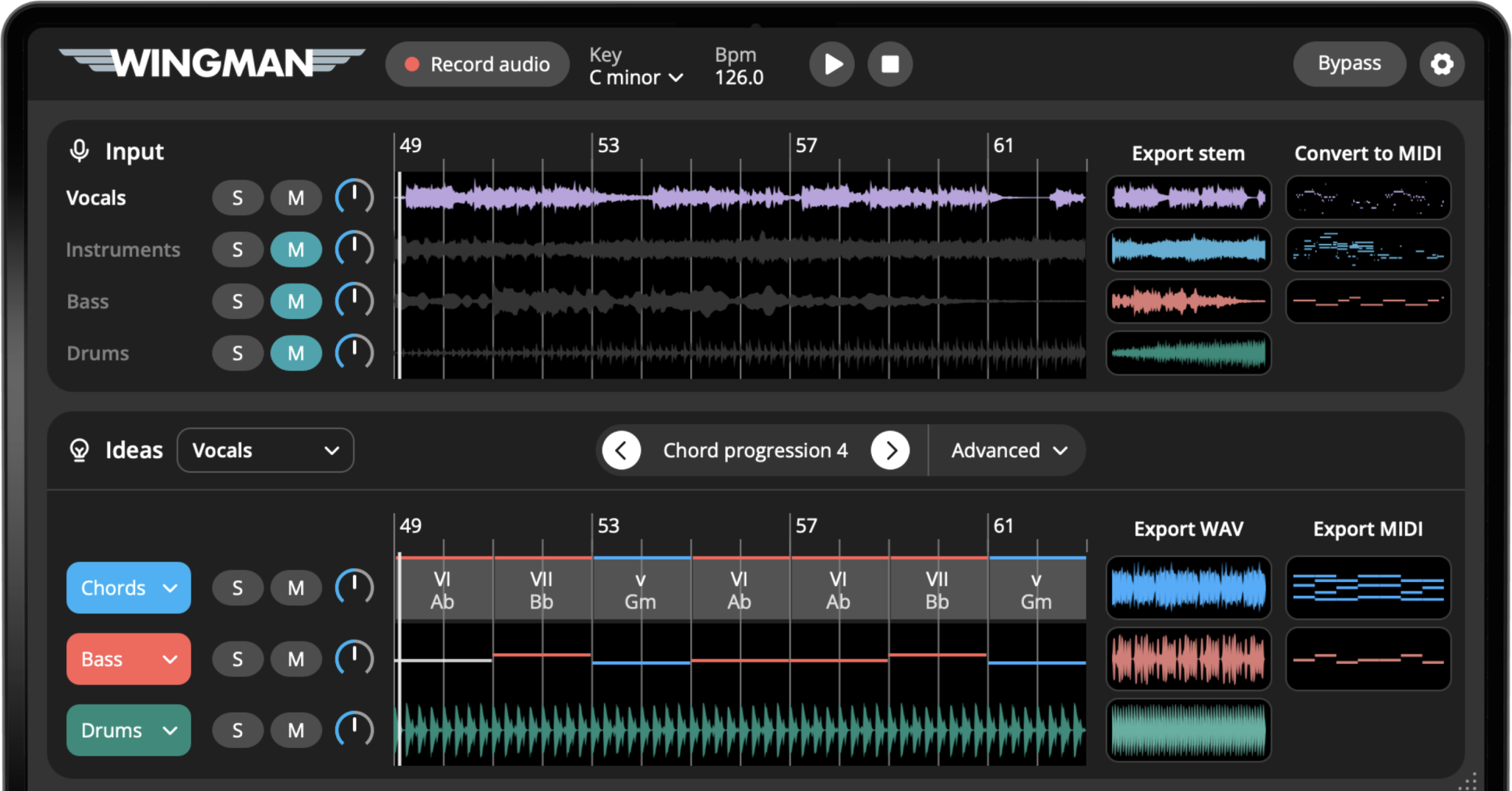
Choose Wingman when an existing vocal, loop or recording is the reference for new chord and bass ideas. Choose Captain Plugins when you want to build and develop a composition through its connected chord, melody, bass and drum tools. Both workflows still need you to choose, edit and arrange the musical parts.
Watch the Wingman workflow
Open this section of the official Wingman 3 walkthrough. The demonstration uses Logic. This video shows Wingman’s workflow; it is not a comparison test.
Two products from Mixed In Key
Wingman and Captain Plugins are separate Mixed In Key products. They share a goal of helping you develop musical ideas, but starting a session in one is not the same process as starting in the other.
The clearest way to choose is to finish this sentence: “I already have ___, and I need ___.” A recorded vocal that needs a new backing points toward one workflow. A blank piano roll and a chord idea point toward another. Owning more tools does not remove that first decision.
Compare the main workflow
| Question | Wingman | Captain Plugins |
|---|---|---|
| What leads the process? | Recorded audio from your DAW | A progression or musical part you build and develop |
| What is the main next step? | Audition accompaniment against the source | Connect and refine composition parts |
| How does bass fit? | Develop bass with the chosen chord idea | Captain Deep follows the progression in Captain Chords |
| What else can the workflow include? | Audio-to-MIDI and separated stems | Captain Melody, Captain Beat and Captain Play alongside Chords and Deep |
| Where do you finish? | Edit or arrange exported MIDI and audio in your DAW | Edit or arrange exported MIDI and audio in your DAW |
These are useful starting points, not restrictions on what you are allowed to write. You can manually compose around a reference in Captain, or change the direction of an idea suggested in Wingman. See the current Wingman and Captain Plugins feature pages for the full tools.
Start with Wingman when the recording matters
A vocal demo often already contains the identity of the song: the phrasing, held notes and points where the singer leaves space. Instead of writing a progression in isolation, capture that audio in Wingman and listen to suggestions with the vocal present.
The useful question is not only whether all the notes belong to a key. Listen for what happens at each chord change. A long vocal note may feel settled over one chord and tense over another. Both can be valid, but they tell different stories.
Choose a short phrase, compare a few ideas, then stop generating and develop one. Our vocal workflow explains the capture and audition process; the chord-editing guide covers refining the result.
This also suits a remix where you want to keep the original vocal but change the backing. Decide which original parts remain before adding new chords or bass, so you are not judging two competing arrangements at once.
Start with Captain when you want to compose the parts
Captain Plugins 8 provides connected tools for building musical parts in your DAW. Captain Chords handles the progression, Captain Melody develops melody material, and Captain Deep can follow the chords with bass. Captain Beat and Captain Play address rhythm and performance tasks.
That approach suits a session where you want to choose the harmonic direction first, then hear how related parts develop around it. You might have a particular rhythm in mind but no recorded melody, or want to try a new verse progression before writing the topline.
The Captain Deep documentation describes its connection to Captain Chords. Change the progression, then check how the bass moves. The fact that parts follow the harmony does not mean every part should play constantly; mute layers and leave space while arranging.
Three common projects
A singer sends a dry vocal
Start by finding its tempo and useful phrase boundaries. Wingman is a relevant first choice for trying accompaniment against that recording. Keep the vocal audible while making decisions. A backing that sounds impressive alone can still crowd the singer.
You want to write a chord progression and melody
If you do not have a source recording to work around, start by composing the progression and phrase in Captain. Choose an uncomplicated sound, decide where the melody needs to breathe, and add bass after the harmonic direction is clear.
You have a loop but the track is going nowhere
Identify what is missing. If the loop needs a new harmonic interpretation, audition ideas against it. If the harmony already works and the arrangement needs another written part, develop that part around the progression. A new plugin is useful only when it addresses the musical task you have identified.
Edit the idea before adding more layers
Whatever tool you use, compare an eight-bar idea with a simpler version. Remove a chord change, shorten a sustained bass note, or leave a beat empty. Listen through the transition into the next section rather than only the most satisfying bar.
Separate the note decision from the sound decision where possible. A bright preset can make a progression seem more energetic without changing its harmony. When comparing two progressions, keeping the instrument and playback level similar helps you hear what the notes are doing.
Can you use both in the same project?
Yes, but give each a clear job. You might use a recorded phrase to find a useful direction, then continue composing or arranging related parts elsewhere in the session. Keep the source and the chosen progression easy to identify so later edits do not create competing versions.
Use ordinary exported MIDI or audio as the handoff. MIDI is useful when you want to change notes or assign a different instrument. Rendered audio retains the sound you exported. Neither format automatically carries every editing choice or plugin setting into another product.
See Wingman’s export workflow and the Captain feature guide. This guide does not assume a special live synchronization link between Wingman and Captain.
Make the choice around one unfinished project
Open a project you actually want to finish. Write down the missing part, choose the workflow that addresses it, and keep the next session focused on that part. You will learn more from getting one useful progression or bassline into the arrangement than from auditioning every available feature.
Explore Wingman for developing a recording. Explore Captain Plugins for composing connected parts.
Common questions
Is Wingman included in Captain Plugins?
They are separate products. Check the current shop or collection listing for what is included in a purchase; do not assume that owning one gives you the other.
Is Captain Plugins another name for Wingman?
No. Wingman is the audio-based accompaniment, stems and MIDI workflow discussed here. Captain Plugins is the connected composition suite. Choose the specific product whose workflow fits your task.
Can I still use Captain when I already have a vocal?
Yes. You can compose around a reference by listening and making musical decisions. For the documented workflow that captures audio and suggests accompaniment from it, start with Wingman.
Do I need to buy both?
No. Start with the task your current tools do not solve comfortably. A single useful part in a finished arrangement is a better reason to choose a tool than an overlapping feature list.
Explore Wingman 3
Build chords, bass and other parts around the audio in your DAW.