


How to Export MIDI and WAV From Wingman
MIDI keeps the notes editable. WAV keeps the rendered audio. Choose the format for the selected part and check it in your DAW before building the arrangement.
Updated · Wingman 3.0
How to Export MIDI and WAV From Wingman
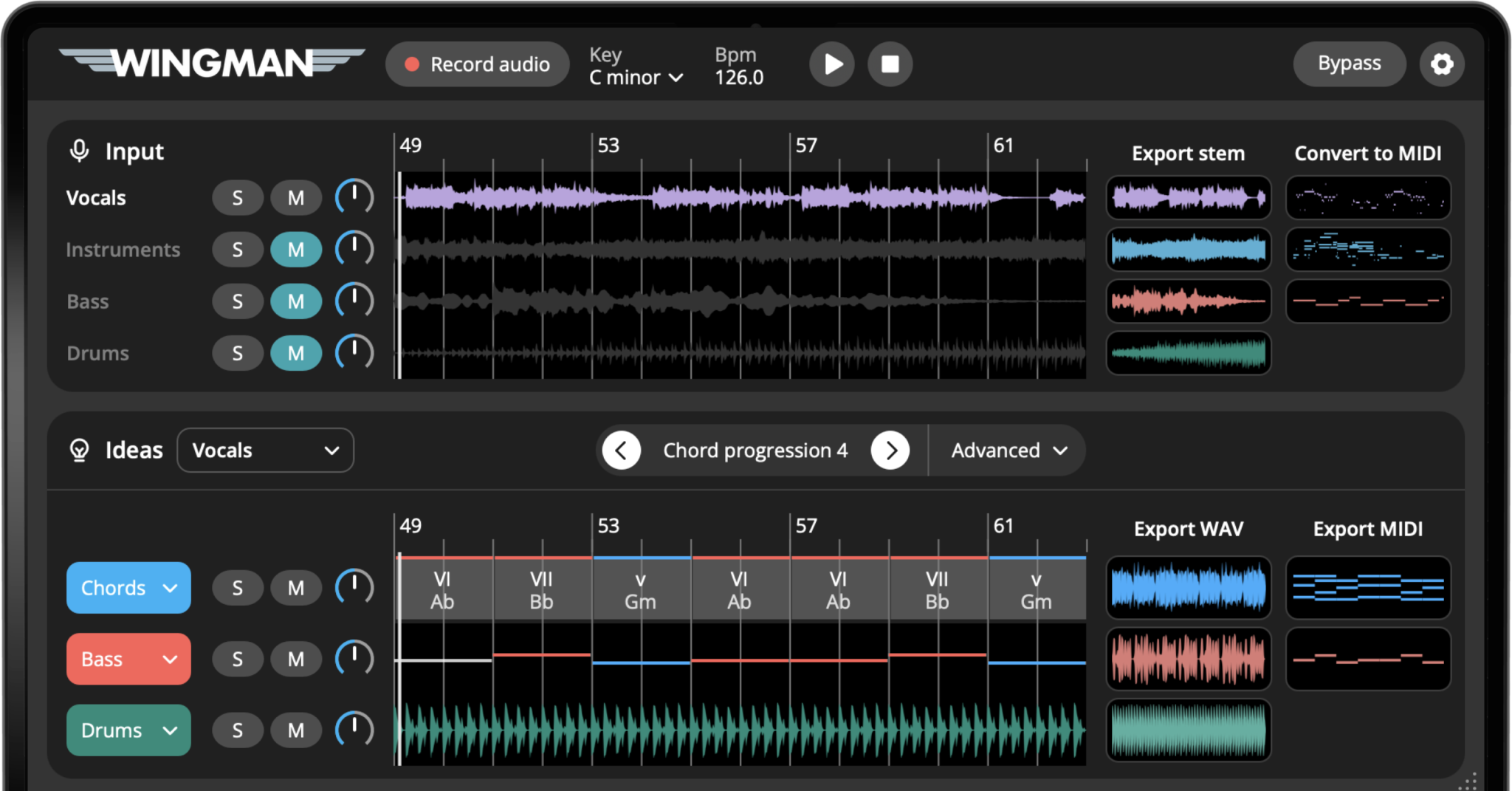
Wingman 3.0 exports MIDI and audio for continued production in your DAW. Use MIDI when you want to edit notes or change the instrument; use WAV when you want an audio file. Export the formats offered for the selected part, place them on the correct track types and compare the result with your preview. Do not assume every channel has identical export options.
Choose the export for the part
Chords, basslines and guitar parts can export as MIDI or WAV. MIDI transfers the notes for editing and playing with an instrument in your DAW. WAV keeps the rendered sound. Generated drums and separated stems export as audio, not MIDI.
Chords and bass
Use MIDI to edit the notes and assign an instrument in your DAW. Use WAV to work with the rendered sound.
Guitar parts
Export MIDI to edit or play the notes with another instrument. Export WAV to keep Wingman’s rendered guitar sound. MIDI does not contain the recorded guitar audio or preserve its sound.
Drums
Export the generated drum part or available separated drum elements as audio for editing and mixing. Drum exports are audio, not MIDI.
Separated stems
Use audio exports for isolated parts. Stem separation and audio-to-MIDI are different processes; a separated stem is not automatically an editable MIDI transcription.
See the workflow in Wingman 3
Follow the relevant part of the official walkthrough, then use the steps below with your own audio.
Watch this section in the official Wingman 3 walkthrough. The demonstration uses Logic; the musical controls are shown inside Wingman.
When to use this workflow
Use this workflow when you have created something useful in Wingman and want to bring it into your DAW as part of the real production session.
Good things to export
- Chord progressions
- Basslines
- Rhythmic chord patterns
- Audio-to-MIDI ideas
- Separated stems or audio parts
What you can do next
- Edit notes in the piano roll
- Change instruments and presets
- Arrange the idea into a full track
- Add drums, vocals, and effects
- Mix and process the exported audio
What you need before you start
Wingman 3.0 installed as a plugin inside a supported DAW.
A chord progression, bassline, rhythm, stem, or converted MIDI idea created in Wingman.
A DAW session where you want to continue arranging, editing, or mixing the exported idea.
Export the part you need for the arrangement
Wingman 3 adds separate export choices for its Drums channel. The walkthrough shows a full drum mix, kicks, tops and transitions. Separate elements make it easier to process a transition without changing the kick.
Chords and bass can be taken into the DAW as MIDI or WAV using the available controls. MIDI keeps the notes editable; WAV preserves a rendered sound. Check each imported part against the preview, especially the start position, loop length and effects.
How to export MIDI and WAV from Wingman
Finish the idea inside Wingman
Start by getting the idea to a useful point inside Wingman. This could be a chord progression, bassline, rhythm pattern, audio-to-MIDI result, or stem-based idea.
The idea does not need to be final. It only needs to be strong enough that you want to continue editing it in your DAW.
Decide whether you need MIDI or WAV
Choose MIDI if you want to keep editing the notes, sound, timing, or instrument later. Choose WAV if you want to capture the current sound as audio and move quickly into arrangement or mixing.
Export MIDI for editable notes
For a part with MIDI export, save or drag the MIDI into an instrument track. Assign a sound, then check notes, tempo and clip position. MIDI does not contain the original instrument audio or effect processing.
Export WAV for audio
For a part with audio export, save the rendered audio and place it on an audio track. Compare the beginning, length, level and ending with the preview, especially if effects add a tail. Keep a MIDI copy as well when that part offers it and you want further note editing.
Drag the exported file into your DAW
After exporting, drag the MIDI or WAV file into your DAW session. Place it on the correct track type: MIDI clips usually go to an instrument track, while WAV files go to an audio track.
Edit the part in your DAW
Once the file is in your DAW, continue shaping the production. For MIDI, edit the notes, timing, instrument, or automation. For WAV, edit the audio, add effects, arrange sections, or process it creatively.
This is where the Wingman idea becomes part of the full track.
Layer the export with other parts
Try layering exported chords with another synth, doubling a bassline with a sub, or using the exported MIDI to create a second supporting instrument.
MIDI exports are especially useful for layering because the same musical idea can trigger multiple instruments.
Build the full arrangement
Use the exported idea as a starting point for your intro, verse, chorus, drop, breakdown, or remix section. Add drums, vocals, transitions, automation, and effects to turn the idea into a full production.
Which export format should you use?
MIDI and WAV are useful for different reasons. In many workflows, exporting both gives you the best of both worlds.
Use MIDI when you want to:
- Edit notes in the piano roll
- Change the instrument or preset
- Transpose the part
- Adjust timing and velocity
- Layer multiple sounds from one idea
Use WAV when you want to:
- Capture the sound as audio
- Resample or process the part
- Chop or rearrange audio
- Commit to the sound quickly
- Mix the part like a finished audio layer
Tips for better exports
Export MIDI before changing too much
If you think you may want to edit the notes later, export MIDI early. It keeps the musical idea flexible while you continue producing.
Export WAV when the sound feels right
If the sound, rhythm, and effects already feel good, export WAV and move forward. Committing to audio can help you finish faster.
Keep both versions when possible
A WAV export gives you the sound, while MIDI gives you editing control. Keeping both makes it easier to revise the part later.
Frequently asked questions
Yes. You can export MIDI from Wingman and use it in your DAW’s piano roll with your own instruments and sounds.
Yes. You can export Wingman ideas as WAV when you want to use the result as audio in your DAW.
Use MIDI if you want to edit notes or change instruments. Use WAV if you want to capture the sound as audio and move quickly into arranging or mixing.
Chords, basslines and guitar parts can export as MIDI or WAV. MIDI keeps the notes editable; WAV keeps the rendered sound. Drums and separated stems export as audio, not MIDI.
Yes. Once you export MIDI from Wingman, you can use it with your own software instruments and synth plugins inside your DAW.
Move your Wingman ideas into your DAW.
Export chords, basslines, rhythms, MIDI, and audio from Wingman so you can keep producing, arranging, and mixing.
Updated