Building on DJ history, and incorporating new technology into your DJ sets can be exhilarating. Here are a few ways
you can do this.
History in the making
The line between DJ and live performer has always been a little blurred. DJing’s roots are at New York block parties,
where DJs like Kool Herc and Grandmaster Theodore would pick up the needle as the ‘break’ ended and place it back
down at the start. They had to be lightning fast to keep the vibe going. They also had to be showmen, working the
crowd while they worked the needle.
These days, such techniques seem crude, but they highlight the need for a DJ to not only mix great records, but to
entertain.
It’s not just Hip-Hop that has seen performance as a crucial part of the art. From Jeff Mills to Fatboy Slim,
Deadmau5 and Ritchie Hawtin, electronic music has a rich history of artists who pushed DJing to new heights.
The operative word there being ‘pushed’. Any time a DJ caught the attention because of their charisma or performance
skill it’s likely they were innovating.
The art of DJing has rarely stood still, and the breadth and scope of tools for innovation at the feet of today’s DJs
is breathtaking.
Let’s hear it for the DJ
There is nothing wrong with purely playing records one after another. For many DJs that’s where the pleasure lies;
selecting the best cuts and arranging them in the perfect order. At its purest, DJing is a seemingly simple act that
is phenomenally hard to master.
Nightmares on Wax’ Boiler Room performance is a masterclass of pure selection and mixing
This article isn’t out to criticize traditional DJs. Far from it; the intention here is to shine a light on DJs that
push the envelope.
The gradual merging of traditional DJing and Producing has been gaining pace for many years.
With new iterations of Traktor including a step sequencer, Serato’s Pitch n’ Time tool rubbing shoulders with
astonishing controller innovations from the likes of Pioneer and Numark it’s clear: The industry sees this trend as
permanent.
Let’s take a look at a few ways you can spice up your DJ sets.
1. Drum Machines
Adding a drum machine to a DJ set is a classic move. Since the early 80s, when DJs like Jeff mills started turning up
to clubs with a Roland 808 in hand, the drum machine has been a natural bedfellow for DJs.
The likes of Derrick Carter, Marshall Jefferson and Frankie Knuckles became masters at mixing live drum synths and
vinyl together, and – as Tyree Cooper explained to Pitchfork in 2005 – “Kids loved that sh*t!”
Nowadays, DJ software such as Serato and Traktor can clock-sync to drum machines, so you can stay perfectly in time
all through the night.
Add in advanced looping functions, DJ FX on mixers and controllers, multi-channel mixing and you’ve got all the tools
you need to turn your DJ set up to 11.
Additionally, many DJs choose to use Ableton Live for DJing.
While Ableton is not designed as a DJ software, its advanced MIDI routing options and Max For Live Patches make it a
natural choice for some DJs.
You can effectively produce music live on stage, which many audiences find equally as exciting as beat-matching and
mixing records.
Jeff Mills expertly blending a Roland TR-909 with his DJ set
This technique has reached a logical conclusion – the Roland DJ-808. It literally combines the 808 with Serato, CDJs
and DJFX in one controller, and illustrates our point rather sweetly.
DJ KINK shows off his skills on the Roland DJ-808
2. Samplers
While drum machines first came to nightclubs under the arms of 1980s House and Techno DJs, a legendary machine rose
to prominence in another of the decade’s breakthrough genres.
The AKAI MPC is synonymous with Hip-Hop, and that’s where acts such as Public Enemy began using the sampling aspect
to devastating effect. The MPC, along with the Roland SP-404, became ubiquitous in the Hip-Hop producers’ studios of
the 80s, 90s and beyond. It wasn’t long before DJs cottoned on.
Suddenly, you could add one shots, drum sounds and more to your DJ sets, simply by triggering the appropriate pad on
stage.
This is a practice still central to many DJs’ performances today. And, as previously mentioned, the addition of
clock-sync to modern DJ software enables this method to be executed with ultimate precision.
Airhooooorn!
Check out this in-depth guide to syncing CDJs with MPC, MIDI keyboard and the Pioneer Nexus DJ mixer
3. SFX, iPads and MIDI Controllers
Let’s take a moment to consider the power of live SFX (AKA sound effects) in a DJ set.
With iPads, Ableton Live FX racks, in-built FX on many DJ mixers and Expansion Packs available for Serato, there are
thousands of SFX tools available. Not to mention the originator, the Kaoss Pad.
Kaoss Pads allow multi-parameter sound manipulation in real-time. From destructive bit-crush, distortion and
filtering, to classic phaser/flanger, reverb, live looping, delays and pitch-shift, there’s a vast array of live SFX
at the swipe of a finger.
It’s really easy to incorporate this into a DJ set to give your performance added dynamism.
Korg have even come up with a deidacted DJ controller based around the Kaoss Pad – here’s a clip of it in action:
Many of today’s mixers, such as the Pioneer Nexus, offer many of the same FX and more, too. In addition, there are
newer FX units specifically for DJs, such as Pioneer’s RMX, which offers tempo-synced SFX and live remixing
functions.
James Zabiela showing what’s possible with new tech and iPads:
James Zabiela on the Pioneer DJM Nexus and RMX-1000
Also using Ableton and his iPad as a MIDI/SFX controller
4. Turntablism
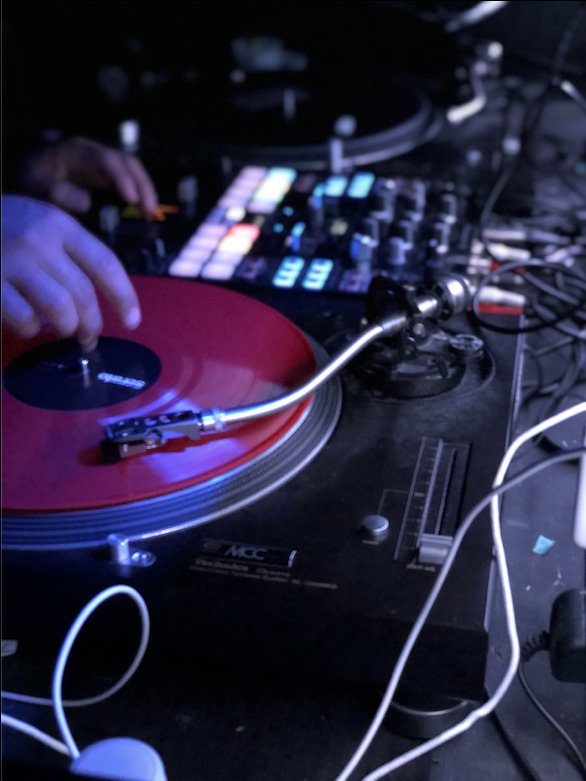
The earliest method of live performance in a DJ set was undoubtedly scratching.
Today, this skill has become an artform in its on right, with the long-running DMC World Championships showcasing
ever more complex and technically audacious turntablists.
It’s come a long way from DJs in the 1970s rubbing records back and forwards to create additional percussion. Modern
turntablists have embraced technology, and combined the art with the very latest in mixer and software design.
This kind of performance arguably takes more physical skill and practice than any other, so don’t expect to master it
overnight.
But there’s no denying that well executed turntablism is a sure-fire way to captivate and excite an audience!
We don’t understand what 14-year old DJ K-Swizz is even doing in this mind-blowing turntables and technology
routine
Meanwhile, legendary turntablist Chris Karns discusses his new gig, touring with live electronic act Pretty
Lights
5. Live Looping
While quickly cutting between records isn’t exactly a novel concept, a descendent of that pursuit has grown into one
of the most exciting of today’s DJ styles. Aided by the advancement in supportive technology, live looping has gone
from the mode operandi of one-man bands to an enormously powerful tool for modern DJs.
DJ software like Serato, Flow and Traktor, plus many CDJ models, have long-standing loop options available. But it’s
the development of new controllers that have really enabled this practice to take flight.
Now, loops can be sliced, duplicated, selected, and mixed in myriad ways, all at the touch of a controller. The
much-maligned sync function allows these loops to stay in time with much greater ease. This frees many DJs up from
maintaining a beat-match to creating ever more advanced and exciting loop-based compositions.
Dance music is famed for its repetitive nature, which often mean it’s full of handy 4-bar loops of bass, drums,
melodies or percussion.
Ritchie Hawtin talks us through his loop-based DJ style
Forward march
Modern versions of traditional live loopers, such as the Boss RC-505, allow clock-synced loops to be added to DJ
sets as well. With one of these tools, you can mix live loops into your DJ set on the fly.
Let’s say you can play an instrument, sing, rap, or want to add live percussion to your set.
With an RC-505 (or Ableton’s Live Looper) among other tools, this is now a relatively simple task. The clock sync
means whatever you perform will be looped in perfect time to your DJ set. You just have to get the performance
right!
A cool remix of Marvin Gaye – Let’s Get It On created using the Boss RC-505, CDJs and MIDI keyboards.
PRO TIP
Mixed In Key enables
you to sort your tracks by key. Try creating a playlist of tracks in the same key. From this playlist, choose
one track each with:
1) a 4-bar section of solo drums
2) a 4-bar section of solo bass
3) a 4-bar section of solo melody
4) a 4-bar loop of pads, SFX, or sparse percussion.
Then, set your DJ software to auto-loop the appropriate parts. Then try mixing these parts together, like you
would any other record. You’ve created a brand new composition out of 4 short loops of existing songs!
If 4-channel mixing is too complex, try selecting loops with drums and bass only on one track, and melody and/or
percussion on another, and mix this like a regular two channel mix.
You can take this to the next level by adding one shots, live SFX and/or scratching!
Sum of the parts
Mastering any or all of these techniques will undoubtedly enhance your DJ performances.
It may be that one in particular grabs your attention, or you might find that you want to explore aspects of all
these techniques.
Many modern DJs also produce, and many modern producers DJ as a way to perform their work.
So, it’s logical that the line betwee DJ and producer should be blurring. This is something these techniques can help
with. But there’s much more to explore.
Check
out Icicle’s incredible performance setup
Is it a DJ set? Is it live music? In a way, it’s both, and it builds on many of the techniques we’ve discussed
above.
Music is inherently derivative. One thing invariably follows, and is influenced by, another. With several decades of
glorious innovation, and an ever-expanding array of technological advances to behold, DJs can deliver fresh and
vital performances to amaze and inspire.
In closing, let’s hear the thoughts of the great Ritchie Hawtin as he discusses the role of technology in modern
DJing
Get Mixed In Key 10 today.
Improve your DJ Mixing by adding up to 8 automatic Cue Points per track. Mixed In Key 10 also gives you industry-standard key detection, rates your tracks by Energy Level, and offers a comprehensive metadata management system. Unlock the secret of the pros.