


How to Turn a Synth Loop Into MIDI With Wingman
Extract notes from a clear synth phrase, clean up the MIDI and try a different instrument. The original synth patch and effects remain part of the audio.
Updated · Wingman 3.0
How to Turn a Synth Loop Into MIDI With Wingman
Capture a short synth loop in Wingman 3.0, review the available MIDI result and export it to an instrument track. Compare notes, octaves and timing with the original loop before changing the sound. MIDI lets you rebuild the musical phrase; it does not recreate the synth patch, automation or effects from the recording.
See the workflow in Wingman 3
Follow the relevant part of the official walkthrough, then use the steps below with your own audio.
Watch this section in the official Wingman 3 walkthrough. The demonstration uses Logic; the musical controls are shown inside Wingman.
When to use this workflow
Use this workflow when you have a synth loop, melodic loop, or sample that has a useful musical idea, but you want to edit it like MIDI. This lets you keep the idea while changing the notes, rhythm, instrument, or arrangement.
Good starting points
- A synth melody loop
- A pluck loop
- A piano or keys loop
- A melodic sample
- A loop from a sample pack
What you can create
- Editable MIDI from the loop
- New synth layers
- Changed melodies or rhythms
- New sounds from the same idea
- Chord or bass ideas based on the loop
What you need before you start
Wingman 3.0 installed as a plugin inside a supported DAW.
A synth loop, melodic loop, piano loop, or sample loaded on a DAW track.
A clear section of the loop where the notes are easy to hear.
Recover the phrase, then choose its sound
Compare the converted MIDI with the synth loop before selecting a new instrument. Reverb, overlapping notes and effects can make the source harder to interpret.
Correct pitches and note lengths in your DAW where needed. Wingman 3’s recorded guitars are another way to play a chosen chord progression; they are not a promise to reproduce every articulation or sound from the original synth loop. Keep transcription and accompaniment as separate creative choices.
How to turn a synth loop into MIDI
Add the synth loop to your DAW
Start by placing the synth loop or melodic sample on an audio track in your DAW. Trim it to the section you want to convert, such as a 2-bar, 4-bar, or 8-bar phrase.
A shorter loop is usually easier to convert, review, and edit than a long audio file.
Record the loop into Wingman
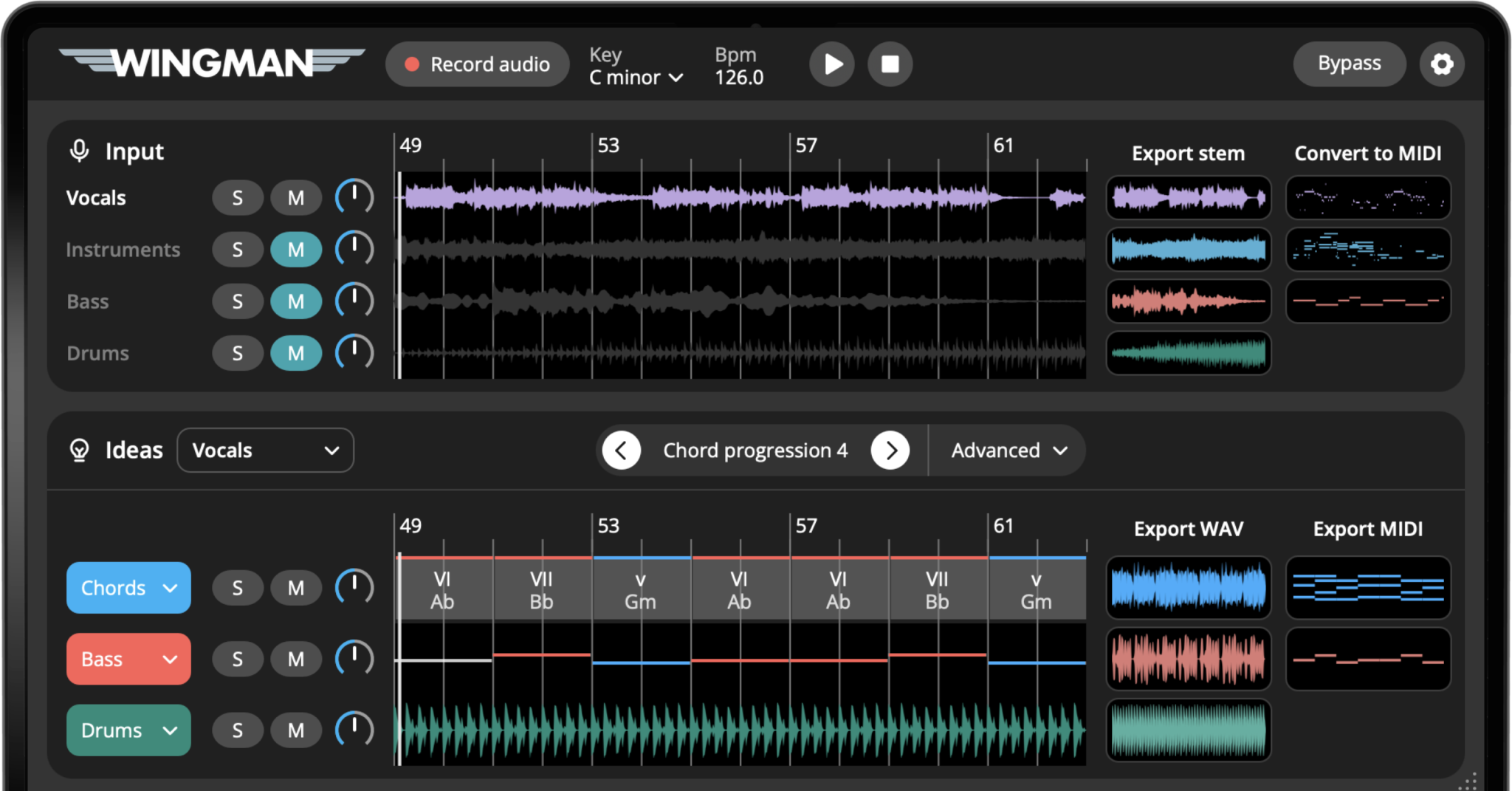
Add Wingman to the track and use Record Audio to capture the synth loop. Wingman uses this recording as the source for the audio-to-MIDI conversion.
Find the synth MIDI clip next to the stems
Review the MIDI clip associated with the instrument material after capture. Compare it with the loop you wanted to convert, especially when the source contains chords or layered sounds. Use the available result as a transcription to check and edit, not a guaranteed exact copy.
Export the MIDI into your DAW
Export the MIDI from Wingman and drag it into your DAW. Place it on an instrument track so you can hear the loop played through a synth, piano, pluck, pad, bass, or another sound.
Choose a new sound for the MIDI
Load the exported MIDI onto a software instrument. You can recreate the original synth idea with a similar sound, or completely change the character with a different preset.
A bright pluck loop can become a pad, a lead can become a bassline, or a simple melody can become a layered synth part.
Edit the notes and rhythm
Keep the original loop on a separate audio track and use a simple sound for the MIDI. Check pitch, octave, note starts and lengths; remove unwanted notes. Once the phrase is useful, try the instrument you want for the new arrangement.
Use the MIDI to build a new part
Once the synth loop is MIDI, you can use it creatively. Try layering it with the original loop, turning it into a new lead, creating a counter-melody, using it as a chord layer, or building a bassline from it.
This gives you more control than simply dragging the audio loop into your arrangement.
Tips for better synth-loop-to-MIDI results
Use loops with clear notes
Audio-to-MIDI conversion works best when the main musical idea is easy to hear. Very dense loops may still be useful, but they may need more cleanup after export.
Do not treat the MIDI as final
The exported MIDI is a creative starting point. Edit notes, timing, rhythm, and sound until it works for your track.
Try a completely different synth
The best part of converting a loop to MIDI is that you can keep the musical shape while replacing the original sound with something that fits your production better.
Frequently asked questions
Yes. Wingman can convert synth loops and melodic audio ideas into MIDI so you can edit the notes and use them with instruments in your DAW.
Yes. After exporting the MIDI, you can play it through any software instrument or synth in your DAW.
Clear loops usually give more useful MIDI results. Dense or heavily processed loops can still work, but the MIDI may need more editing after export.
Yes. Once exported, the MIDI can be edited in your DAW’s piano roll like any other MIDI clip.
Yes. You can use the MIDI to create new melodies, layers, basslines, chord parts, or variations based on the original loop.
Turn synth loops into editable MIDI.
Use Wingman to convert loops and samples into MIDI, then change the notes, sound, rhythm, and arrangement in your DAW.
Updated