


Can Wingman find chords that match my audio?
Use Record Audio to capture the phrase you want to build around, then listen to Wingman’s chord suggestions with the original audio. Compare how each progression supports the melody and choose the changes that work for your track. Treat the suggestions as accompaniment ideas and judge them against the original phrase.
See the workflow in Wingman 3
Follow the relevant part of the official walkthrough, then use the steps below with your own audio.
Watch this section in the official Wingman 3 walkthrough. The demonstration uses Logic; the musical controls are shown inside Wingman.
When to use this workflow
Use this workflow when you already have an audio idea but do not know which chords should go underneath it. This is common with vocal hooks, synth riffs, samples, toplines, or loops that sound good but still need harmony.
Good starting points
- A vocal hook
- A synth melody
- A piano phrase
- A sample or loop
- An unfinished track idea
What you can create
- Chord progressions that fit the audio
- Alternative harmony ideas
- Chords for vocals or toplines
- Remix starting points
- MIDI or WAV parts for your DAW
What you need before you start
Wingman 3.0 installed as a plugin inside a supported DAW.
A melody, vocal, loop, sample, or audio idea loaded in your DAW.
A clear section of audio that represents the idea you want to build around.
Match the phrase with chord timing and voicing
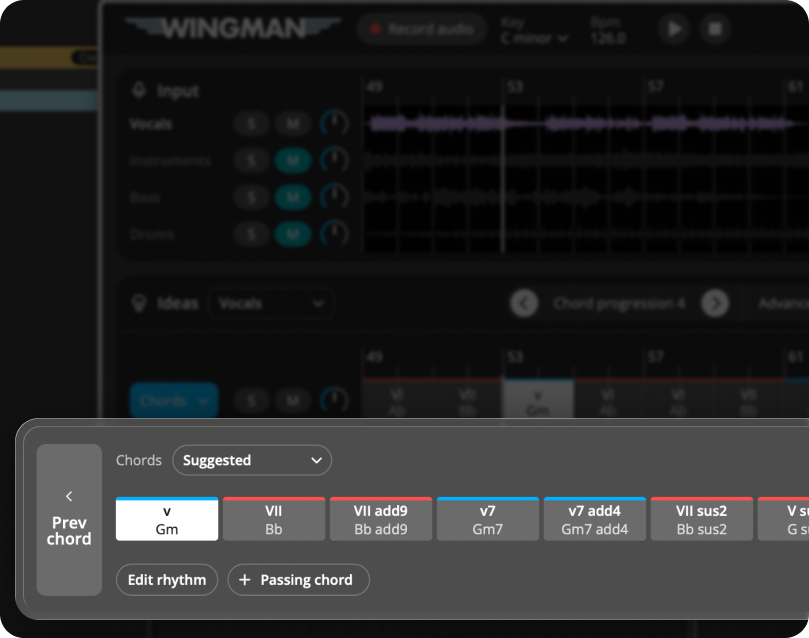
A progression can use suitable notes and still change at the wrong moments. In Wingman 3, compare the Advanced chord-change rates before replacing all the chords.
Then select an individual chord, try the available alternatives and use inversions to change the spacing. You can also split, resize or delete chords and add a passing chord. Listen across the edit with your original audio and bass playing; the aim is to support that phrase, not simply use a more complex chord.
How to find chords that match your audio
Add your audio to a DAW track
Start by placing the audio you want to build around on a track in your DAW. This could be a vocal, melody, sample, loop, synth riff, or an unfinished idea.
Choose the section that best represents the musical phrase you want the chords to support.
Record the audio into Wingman
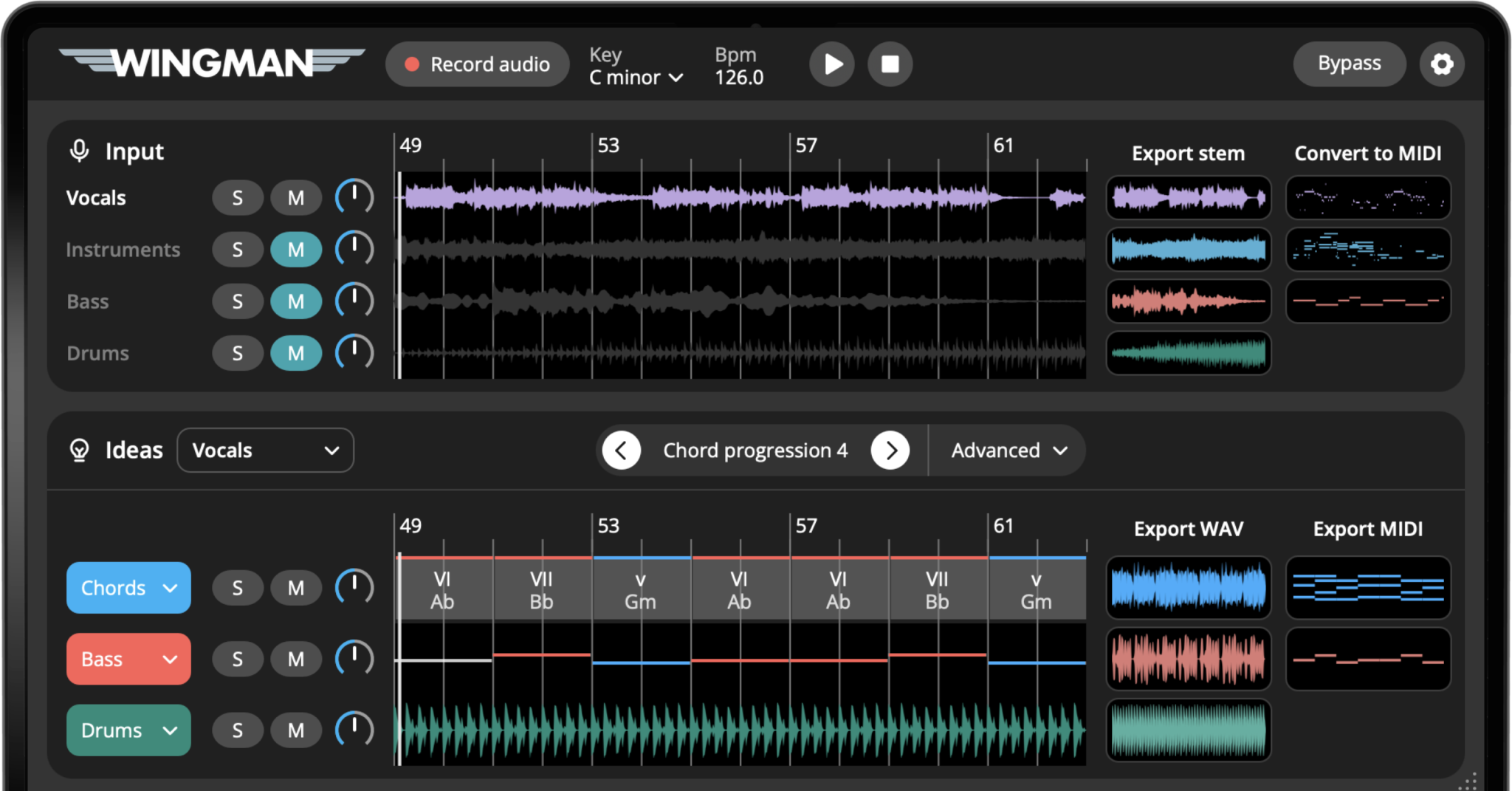
Set up Wingman so it receives the audio from your DAW, then use Record Audio to capture the phrase. Follow Use Wingman in your DAW if you need the setup workflow. The recorded audio becomes the context for the chord suggestions.
Work from the captured phrase in Wingman 3
Check the source audio, then audition only the parts you need. Keep listening to the original phrase as you refine the result.
Generate chord progressions
Explore the chord progressions Wingman suggests for your audio. Listen for chords that make the original idea feel more complete, emotional, or supported.
Listen for clashes with held notes, and check the chord changes against the phrasing of the vocal or melody. Keep the progression that supports the part.
Try different harmonic directions
The same melody or vocal can often work with more than one chord progression. Try different suggestions and listen to how they change the emotional direction of the track.
One progression may feel brighter, another may feel darker, and another may feel more dramatic or energetic.
Edit individual chords if needed
If most of the progression works but one chord feels wrong, edit that chord instead of starting over. Small chord changes can make the progression fit the audio more naturally.
Add a bassline that supports the chords
Once the chords match your audio, add a bassline. The bassline helps define the groove and makes the progression feel more grounded.
A simple bassline can work well if the melody or vocal is busy. A more active bassline can add movement if the audio phrase is sparse.
Shape the rhythm of the chords
Use rhythm presets, accents, and pattern editing to make the chords feel less static. This can help the progression fit the drums, bassline, or vocal rhythm more naturally.
Export the chords into your DAW
When the chords fit your audio, export them as MIDI or WAV and continue producing in your DAW.
Export MIDI if you want to keep editing notes and instruments. Export WAV if you want to capture the current sound and move quickly into arrangement.
Tips for finding better matching chords
Start with the clearest part of the audio
If the input is crowded or noisy, try recording a section where the melody, vocal, or main idea is easier to hear.
Listen for emotion, not just correctness
A chord progression can technically fit but still feel boring. Try alternatives until the audio feels supported emotionally.
Use rhythm and sound after the harmony works
First choose chords that fit. Then shape the rhythm, bassline, and sound design to make the idea feel like a real production.
Frequently asked questions
Yes. Wingman can listen to audio in your DAW and suggest chord progressions that fit melodies, vocals, loops, samples, or unfinished ideas.
You can use melodies, vocals, synth riffs, piano phrases, samples, loops, or other musical ideas. Clear audio usually gives you the most useful results.
Yes. You can use Wingman to build chord progressions around vocals, toplines, acapellas, and vocal samples.
Yes. You can try alternate chords, edit the progression, shape the rhythm, and export the final idea into your DAW.
Yes. You can export the chords as MIDI or WAV and continue editing the part in your DAW.
Find chords that fit your next idea.
Use Wingman to turn vocals, melodies, loops, and samples into chord progressions you can keep producing in your DAW.