


Mixed In Key Announces Wingman 3.0 with Expanded Chord Editing, Guitars, and Genre-Specific Drums
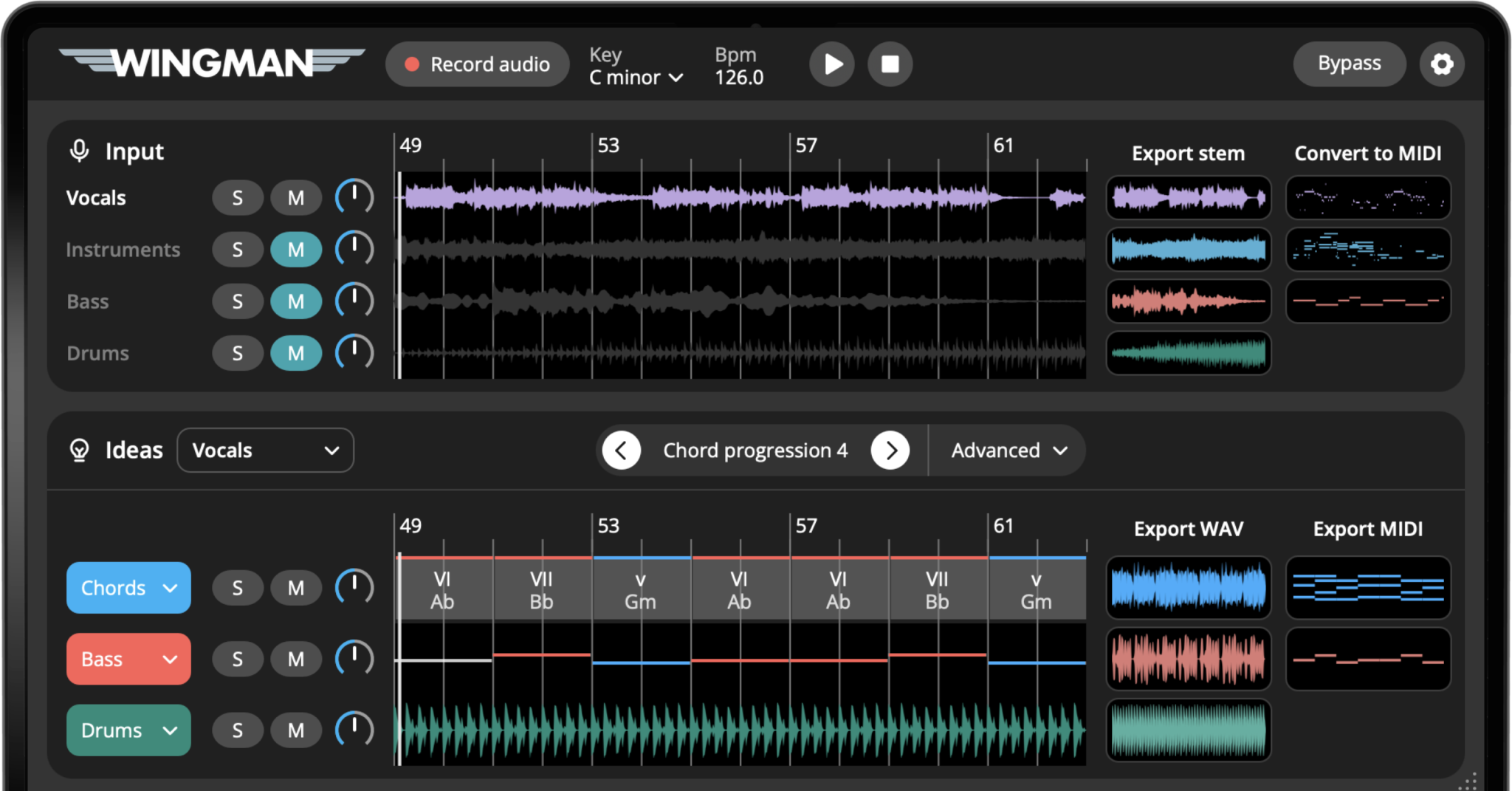
Wingman suggests musical ideas based on audio from the producer’s own session. The free update gives Wingman owners more ways to edit and play those ideas.
MIAMI, FL — Mixed In Key has announced Wingman 3.0, an update to its music production plugin that suggests chord progressions and basslines based on audio captured from a producer’s DAW. Version 3.0 expands its chord-editing tools and adds vintage and modern guitar performances alongside genre-specific drums.
Producers can use Wingman to explore new chords around a vocal, find harmony for a sample, or try a different bassline for a remix. The original audio remains unchanged: Wingman provides musical ideas to audition against it, then edit and export back into the session.
The update is available now and is free for all current Wingman owners.
“Our fans have been asking for new features for the last 9 months, so we added a ton of requests to this version. I’m really happy with how it came out. It’s a joy to use and it does its job REALLY WELL,” said Yakov Vorobyev, founder of Mixed In Key.
What artists say about Wingman
 David Guetta
“Wingman is the easiest and best chord and melody detector. If you don’t know the relationship between the melody and the chords, it’s the best way to make it and to learn it.”
 Diplo
Diplo
“Wow I wish I had this 20 years ago, when Yakov was still at school”
 Pete Tong
“Wow, Wingman is a very clever creative tool. I’ve found it very intuitive in terms of generating ideas for my projects.”
 Karra
Karra
“This is a plugin I genuinely use in my workflow as someone who understands basic piano playing, but struggles with finding unique/more advanced chord progressions!”
 Reid Stefan
“I’ve always needed a plugin to help me with chords. Wingman is the SAUCE!!”
 Gui Boratto
“Wingman is the software that offers the 3 main tools in one! You separate, you replace, you create.”
 Junior Sanchez
“Wingman is that silent partner every producer wishes they had.”
 Lasha
Lasha
“Honestly, this plugin is genius. I’ve been using it in my recent singing sessions and it’s so cool.”
 Flosstradamus
“It nailed it! Quickly! That’s the main thing we want. This tool helps you find the right idea.”
 Mendo
Mendo
“Wingman is a great tool for quickly generating musical ideas and exploring new creative directions in the studio.”
 Chus
Chus
“Wingman is a powerful tool for uncovering new musical ideas. Its guidance reveals harmonic possibilities beyond the conventional workflow.”
 MK
MK
“Wingman is amazing!”
 Mathame
“Wingman is definitely the best creative remixing tool we have ever tried. It’s a total beast, a truly game changer.”
 Pan-Pot
“I played around with Wingman and I gotta say it’s a really great tool, especially if you like to work with audio loops and samples. It really lifts up creativity and gives a lot of opportunities to people who aren’t too experienced with harmony knowledge.”
 Pig&Dan
“Wingman is an incredibly powerful and inspirational tool for creators at any level. It’s helped me to think outside of the box by suggesting structures I would never have considered.” – Dan Duncan (Pig&Dan)
 Soel
Soel
“I’ve been using Wingman a lot lately, and it’s quickly become one of my favorite tools when I hit a creative wall. It helps create ideas without overcomplicating the process and gives just enough direction to move forward while leaving room for your own creativity.”
 Ocean
Ocean
“Wingman gives you musical ideas that match the vibe of the songs, which is perfect for remixing.”
 Sifasile
“For me, Wingman is like a GPS. It lets you move much faster without going through intensive music theory training.”
 Jay Cactus
“This is a really powerful plugin because it’s going to take the audio from the sample, isolate the vocals, and give us chord progression ideas based around the vocals.”
 Beautiful Beats
“This plugin might be a little too good.”
 Larry Ohh
“This plugin will generate chords and bass lines based on the audio in your DAW.”
 RVMEN
RVMEN
“It takes the audio, splits it into stems and MIDI, then recommends an idea based on it.”
 BLANK66
“It’s perfect for remixes, alternate versions, or when you need a touch of inspiration.”
 Harry Romero
“I can literally record any music into Wingman and have it write me some new chords and bass line which I can then take and start my own composition. Best part is it is super easy to use.”
Find and Shape Chords Around Your Audio
Wingman suggests chord progressions based on the music a producer captures. Version 3.0 gives producers more control over those suggestions: they can replace individual chords, add passing chords, and edit when the harmony changes directly inside the plugin.
For a vocal remix, that means trying a different progression around the same performance, then adjusting individual changes while listening to the vocal. The suggestion is a starting point; the producer decides which chords to keep and how they move.
- Insert passing chords between existing chords
- Replace individual chords and choose how frequently the harmony changes
- Resize, split, or remove chord regions
- Audition each edit against the source audio
Vintage and Modern Guitars
Wingman 3.0 adds acoustic and electric guitar performances recorded with real musicians. The recordings adapt to the selected chord progression, so producers can hear their chord ideas played as guitar parts rather than only through a synth or piano sound.
Producers can compare playing styles against their track and export the chosen performance as audio. Because the source material is played by musicians, it retains the articulation and variation of a recorded instrument.
Genre-Specific Drums
The new Drums channel adds genre-based patterns for sections such as verses, hooks, and bridges, with separate kick and transition controls. Producers can audition patterns alongside their chord and bassline ideas and choose the elements they need.
- Export the full drum part as audio
- Export individual elements separately for further work in the DAW
How Wingman Works
Wingman runs inside the DAW and can capture a vocal, sample, loop, individual stem, or full track. Its stem separation lets producers isolate vocals, instruments, bass, or drums and choose which part guides the suggestions. For example, a remixer can start with a full track, isolate the vocal, and explore new chord progressions and basslines around it.
Producers can audition ideas through Wingman’s built-in sounds or their own VST3 instruments, then shape the sound with built-in effects. For producers who own Serum 1 or Serum 2, Wingman also includes hundreds of free Serum presets, giving them more sounds to try with their chord and bassline ideas. Additional tools include key detection, rhythm and accent editing, and audio-to-MIDI conversion for melodic source material.
Chord, bassline and guitar parts can be exported as WAV or MIDI. MIDI keeps the notes editable but does not preserve the guitar sound; choose WAV to keep the rendered guitar audio. Generated drum parts export as audio, not MIDI.
Speaking about Wingman, David Guetta said: “Wingman is the easiest and best chord and melody detector. If you don’t know the relationship between the melody and the chords, it’s the best way to make it and to learn it.”
Export formats and setup
Chords, basslines and guitar parts export as MIDI or WAV. Guitar MIDI transfers the notes and does not preserve the guitar sound; WAV keeps the rendered performance. Generated drum parts and drum stems separated from an original recording export as audio, not MIDI. Available drum elements can be exported separately or together.
For the practical handoff, see how to export MIDI and WAV from Wingman. For setup, refer to the published system requirements, DAW setup guide and release notes.
Availability
Wingman 3.0 is available now for macOS and Windows as a one-time purchase with no subscription. Visit the Wingman website.
Wingman 3.0 is a free update for all current Wingman owners.
About Mixed In Key
Since 2006, Mixed In Key has developed software that helps DJs and music producers work more creatively with their music.
Its products—including Mixed In Key, Mixed In Key Pro, Captain Plugins, Platinum Notes, Pilot Plugins, Mixed In Key Live, and Wingman—are used by artists around the world for harmonic mixing, music production, sound design, and creative exploration.
Mixed In Key is based in Miami, Florida, with an international team of developers, designers, and music-industry professionals.