


What Is Mixed In Key 11 Pro?
Pro includes the same library analysis as Standard, plus two-deck tools for testing mashups and DJ transitions with tracks you own.
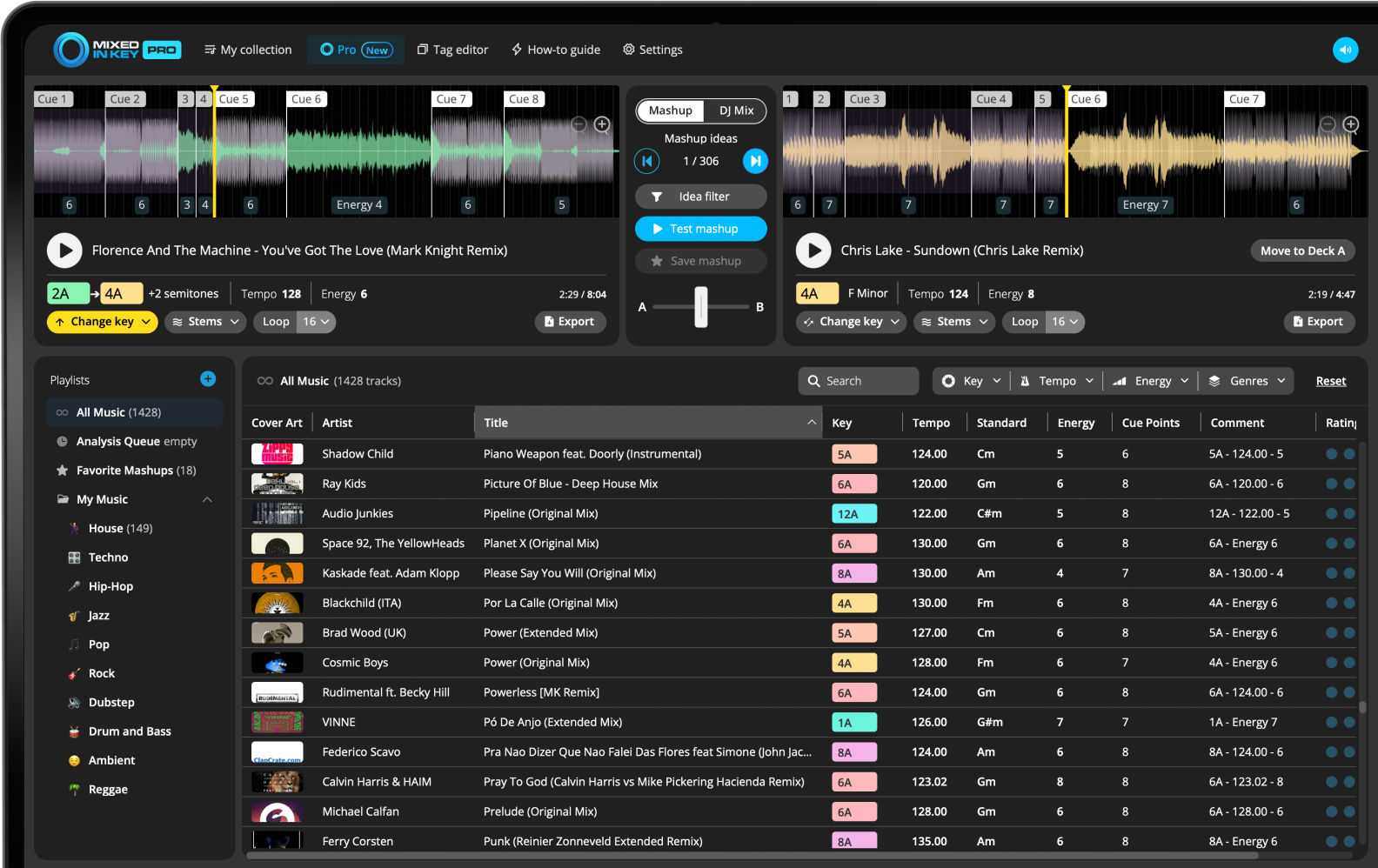
What does Pro add to Mixed In Key?
Mixed In Key 11 Pro combines Key, BPM, Energy Level and Cue Point analysis with tools for auditioning pairs of tracks from your own library. Mashup Mode helps you try vocal and instrumental combinations; DJ Mix Mode helps you test next-track ideas for a set.
Standard and Pro share the analysis features. Pro adds mashup suggestions, deck players and mix-out ideas, alongside its stem and key-change workflow. Compare the editions on the Features page.
Use your library to test ideas before arranging
Analyze your local tracks first. In Pro, load a track into Deck A, audition a candidate in Deck B and try the sections you plan to combine. A suggested match is a starting point: vocals, groove and arrangement still need a listen.
Preparing a DJ set?
Use DJ Mix Mode to audition the next track. Keep combinations that fit the key, tempo and energy of your set.
Build a harmonic DJ setMaking a mashup?
Use Mashup Mode to try a vocal against another instrumental, then export the parts you need to finish the arrangement in your DAW.
Follow the Pro mashup workflowMixed In Key 11 Pro includes the main Mixed In Key features
Mixed In Key 11 Pro includes the core analysis features DJs already use for music preparation. That means you still get Key, BPM, Energy Level, Cue Points, and tag editing as part of the workflow.
These features help you understand your library before you start testing mashup ideas or building DJ playlists.
Key detection
Use Key and Camelot notation to find harmonically compatible songs and avoid clashing Keys.
BPM analysis
Use BPM to understand tempo, compare tracks, and plan realistic transitions.
Energy Level
Use Energy Level to understand track intensity and build playlists that lift, hold, reset, or peak at the right time.
Cue Points
Use Cue Points to jump to intros, breakdowns, drops, and mix-out sections when testing songs together.
Use Mashup Mode to find mashup ideas from your library
Mashup Mode is designed to help you discover song combinations that could work as mashups. Load a track into Deck A, and Mixed In Key Pro searches your music collection for possible matches in Deck B.
You can test the two decks together, jump between Cue Points, and quickly decide whether the combination is worth saving.
Preview combinations quickly
Instead of manually dragging songs into a DAW just to test whether they might work, Mashup Mode lets you preview combinations inside Mixed In Key Pro.
You can listen to both decks playing together, try different sections, and save the combinations you like to your favorites.
Use stem separation for cleaner mashup testing
Mixed In Key 11 Pro includes stem separation so you can switch between full track, acapella, and instrumental playback. This makes it easier to test a vocal over a different instrumental or remove a competing vocal from one deck.
For mashup creation, this is useful because vocals and instrumentals often need to be tested separately. You can listen to an acapella on one deck while playing an instrumental on the other deck, then decide whether the combination works.
Use stems to test:
- Acapella over instrumental
- Instrumental-only sections
- Full-track combinations
- Cleaner mashup ideas
- Vocal-free transitions
Why it helps
If both tracks have vocals at the same time, a mashup can feel crowded. Switching one deck to instrumental can make the idea easier to evaluate.
Change Key to discover new mashup suggestions
Mixed In Key Pro lets you change the Key of a track and then discover new suggestions based on that changed Key. This can reveal combinations that would not appear if you only searched in the original Key.
This is useful when you want a more unique mashup idea or when a track is close to working but needs a Key change to fit better.
Use Key changes to:
- Explore new harmonic matches
- Find less obvious mashup ideas
- Make vocals and instrumentals fit better
- Create more unique combinations
Use carefully
Changing Key can unlock new ideas, but the final combination should still be checked by listening. Harmonic compatibility is a starting point, not the final decision.
Use looping and Cue Points to test sections faster
Mixed In Key Pro helps you test specific parts of a track instead of listening through the entire song. You can use Cue Points to jump to useful sections, then use looping to focus on the part you want to test.
This is especially useful when you want to hear whether a vocal phrase, instrumental groove, breakdown, drop, or mix-out section works with another song.
Use Cue Points for:
- Intros
- Breakdowns
- Drops
- Mix-out sections
Use loops to:
- Hold a useful section
- Test a vocal phrase
- Compare different instrumentals
- Preview a transition idea
- Build a cleaner mashup draft
Export stems and ideas for your DAW or DJ workflow
When you find a mashup idea you like, Mixed In Key Pro lets you save the idea and export audio for further editing. You can export the full track, instrumental, or acapella, depending on the idea you are building.
This makes it easier to move your idea into a DAW such as Ableton, Logic, or another production workflow, where you can finish the mashup or edit.
You can export:
- Full track
- Instrumental
- Acapella
- Stems in the original Key
- Stems with Key changes applied
Use exports for:
- Mashups
- Edits
- DAW sessions
- DJ preparation
- Further arrangement and mixing
Use DJ Mix Mode to build better DJ playlists
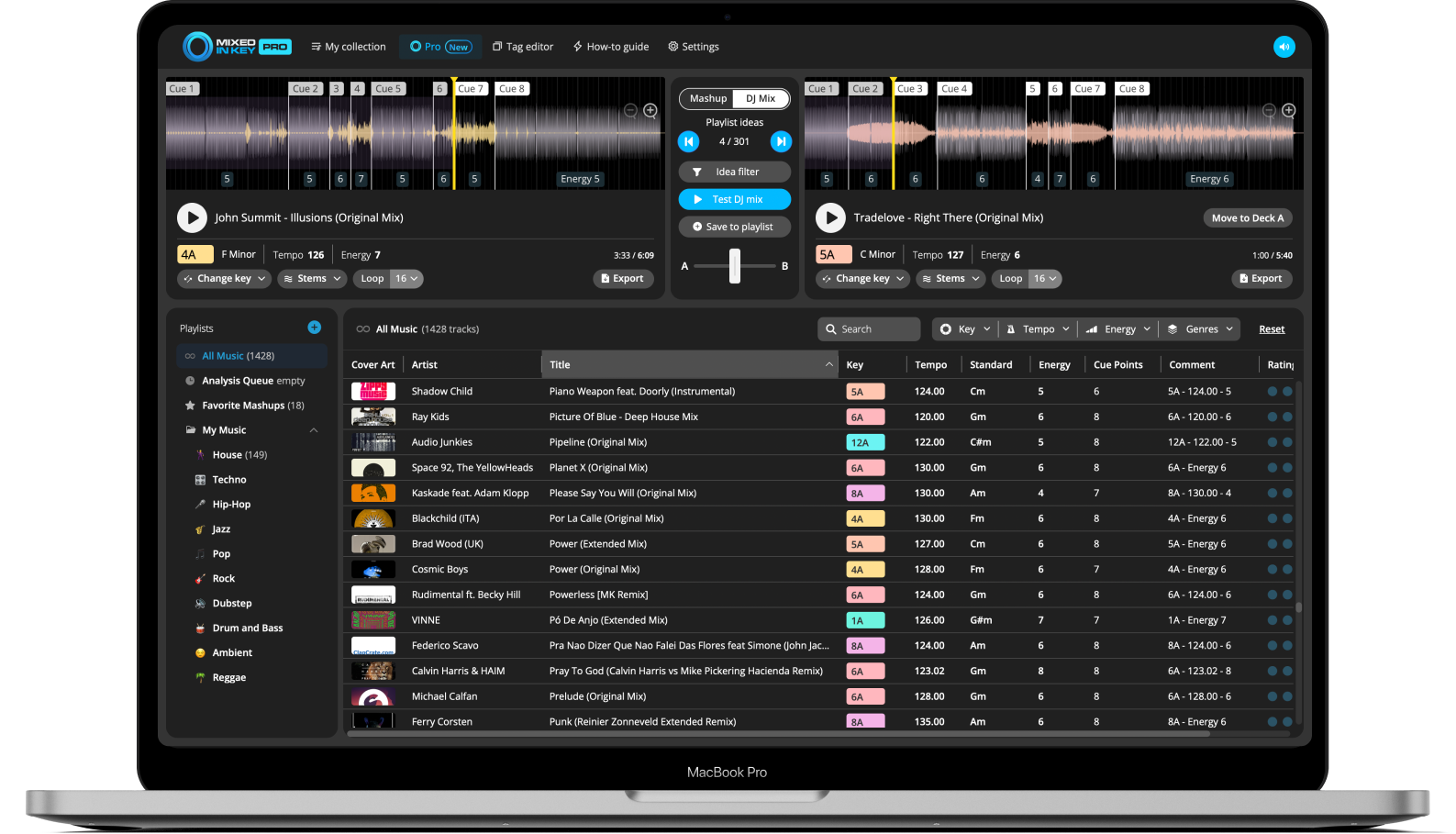
DJ Mix Mode is designed for playlist building and set preparation. Load a track, and Mixed In Key Pro suggests possible next songs from your library based on Key, Energy Level, and BPM.
This helps you test transitions faster, learn new tracks more quickly, and build a playlist that flows from one song to the next.
Build a set one song at a time
In DJ Mix Mode, you can test a DJ mix idea, save it to a playlist, then continue from the next track. This helps you build a setlist in a more organized way.
You can use it for gigs, practice sets, radio shows, livestreams, or any playlist where the order of songs matters.
Use Idea Filter to control where suggestions come from
Idea Filter lets you narrow the suggestions Mixed In Key Pro shows you. This is useful when you do not want suggestions from your entire library.
For example, if you downloaded a batch of new music and want to build a mix only from those tracks, put them in a playlist and use Idea Filter so the suggestions come from that playlist.
Use Idea Filter when:
- You want suggestions from one playlist
- You are preparing new music
- You are building a genre-specific set
- You want to limit ideas by tempo
- You want to focus on a smaller group of tracks
Why it helps
Large libraries can create a long list of ideas. Filtering keeps the workflow focused and helps you find useful results faster.
How to use Mixed In Key 11 Pro
Analyze your music library
Start by analyzing your tracks so Mixed In Key can show Key, BPM, Energy Level, and Cue Points.
Open the Pro tab
Use the Pro interface to load tracks into the two-deck workflow.
Choose Mashup Mode or DJ Mix Mode
Use Mashup Mode when you want to find mashup ideas. Use DJ Mix Mode when you want to build playlists or find next-song ideas.
Load a track into Deck A
Start with a song you want to build from. Mixed In Key Pro will use that track to generate suggestions from your library.
Preview suggested ideas
Test mashup ideas or DJ mix ideas by listening to both decks together. Use Cue Points to jump to different sections.
Use stems, looping, or Key changes when needed
Switch between full track, acapella, and instrumental playback. Change Key to discover new suggestions, or loop useful sections while testing ideas.
Save your favorite ideas
When you find a mashup or transition idea that works, save it so you can return to it later.
Export stems or build your playlist
For mashups, export stems or audio for your DAW. For DJ sets, save the song order to your playlist and keep building.
Who should use Mixed In Key 11 Pro?
Mixed In Key 11 Pro is useful for DJs and producers who want more than music analysis. It is built for people who want to discover combinations, test ideas quickly, and turn their own music library into a source of mashups and DJ sets.
DJs who build playlists
Use DJ Mix Mode to find songs that work together and build better playlists before gigs.
DJs who make mashups
Use Mashup Mode, stems, Key changes, and looping to discover and test mashup ideas faster.
Open-format DJs
Use Idea Filter and DJ Mix Mode to explore music from specific playlists, genres, or new downloads.
Producers and editors
Export stems and ideas into a DAW to finish edits, mashups, or performance versions.
Common mistakes when using Mixed In Key 11 Pro
Using Pro before analyzing your library
Analyze your tracks first so Mixed In Key Pro has Key, BPM, Energy Level, and Cue Point information to work with.
Testing too many ideas at once
Use Idea Filter to focus suggestions by playlist, tempo, or a smaller group of tracks.
Ignoring Energy Level
Harmonic matches can still feel wrong if the energy does not fit the moment.
Forgetting to save good ideas
Save your favorite mashups or DJ mix ideas so you can return to them later.
Assuming every suggestion is final
Suggestions are starting points. Use your ears, Cue Points, stems, and Key changes to decide what really works.
Not finishing ideas in a DAW when needed
For polished mashups and edits, export stems and finish the arrangement in your DAW.
Frequently asked questions
Mixed In Key 11 Pro is the advanced version of Mixed In Key. It includes the core analysis features plus Mashup Mode, DJ Mix Mode, stem separation, Key changes, looping, favorites, Idea Filter, and export tools.
Mashup Mode lets you load a track into Deck A and discover possible mashup suggestions from your own music library in Deck B. You can preview combinations, test Cue Points, use stems, change Key, and save ideas.
DJ Mix Mode helps you find songs that could work well together based on Key, Energy Level, and BPM. It is useful for playlist building, set planning, and next-song ideas.
Yes. Mixed In Key 11 Pro can export full tracks, instrumentals, and acapellas, including exports with Key changes applied when you use that workflow.
No. Mixed In Key 11 Pro is offered as a one-time purchase.
Use Mixed In Key 11 Pro to turn your music library into creative ideas.
Find mashup suggestions, build playlists, test transitions, separate stems, change Key, and export ideas for your DJ sets and edits.
Updated