


How to Build Better DJ Playlists
Build a crate for the job: warmup, peak time, a recorded mix or a particular gig. Use the analysis to narrow your choices, then listen to the transitions.
How to Build Better DJ Playlists
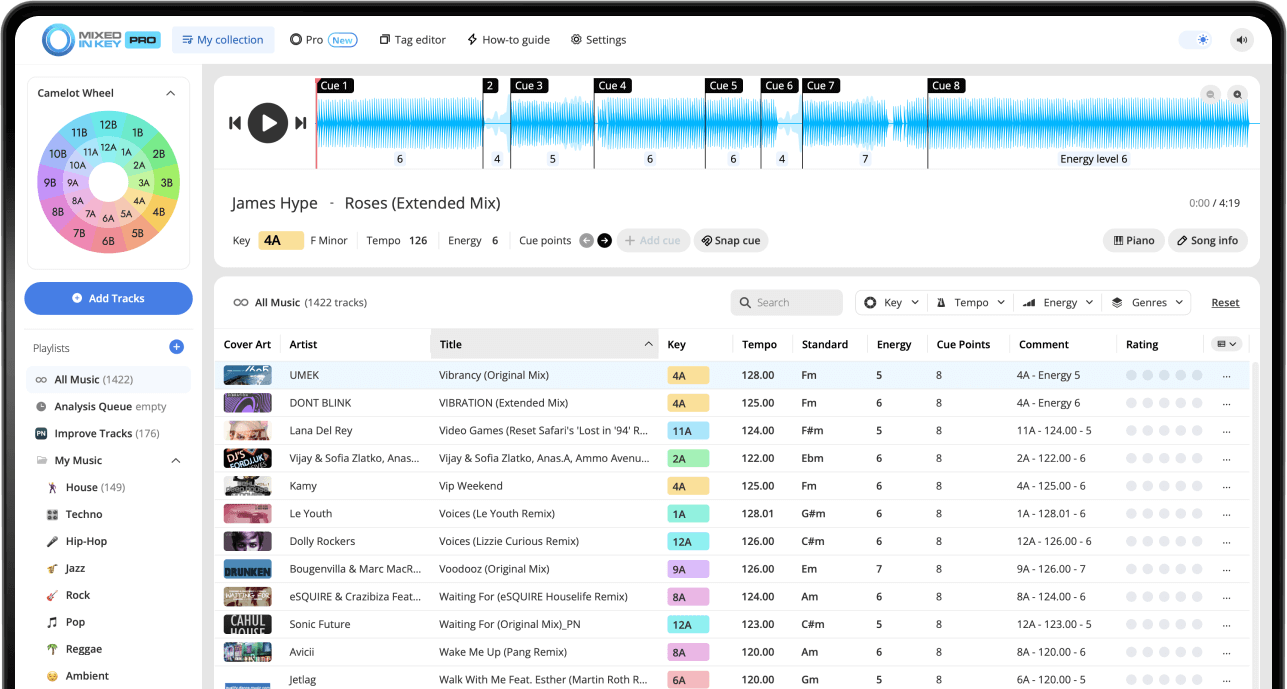
Start with the purpose of the playlist, not the size of your library. In Mixed In Key 11, analyze the tracks for key, BPM, energy and cue points. Shortlist songs that suit the room and tempo range, test the sections you plan to mix, and keep a few alternative routes. Both Standard and Pro provide the analysis; DJ Mix Mode adds suggestions in Pro.
Key, BPM, energy and automatic Cue Points are included in Standard and Pro. Mashup suggestions, deck players, stems and key changes require Pro. Compare Standard and Pro.
What makes a DJ playlist better?
A better DJ playlist makes it easier to find the right song at the right moment. It gives you useful options instead of forcing you to search through your entire library while preparing a set.
The best playlists usually combine musical compatibility, tempo flow, energy control, genre or mood, and practical performance needs. Mixed In Key helps by giving you Key, BPM, Energy Level, and Cue Points before you start arranging the playlist.
A strong playlist helps you:
- Find compatible songs faster
- Build a smoother musical flow
- Control the energy of the set
- Prepare for a specific gig or room
- Reduce last-minute guessing
Useful playlist ingredients:
- Key and Camelot notation
- BPM range
- Energy Level
- Genre, mood, or time of night
- Cue Points and arrangement knowledge
Start with the purpose of the playlist
Before sorting by Key or BPM, decide what the playlist is supposed to do. A warmup playlist should not feel the same as a peak-time playlist. A radio show playlist may need a different flow than a nightclub set. A practice playlist may be built around testing song combinations.
When you know the purpose, it becomes easier to decide which tracks belong, which tracks should be saved for another playlist, and how much energy the playlist should have.
Build playlists for:
- Warmup sets
- Peak-time sets
- After-hours or closing sets
- Radio shows and livestreams
- Specific venues or crowds
- Practice sessions
Ask before building:
- What time of night is this for?
- How much energy should it have?
- What BPM range makes sense?
- Should the playlist feel smooth or high-impact?
- Is this for a specific venue, crowd, or event?
Analyze your tracks before building the playlist
Start by analyzing your music in Mixed In Key. This gives you useful information before you begin sorting, grouping, and arranging your playlist.
Once your tracks are analyzed, you can use Key, BPM, Energy Level, and Cue Points to make faster and more musical playlist decisions.
Mixed In Key helps you see:
- Key
- BPM
- Energy Level
- Cue Points
- Camelot notation
Before a big playlist build:
- Review your DJ software integration tutorial
- Set your Tag Options
- Analyze the tracks in Mixed In Key
- Refresh or reload tags in your DJ software
- Check that the results appear correctly
Use Key to find songs that fit together harmonically
Key is one of the most useful ways to build a playlist that feels musical. Mixed In Key shows each track’s Key in Camelot notation, which makes harmonic playlist building easier.
On the Camelot Wheel, A means minor and B means major. If your current track is 8A, strong starting points are 8A, 7A, 9A, and 8B.
Build around compatible Camelot Keys
You do not need every song in a playlist to be in the same Key. Instead, use compatible Camelot movement to create groups of songs that are easier to test together.
Staying in the same Camelot Key, moving one number up, moving one number down, or switching between A and B on the same number can help you build a smoother harmonic flow.

Use BPM to keep the playlist practical
BPM helps you understand the tempo range of your playlist. A playlist can stay in one tempo zone, gradually move upward, gradually move downward, or use planned tempo changes for contrast.
BPM should not be the only thing you use, but it is a practical filter. After you find harmonic options by Key, BPM helps you decide which songs are realistic to test together.
Use BPM to:
- Group tracks by tempo range
- Plan smoother tempo movement
- Build warmup or peak-time sections
- Prepare for open-format transitions
- Avoid unnecessary tempo jumps
Playlist BPM ideas:
- One playlist for a narrow BPM range
- One playlist that gradually builds in BPM
- One playlist for slower high-energy tracks
- One playlist for warmup tempo zones
- One playlist for peak-time tempo zones
Use Energy Level to shape the playlist journey
Energy Level helps you understand how intense each song feels on a scale from 1 to 10. This is useful because two songs can have compatible Keys and similar BPM, but still feel wrong together if the energy does not fit the moment.
For smoother playlist flow, group songs with similar Energy Levels or move one level at a time when you want a gradual lift. For example, Energy Level 5 into Energy Level 6 can create a natural rise, while jumping from Energy Level 9 down to Energy Level 5 can feel like a sudden drop unless you are doing it intentionally.
Lower Energy Level
Useful for warmups, early-night sections, smoother moments, and resets.
Medium Energy Level
Useful for groove, lounge, steady dancefloor movement, and controlled build sections.
Higher Energy Level
Useful for peak-time sections, stronger drops, festival-style moments, and high-impact songs.
One-level movement
Moving from one Energy Level to the next can help the playlist build without shocking the room.
Use Cue Points to test how songs actually work together
Sorting by Key, BPM, and Energy Level gives you strong candidates. Cue Points help you test whether those candidates actually work inside a real transition.
Use Cue Points to jump to intros, breakdowns, drops, and mix-out sections. This helps you decide where each song belongs in the playlist and whether the transition supports the energy direction you want.
Use Cue Points to check:
- Whether the intro is useful
- Where the breakdown starts
- Where the drop lands
- Where the mix-out section begins
- Whether the next track fits the moment
Listen for:
- Key compatibility
- Tempo comfort
- Energy lift or drop
- Arrangement overlap
- Whether the transition feels natural
Plan the playlist like a journey
A good playlist has movement. It can start relaxed, build gradually, reach a peak, create a reset, and then build again. It does not need to be locked into one formula, but it should feel intentional.
Think in sections instead of one long list. This makes it easier to prepare a playlist for a specific room, crowd, or time of night.
Example set flow
- Warmup: lower Energy Level
- Groove: medium Energy Level
- Build: gradual Energy Level increase
- Peak: higher Energy Level
- Reset: controlled drop in intensity
- Second build: new direction or mood
Use structure to avoid:
- Playing too hard too early
- Staying flat for too long
- Dropping energy by accident
- Mixing busy sections together
- Building a playlist with no direction
Use DJ Mix Mode to find playlist ideas faster
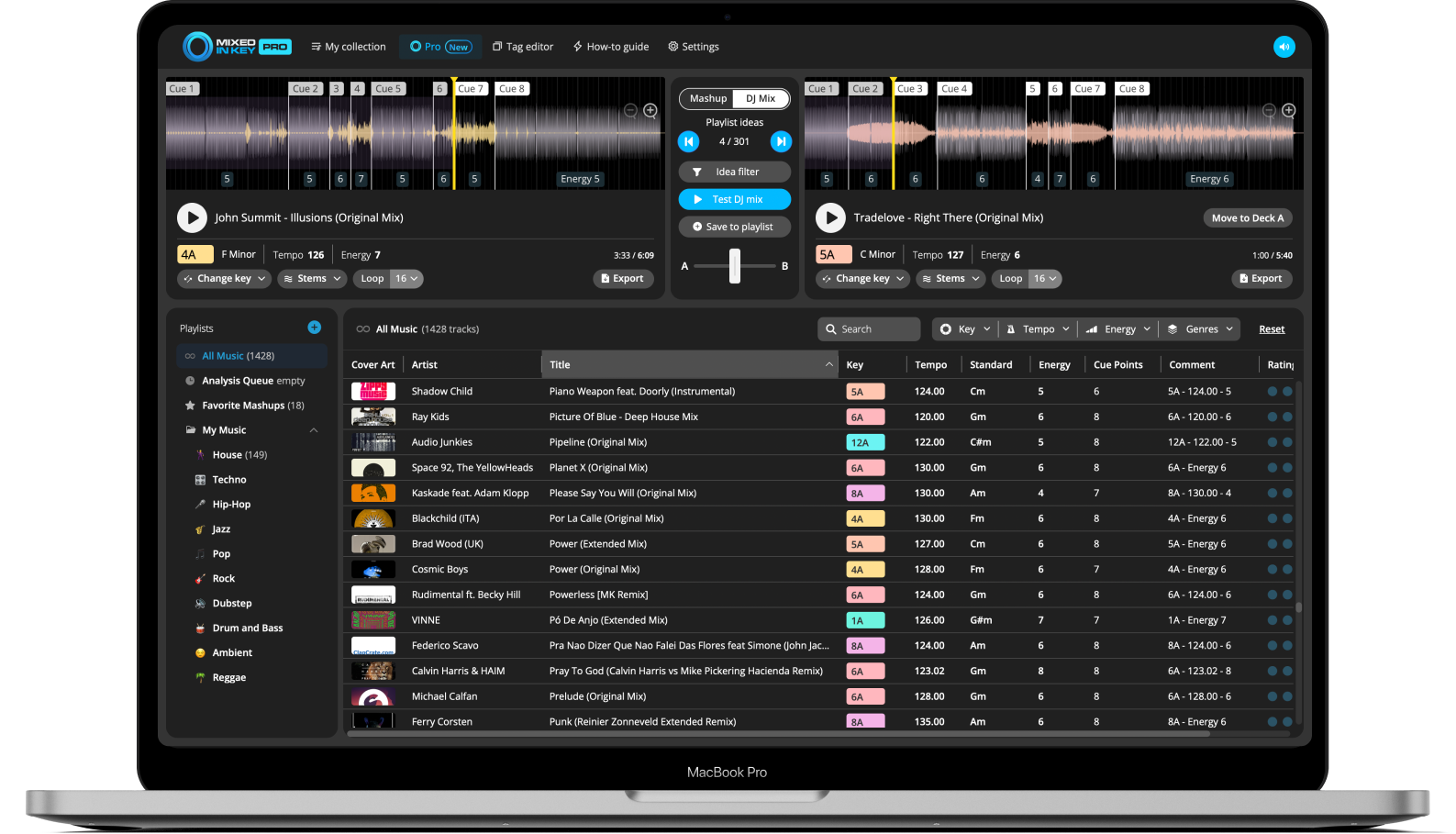
Mixed In Key Pro can help you build better playlists with DJ Mix Mode. Instead of manually searching your entire library, you can find songs that could work well together based on Key, Energy Level, and BPM.
This is useful when you want more options for a playlist, need help finding the next song, or want to test combinations before committing them to a setlist.
Find songs that fit the playlist direction
Use DJ Mix Mode to discover songs that support the direction of your set. You can look for tracks that help lift the energy, hold the groove, create a reset, or continue a harmonic section.
Once you find promising song combinations, preview them, save your favorites, and use your ears to make the final decision.
How to build better DJ playlists with Mixed In Key
Choose the purpose of the playlist
Decide whether the playlist is for a warmup, peak-time set, radio show, livestream, practice session, open-format gig, or a specific venue.
Analyze your tracks in Mixed In Key
Analyze the tracks so you can see Key, BPM, Energy Level, and Cue Points before building the playlist.
Set your Tag Options
Choose how Mixed In Key should write Key, BPM, Energy Level, and related metadata into your files so the information is easy to see in your DJ software.
Start with a focused group of songs
Begin with tracks that fit the playlist purpose. For example, choose warmup tracks, peak-time tracks, new downloads, genre-specific tracks, or songs for a specific gig.
Sort by Key to find harmonic options
Use Camelot Key to find songs that may work together harmonically. Same Key, one number up, one number down, and the matching A/B position are strong starting points.
Use BPM to narrow the playlist
Compare BPM values so the playlist stays practical for the type of set you are preparing.
Use Energy Level to shape the flow
Treat Energy Level as a sorting aid, not a prediction of the crowd. Compare tracks at the sections you will play: a sparse breakdown and a full drop can feel very different within the same song. Keep warmup, peak-time and reset options in separate crates.
Test transitions with Cue Points
Use Cue Points to jump to intros, breakdowns, drops, and mix-out sections. Listen to whether the songs actually work together before finalizing the order.
Use DJ Mix Mode for more ideas
In Mixed In Key Pro, use DJ Mix Mode to discover more songs that could fit the playlist based on Key, Energy Level, and BPM.
Save a final version and a backup version
Save a focused crate plus a few alternatives for a different crowd response, a tempo change or a track that does not work on the night. Rehearse the first few transitions, and avoid locking the whole set into a fixed order.
Useful playlist types for DJs
Different playlists should solve different problems. Use these examples as starting points, then adjust them to your style, genre, and audience.
Warmup playlist
Lower or medium Energy Level tracks, controlled BPM, and smooth harmonic options for the start of the night.
Peak-time playlist
Higher Energy Level tracks, stronger drops, and songs that can keep the room moving during the busiest part of the set.
Harmonic playlist
Songs grouped by compatible Camelot Keys, then refined by BPM and Energy Level.
New music playlist
New downloads or promos that have been analyzed, tagged, and tested before being added to your main gig playlists.
Reset playlist
Songs that bring the room down in a controlled way before building energy again.
Emergency options playlist
Flexible songs you can use when the room changes direction and you need to adapt quickly.
Common playlist-building mistakes
Building playlists only by genre
Genre is useful, but Key, BPM, and Energy Level give you more practical ways to find songs that work together.
Ignoring Energy Level
A playlist can have compatible Keys and BPM, but still feel wrong if the energy jumps too suddenly.
Overfilling the playlist
A playlist with too many songs can become hard to use. Keep the main playlist focused and save extra tracks in a backup playlist.
Not testing transitions
Sorting data helps you find candidates, but you still need to listen and test transitions with Cue Points.
Playing peak-time energy too early
If the playlist starts too intense, you may have nowhere to build later in the set.
Forgetting the crowd
A playlist is a plan, not a rule. Use the playlist to prepare, then adapt based on the room.
Frequently asked questions
A good DJ playlist has a clear purpose, useful song options, and a musical direction. It should help you find tracks by Key, BPM, Energy Level, genre, mood, and set timing.
Use both. Key helps you find harmonically compatible songs, while BPM helps you keep tempo movement practical. Energy Level adds another layer by showing how intense each track feels.
Energy Level helps you build playlists for different moments, such as warmup, groove, peak-time, reset, and closing sections. It also helps you avoid sudden energy drops.
Yes. Cue Points help you test intros, breakdowns, drops, and mix-out sections so you can decide whether songs actually work together in a playlist.
Mixed In Key Pro includes DJ Mix Mode, which can help you find songs that may work well together based on Key, Energy Level, and BPM. This is useful when building playlists or looking for next-song ideas.
Use Mixed In Key to organize your music and find stronger song combinations.
Analyze Key, BPM, Energy Level, and Cue Points, then use Mixed In Key Pro DJ Mix Mode to discover playlist ideas that fit your set.
Updated