


How to Organize a DJ Library by Key, BPM and Energy
Choose consistent tag fields, check one file in your DJ app, then organize the library into useful crates rather than one large list.
How to Organize a DJ Library by Key, BPM and Energy
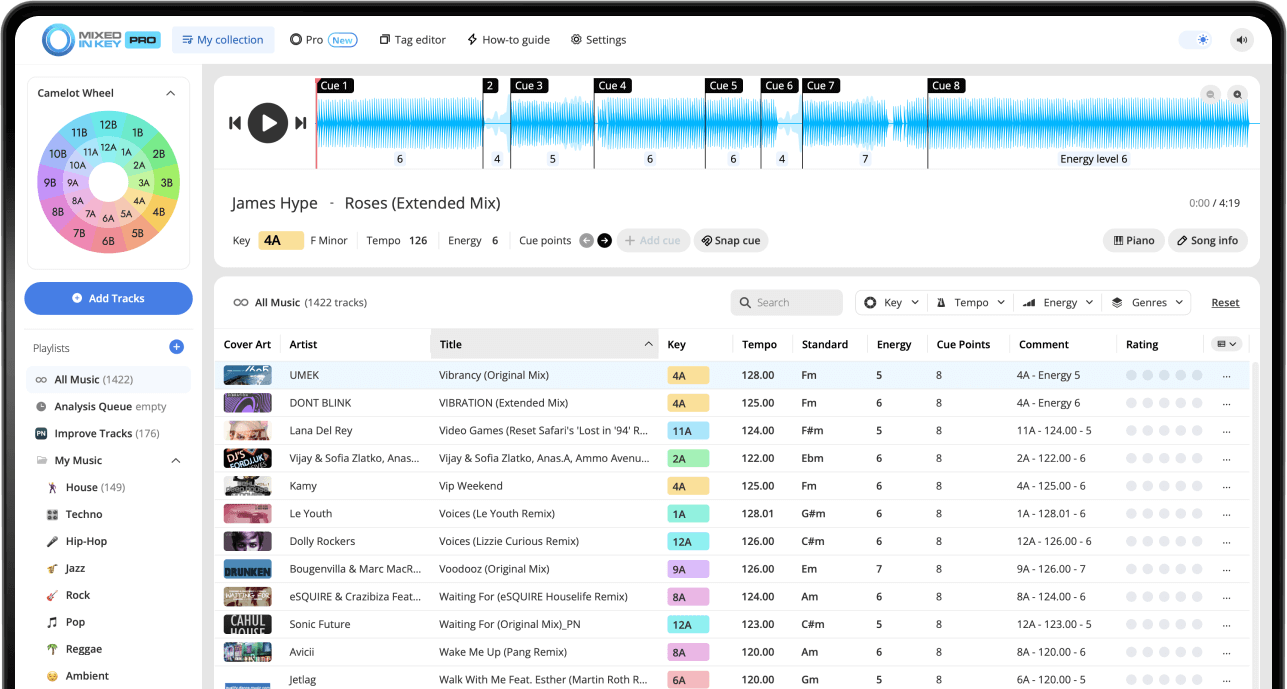
Use Mixed In Key 11 to analyze your tracks and choose a consistent tag format. Follow the integration guide for your DJ app, verify one writable local file, then refresh the library metadata. Sort key, BPM and energy alongside your own genre and set-purpose labels. Transfer Cue Points through the app’s supported integration separately.
Key, BPM, energy and automatic Cue Points are included in Standard and Pro. Mashup suggestions, deck players, stems and key changes require Pro. Compare Standard and Pro.
Why DJs should organize their library before a set
A large music library is only useful if you can find the right song at the right time. When your tracks are organized by Key, BPM, and Energy Level, you can make better decisions while building playlists and preparing sets.
Mixed In Key helps by turning your tracks into a more searchable library. Instead of relying only on memory, genre folders, or track titles, you can use musical information to find songs that fit the moment.
A better organized library helps you:
- Find compatible songs faster
- Build smoother playlists
- Prepare sets with more intention
- Search large libraries more easily
- Avoid guessing during preparation
Mixed In Key helps you organize by:
- Key and Camelot notation
- BPM
- Energy Level
- Cue Points
- Clean and consistent ID3 tags
Set up your tags before organizing a large library
Before analyzing a large batch of tracks, review the integration tutorial inside Mixed In Key for the DJ software you already use. Rekordbox, Serato, Traktor, and others can each handle tags, Cue Points, and library updates differently.
Then open Settings → Tag Options and choose how you want Mixed In Key results to appear. This helps your Key, BPM, Energy Level, and metadata follow one consistent scheme across your collection.
Organize your library by Key
Key is one of the most useful ways to organize music for harmonic mixing. Mixed In Key can show the musical Key of each track in Camelot notation, such as 8A or 9B.
On the Camelot Wheel, A means minor, and B means major. Sorting or searching by Camelot Key helps you find songs that may work well together harmonically.
Use Camelot Key to find compatible songs
If your current song is 8A, you can quickly look for tracks in 8A, 7A, 9A, or 8B. These are strong starting points when you want to build playlists with smoother harmonic flow.
You can organize your library so Camelot Key appears in a visible tag field, making it easier to sort and search inside your DJ software.

Organize your library by BPM
BPM helps you organize songs by tempo. This is useful when building playlists, preparing transitions, or planning how fast the set should feel.
You can use BPM ranges to create sections of your library that are easier to browse. For example, you might group slower warmup tracks, mid-tempo tracks, and peak-time tracks into different playlists or crates.
Use BPM to group tracks
Grouping songs by tempo range makes it easier to find tracks that can be tested together without large tempo jumps.
Use BPM with Key
After you find compatible Keys, BPM helps you narrow the list to songs that make sense rhythmically.
Use BPM for playlist flow
A playlist can move gradually through BPM ranges, stay within one tempo zone, or use planned tempo changes for contrast.
Use BPM to prepare sets faster
Sorting by BPM can quickly show which tracks are likely to work in the same part of a set.
Organize your library by Energy Level
Energy Level helps you understand how intense a track feels. This is useful because two tracks can have compatible Keys and similar BPM, but still feel wrong together if the energy does not fit the moment.
Organizing by Energy Level helps you build playlists with a clear direction. You can find songs that lift the room, maintain the groove, create contrast, or reset the mood before building again.
Lower Energy Level
Useful for warmups, smoother sections, resets, and moments where you want to create space.
Medium Energy Level
Useful for maintaining a groove, building steady momentum, or keeping the room moving without pushing too hard.
Higher Energy Level
Useful for peak-time moments, bigger transitions, stronger drops, and high-intensity sections.
Energy changes
Use Energy Level to decide when to build, hold, reset, or create contrast inside a playlist or set.
Use Key, BPM, and Energy Level inside your DJ software
After Mixed In Key analyzes your tracks and writes tags, refresh or reload the tags inside your DJ software. The exact workflow can vary between Rekordbox, Serato, Traktor, and others, so follow the integration tutorial inside Mixed In Key for your specific setup.
Once the results are visible, you can sort, filter, and build playlists using the information you added.
Sort by Key
Find songs that may work well together harmonically.
Sort by BPM
Find songs that fit the tempo range you need.
Sort by Energy Level
Find songs that match the intensity or direction of the set.
Use Cue Points
Jump to intros, breakdowns, drops, and mix-out sections while testing combinations.
How to organize your DJ library by Key, BPM, and Energy
Review the integration tutorial for your DJ software
Before organizing a large library, open the integration tutorial inside Mixed In Key for the DJ software you use. This helps you understand how tags and library updates should be handled.
Choose a consistent tag format
Choose the notation and fields your DJ app reads, and keep the format consistent across your library. Check Tag Options on a test file before a large batch. Key and BPM metadata do not automatically transfer Cue Points.
Add your tracks to Mixed In Key
Add the tracks, folders, or playlists you want to organize. You can start with your full library or organize one crate at a time.
Analyze your music
Let Mixed In Key analyze your tracks for Key, BPM, Energy Level, and Cue Points. The results will help you organize the library more effectively.
Refresh or reload tags in your DJ software
Use your DJ app’s integration guide to refresh metadata for the same local file. Display the intended key, BPM or comments columns and confirm the values. If cues are missing, troubleshoot their export/import workflow separately.
Create playlists or crates by purpose
Build playlists for warmups, peak-time tracks, after-hours sets, radio shows, practice sessions, genres, or specific gigs. Then use Key, BPM, and Energy Level to refine each playlist.
Sort and refine your playlists
Sort by Key to find harmonic options, BPM to check tempo flow, and Energy Level to shape intensity. Use Cue Points to test intros, breakdowns, drops, and mix-out sections.
Example ways to organize your DJ library
There is no single correct way to organize a DJ library. The best system is the one that helps you find the right song quickly. These examples can help you build a structure that works for your sets.
Warmup playlist
Use lower or medium Energy Level tracks with BPM ranges that fit the beginning of the night. Sort by Key to find smooth combinations.
Peak-time playlist
Use higher Energy Level tracks and organize them by BPM range and Camelot Key so you can find strong next-song options quickly.
Harmonic playlist
Build a playlist around compatible Camelot Keys, then refine it with BPM and Energy Level.
Radio show or recorded mix
Use Key, BPM, and Energy Level to plan a smooth progression before recording, then test sections with Cue Points.
Common mistakes when organizing a DJ library
Using inconsistent tags
If some tracks use one format and others use another, your library becomes harder to scan. Choose one scheme and use it consistently.
Only organizing by genre
Genre is useful, but Key, BPM, and Energy Level give you more ways to find songs that work together.
Ignoring Energy Level
Key and BPM help, but Energy Level is important for planning the emotional flow of a set.
Forgetting to refresh tags
After Mixed In Key writes tags, your DJ software may need to refresh or reload the updated track information.
Frequently asked questions
A strong DJ library is usually organized by a combination of genre, Key, BPM, Energy Level, and use case. Mixed In Key helps by adding Key, BPM, Energy Level, Cue Points, and cleaner tag information to your tracks.
It depends on the playlist you are building. Key is useful for harmonic compatibility, while BPM is useful for tempo flow. Many DJs use both together, then refine the playlist with Energy Level.
Energy Level helps you understand how intense a track feels. This makes it easier to find warmup tracks, peak-time tracks, smoother resets, and songs that match the direction of a set.
Yes. Bring the Key, BPM, Energy Level, and Cue Point information into your DJ software workflow, such as Rekordbox, Serato, Traktor, and others. Follow the integration tutorial inside Mixed In Key for your setup.
Yes. A consistent tagging format makes your library easier to search and scan. Choose a format in Mixed In Key Tag Options and use it across your collection.
Use Mixed In Key to make your library easier to search and prepare.
Analyze Key, BPM, Energy Level, and Cue Points, then use cleaner tags to build stronger playlists and DJ sets.
Updated