


How to Prepare New Music Before a Gig
Process new tracks in a small batch. Confirm the tags and cues in your DJ app, learn the arrangements and test where each track fits.
How to Prepare New Music Before a Gig
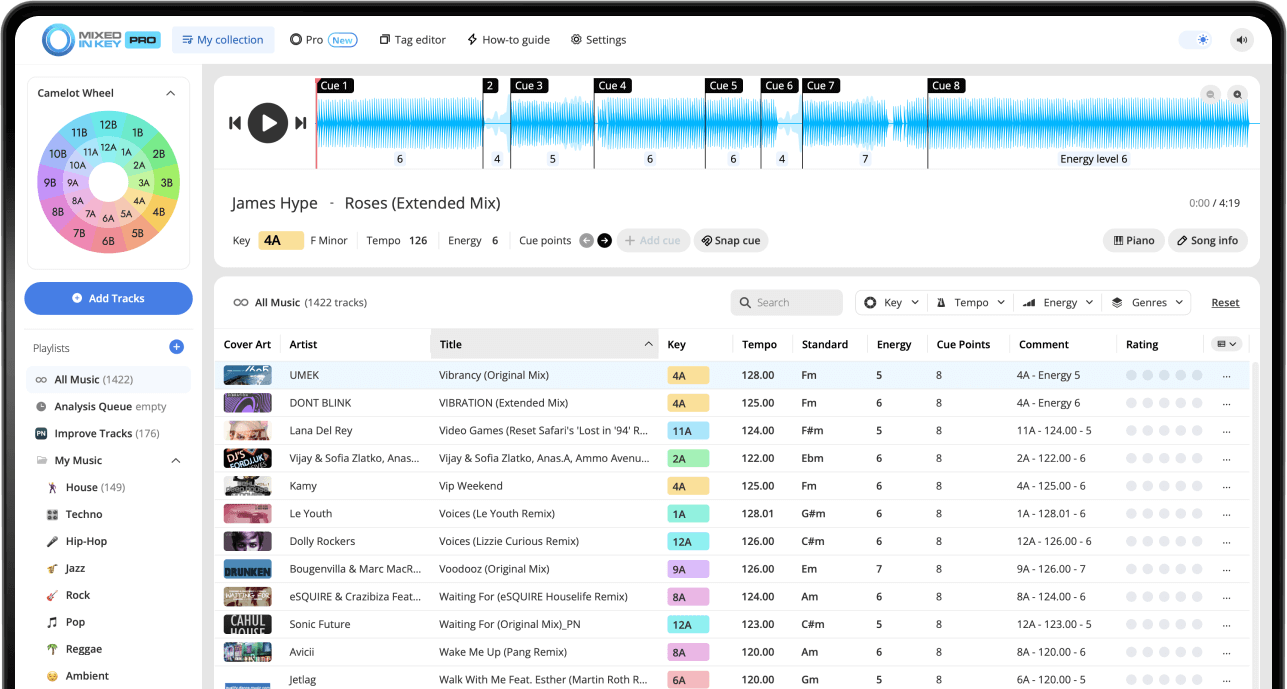
Collect your new tracks, check the files and Tag Options, then analyze them in Mixed In Key 11. Review key, BPM, energy and cue positions. Refresh metadata and transfer cues using the guide for your DJ app, then rehearse the tracks before adding them to the gig crate. Keep familiar alternatives ready.
Key, BPM, energy and automatic Cue Points are included in Standard and Pro. Mashup suggestions, deck players, stems and key changes require Pro. Compare Standard and Pro.
Why new music should be prepared before the gig
New music can be exciting, but it can also be risky if it is not prepared before the set. Missing tags, unknown Keys, incorrect BPM values, messy filenames, and untested arrangements can slow you down when you are trying to perform.
Mixed In Key helps you prepare new tracks before they reach your main DJ workflow. This gives you better information when building playlists and makes it easier to decide which songs are ready for the gig.
Pre-gig prep helps you:
- Understand new tracks faster
- Find compatible songs before the set
- Prepare playlists with more confidence
- Avoid missing Key or BPM information
- Reduce last-minute library problems
Mixed In Key helps you check:
- Key and Camelot notation
- BPM
- Energy Level
- Cue Points
- Clean and consistent tags
Start by organizing your new music folder
Before you analyze new music, collect the tracks you want to prepare in one place. This could be a folder of new downloads, promos, edits, remixes, or songs you want to test for an upcoming gig.
Keeping new music separate at first makes it easier to review, analyze, tag, and decide what should be added to your main DJ library.
Create a “new music” workflow
Use a temporary folder or playlist for new tracks before moving them into your main library. This keeps your prep process organized.
Review the files before analysis
Remove duplicates, rough downloads, unfinished files, or tracks you already know you will not use before analyzing a large batch.
Analyze new tracks in Mixed In Key
Once your new music is organized, add the tracks or folder to Mixed In Key and let the software analyze them. After analysis, you can review Key, BPM, Energy Level, and Cue Points.
This helps you understand how each new track could fit into your playlists before you add it to your DJ software workflow.
Key
Key helps you find songs that may work together harmonically and avoid clashing Keys in a mix.
BPM
BPM helps you compare tempo and decide where the track might fit in a set.
Energy Level
Energy Level helps you understand whether the track feels like a warmup song, groove track, peak-time track, reset, or contrast moment.
Cue Points
Cue Points help you jump to intros, breakdowns, drops, and mix-out sections while testing new music.
Use Key, BPM, and Energy Level to decide where each track belongs
After analysis, use the results to decide how each new track fits into your set. A new song might be useful for a warmup playlist, a peak-time section, a harmonic transition, a radio show, or a specific gig.
Key, BPM, and Energy Level give you a fast way to compare new tracks before you test them in your DJ software.
Use the results together
Key helps you find harmonic matches. BPM helps you understand tempo range. Energy Level helps you decide whether a track should lift, hold, reset, or change the mood of the set.
When you use all three together, it becomes easier to decide which new tracks are worth adding to your gig playlist.

Use Cue Points to learn new tracks faster
New tracks can be hard to use live if you do not know their structure. Cue Points help you jump to useful moments in each song so you can understand the arrangement faster.
Use Cue Points to check intros, breakdowns, drops, and mix-out sections before deciding whether a track is ready for the gig.
Use Cue Points to check:
- How long the intro feels
- Where the breakdown happens
- Where the drop lands
- Where the mix-out section begins
Why it helps before a gig
- Learn tracks faster
- Test song combinations quickly
- Avoid surprises during the set
- Prepare transition sections ahead of time
Update your DJ software before the gig
After Mixed In Key analyzes your new music and writes the selected tags, open your DJ software and refresh or reload the updated track information. The exact workflow can vary between Rekordbox, Serato, Traktor, and others.
Mixed In Key includes integration tutorials inside the software. Follow the tutorial for your specific setup so your Key, BPM, Energy Level, and Cue Points appear where you expect them.
Check that tags appear correctly
Confirm that Key, BPM, Energy Level, and other information appear in the right fields before you rely on them during the gig.
Check Cue Point workflow
Cue Point workflows can vary by DJ software, so follow the integration tutorial inside Mixed In Key for your setup.
Use DJ Mix Mode to find playlist ideas before the gig
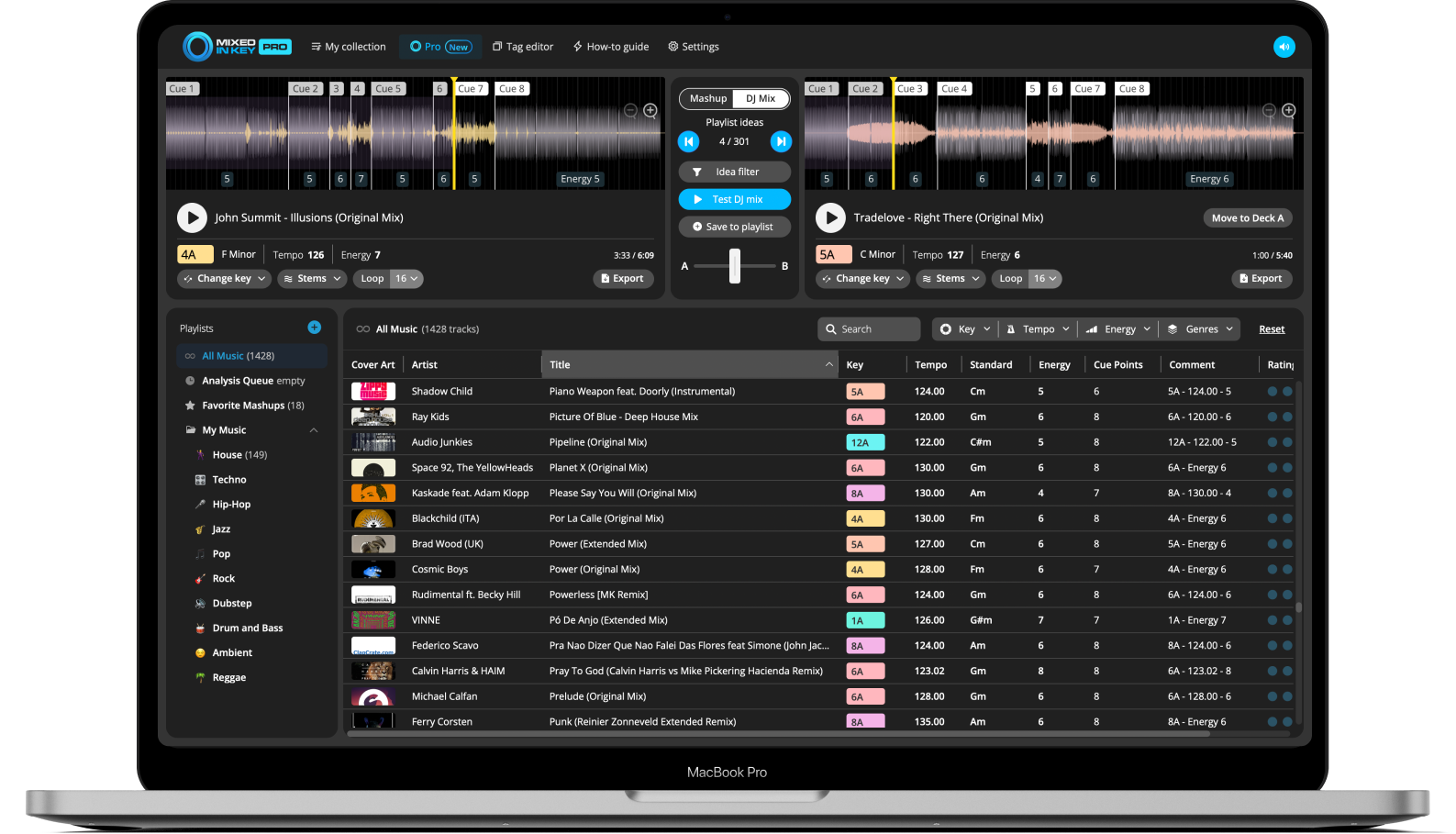
Mixed In Key Pro can help you turn new music into playlist ideas faster with DJ Mix Mode. It helps you discover songs that could work well together based on Key, Energy Level, and BPM.
This is useful when you have new tracks and want to quickly find where they might fit inside your gig playlist or setlist.
Find where new songs fit
Use DJ Mix Mode to test new tracks against songs already in your library. You can find promising combinations, preview how they feel together, and save your favorites while building the setlist.
This can help you decide which new tracks are ready for the gig and which ones need more testing later.
How to prepare new music before a gig
Collect your new tracks in one folder or playlist
Start with the new music you want to prepare for the gig. This can include promos, downloads, edits, remixes, or tracks you want to test.
Review the integration tutorial for your DJ software
Before analyzing a large batch, review the integration tutorial inside Mixed In Key for the DJ software you already use. Rekordbox, Serato, Traktor, and others can each handle tags, Cue Points, and library updates differently.
Check your Tag Options
Go to Settings → Tag Options and confirm how you want Key, BPM, Energy Level, and other information to be written into your files.
Analyze the new tracks in Mixed In Key
Add your new tracks or folder to Mixed In Key and let the analysis finish. Review the Key, BPM, Energy Level, and Cue Points for each song.
Refresh or reload tags in your DJ software
Open your DJ software and make sure the updated tags appear correctly. Follow the integration tutorial inside Mixed In Key for your specific setup.
Sort the new tracks by Key, BPM, and Energy Level
Use Key to find harmonic options, BPM to check tempo range, and Energy Level to decide where each track fits in the set.
Test combinations with Cue Points
Listen through the intro, breakdown, drop and mix-out section, and adjust cue positions where needed. Rehearse at least one incoming and one outgoing transition. Automatic analysis helps preparation but does not replace learning a new track.
Build your gig playlist
Add only the tracks you have checked to the relevant gig crate. Confirm the files are available in your performance setup and keep familiar alternatives alongside the new material. Leave bulk retagging for a separate preparation session.
New music pre-gig checklist
Use this checklist before adding new tracks to your performance playlist.
Before analysis
- Collect new tracks in one folder
- Remove duplicates or tracks you will not use
- Review your DJ software integration tutorial
- Check Mixed In Key Tag Options
After analysis
- Review Key, BPM, and Energy Level
- Check Cue Points
- Refresh or reload tags in your DJ software
- Test important song combinations
- Add ready tracks to your gig playlist
Common mistakes when preparing new music
Adding new music directly to the gig playlist
New tracks should be checked first. Analyze, tag, and test them before relying on them during a set.
Forgetting to refresh tags
After Mixed In Key writes tags, your DJ software may need to refresh or reload the updated information.
Ignoring Energy Level
A track may be in the right Key and BPM range, but still feel wrong if the Energy Level does not fit the moment.
Not learning the arrangement
Use Cue Points to check intros, breakdowns, drops, and mix-out sections before using a new track live.
Frequently asked questions
Analyze new music in Mixed In Key, review Key, BPM, Energy Level, and Cue Points, refresh the tags in your DJ software, then test the tracks before adding them to your gig playlist.
It depends on your workflow, but it is important to review the integration tutorial inside Mixed In Key first. Some DJ software workflows require specific steps for tags, Cue Points, and library updates.
Energy Level helps you understand how intense a track feels, making it easier to decide whether it fits a warmup, groove, peak-time, reset, or contrast section.
Cue Points help you learn the structure of new tracks faster by jumping to intros, breakdowns, drops, and mix-out sections.
Yes. Mixed In Key Pro includes DJ Mix Mode, which can help you find songs that work well together based on Key, Energy Level, and BPM. This is useful when deciding where new tracks fit in a playlist or setlist.
Prepare new music faster with Mixed In Key.
Analyze Key, BPM, Energy Level, and Cue Points, clean up your tags, and use Mixed In Key Pro DJ Mix Mode to find where new tracks fit in your set.
Updated