


What is Wingman?
Wingman 3.0 is a plugin that builds musical parts around the audio in your DAW. Start with a vocal, melody or loop, audition ideas, then edit and export the parts you want.
Updated · Wingman 3.0
What is Wingman?
Wingman 3.0 is a music production plugin that listens to audio in your DAW and helps you build chords, bass, drums and recorded guitar parts around it. It also separates stems, converts audio to MIDI and provides sound, rhythm, editing and export controls. Choose the parts that fit, then finish the arrangement in your DAW.
New to the plugin? Start with the DAW setup guide.
See the workflow in Wingman 3
Follow the relevant part of the official walkthrough, then use the steps below with your own audio.
Watch this section in the official Wingman 3 walkthrough. The demonstration uses Logic; the musical controls are shown inside Wingman.
What Wingman 3 adds to the workflow
Wingman 3 brings a dedicated Drums channel, guitar performances recorded with musicians and more detailed chord editing into the same session. Build the harmony first, then decide which extra parts the track needs.
You can browse drum kits by genre, try arrangement variations and audition guitar rhythms against your progression. The new chord controls let you adjust how often chords change, add a passing chord, and split, resize or delete a chord. These are editable starting points: listen with the source and finish the arrangement in your DAW.
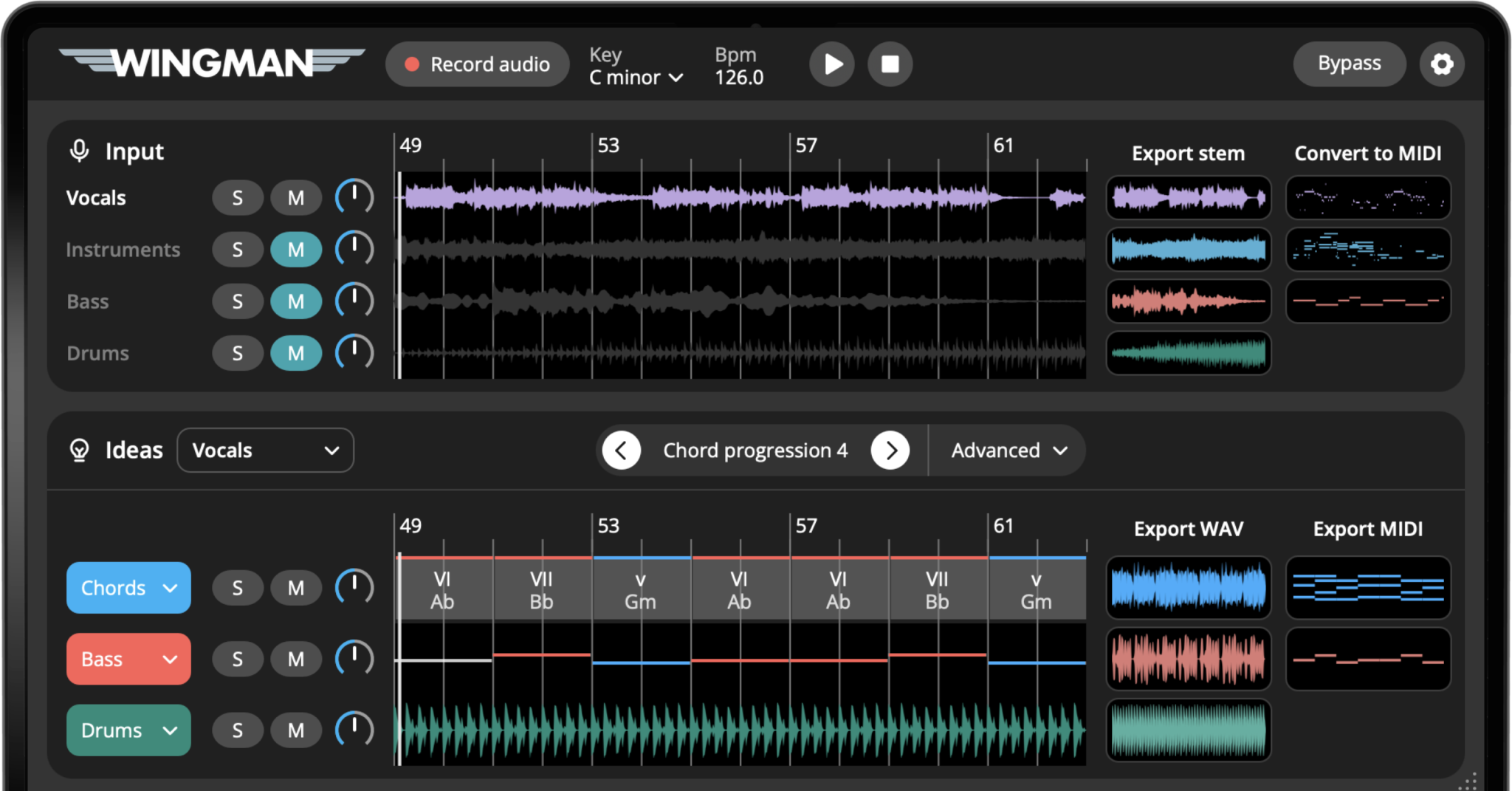
What does Wingman do?
Wingman helps producers turn existing audio into new musical material. You can start with a melody, vocal, acapella, synth loop, full track, sample, or unfinished idea, then use Wingman to build chords, basslines, MIDI, stems, rhythms, sounds, and exportable parts.
Wingman can help you create:
- Chord progressions that fit your audio
- Basslines that support the chords
- MIDI from vocals, melodies, and loops
- Separated stems for remixing
- Rhythmic chord and bass patterns
- Drum parts with arrangement variations
- Recorded guitar parts that follow the progression
Wingman can help you shape:
- Chord rhythm and bounce
- Bassline movement
- Instrument sounds
- Effects like reverb, delay, and filtering
- MIDI and WAV exports for your DAW
Choose the workflow for the audio you have
A vocal or topline
Try accompanying chords and bass without replacing the vocal performance.
Build chords around a vocalA melody or loop
Use the phrase as a starting point for a backing, then refine the notes and rhythm in context.
Turn a melody into chords and bassWingman works alongside your DAW. It supplies editable parts and ideas; you still arrange, mix and finish the track in your session.
How Wingman works inside your DAW
Wingman works as a plugin inside your DAW. You record audio into Wingman, choose the workflow you want, then export the result back into your session.
Add Wingman to your DAW session
Open Wingman as a plugin inside your DAW and place it on the track you want it to listen to.
Record the audio you want to build around
Use Record Audio to capture a vocal, melody, loop, sample, acapella, or track section from your session.
Review the ideas Wingman creates from your audio
After the audio is recorded, Wingman automatically creates useful results from the source material. Depending on the audio, you can review chord and bassline ideas, separated stems, and audio-to-MIDI clips for vocals, instruments, and bass.
From there, you can decide which results are useful for your track and continue shaping them inside Wingman or export them into your DAW.
Edit the idea and export it
Once you have a result you like, you can adjust rhythm, change sounds, add effects, then export the idea as MIDI or WAV into your DAW.
What can you do with Wingman?
Wingman brings several creative workflows into one plugin, so you can move from audio to musical ideas without constantly switching tools.
Chord and bassline generation
Generate chord progressions and basslines that fit the musical context of your audio.
Audio to MIDI
Convert vocals, bass, and instruments into editable MIDI for your DAW.
Stem separation
Separate tracks into stems such as vocals, drums, bass, and instruments for remixing and production.
Rhythm and accents
Add bounce, movement, accents, and rhythmic patterns to chords and basslines.
Sounds and VST synths
Change sounds, use compatible VST synths, and audition ideas with instruments that fit your track.
Effects and export
Add effects like reverb, delay, and filtering, then export the result as MIDI or WAV.
Examples of what you can make with Wingman
Wingman can fit into many different production workflows depending on what audio you start with.
Start with a melody
- Record the melody into Wingman
- Generate chords that fit
- Add a bassline
- Export MIDI into your DAW
Start with a vocal
- Record a vocal phrase
- Build chords around the vocal
- Create a bassline
- Use the result for songwriting or remixing
Start with a full track
- Separate stems
- Use the vocal or instrumental as a starting point
- Create new chords and bass
- Build a remix idea
Start with a loop or sample
- Convert audio to MIDI
- Change the sound
- Create new layers
- Build the loop into a full track section
Frequently asked questions
Wingman is used to create musical ideas from audio inside your DAW. It can help with chords, basslines, stems, audio-to-MIDI, rhythm, sounds, effects, and export workflows.
No. Wingman is a plugin that works inside your DAW. You use it alongside your existing production workflow.
Yes. Wingman can listen to audio in your DAW and help create chord progressions that fit the musical idea.
Yes. Wingman can convert vocals, bass and instruments into editable MIDI.
Yes. Wingman can separate audio into stems such as vocals, drums, bass, and instruments for remixing and production workflows.
Turn audio into chords, basslines, stems, MIDI, and production ideas.
Use Wingman inside your DAW to build new musical ideas faster from vocals, melodies, loops, samples, and unfinished tracks.
Updated