


How to Prepare a Library for Open-Format DJing
Prepare flexible routes between genres and tempo ranges. Use key where the melodies overlap, and keep bridge tracks and alternatives within reach.
How to Prepare a Library for Open-Format DJing
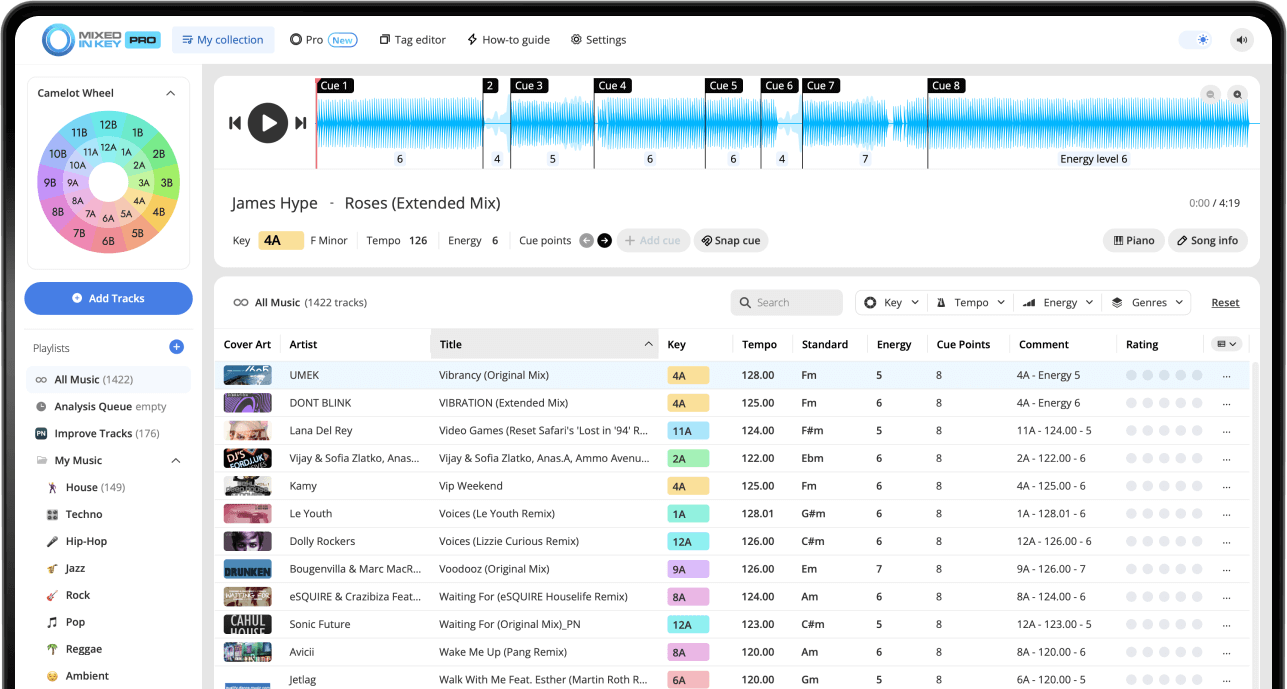
Analyze your music in Mixed In Key 11, then build crates around genre, tempo range and the moments you need to cover. Use energy results to compare intensity and key to check melodic overlaps. Prepare bridge tracks, cue points and backup routes so you can change direction without forcing every transition into the same harmonic pattern.
Key, BPM, energy and automatic Cue Points are included in Standard and Pro. Mashup suggestions, deck players, stems and key changes require Pro. Compare Standard and Pro.
Open-format DJing is about flexibility
Open-format DJs often move between different genres, decades, moods, and tempos. One part of the night might need house, another might need hip-hop, pop, Latin, classics, edits, or a quick energy reset.
Because the music can change direction quickly, your library needs to be organized for fast decisions. You should be able to find compatible tracks by Key, BPM, Energy Level, genre, and purpose without digging through thousands of songs during a set.
An open-format library should help you find:
- Songs by genre and subgenre
- Songs by BPM range
- Songs by Key and Camelot compatibility
- Songs by Energy Level
- Songs for specific moments in the night
- Backup options when the crowd changes
Open-format preparation helps you avoid:
- Searching too long during a set
- Jumping genres without a plan
- Dropping energy by accident
- Choosing songs that clash harmonically
- Losing the room during tempo changes
Analyze your library in Mixed In Key
Start by analyzing your music in Mixed In Key. This gives you Key, BPM, Energy Level, and Cue Points before you organize the library into open-format playlists.
For open-format DJs, this information is especially useful because it gives you multiple ways to search. You can find songs by tempo, intensity, harmonic compatibility, and transition points.
Mixed In Key helps you see:
- Key
- BPM
- Energy Level
- Cue Points
- Camelot notation
Before organizing:
- Analyze new tracks
- Check your Tag Options
- Refresh tags in your DJ software
- Make Key, BPM, and Energy visible
- Keep new music separate until tested
Set your tags so the library is easy to scan
Open-format DJing works best when your most important information is visible. In Mixed In Key, go to Settings → Tag Options and choose how you want Key, BPM, Energy Level, and other metadata to appear.
Many DJs like to write Key and Energy Level into comments, while also updating the custom Initial Key tag. The right format depends on how you browse inside your DJ software.
Useful tag choices include:
- Write Key and Energy Level
- Write Key, Tempo, and Energy Level
- Update custom Initial Key tag
- Update Tempo tags
- Write Energy Level in grouping or label fields
Use visible fields like:
- Key
- Comments
- Grouping
- Label
- Genre
- BPM
Organize by genre and subgenre
Genre is still important for open-format DJing. Start with broad genre folders or playlists, then add subgenres when you need more precision.
For example, one broad “House” category can be split into tech house, deep house, Afro house, classics, edits, and warmup tracks. The goal is to make your library easier to browse under pressure.
Broad categories
- House
- Hip-hop
- Pop
- Latin
- Disco and funk
- Classics
- Edits and remixes
Useful subfolders
- Warmup
- Peak-time
- Singalong
- Transition tools
- Clean versions
- Instrumentals
- Emergency options
Organize open-format tracks by BPM range
BPM ranges are essential for open-format sets because tempo changes can happen often. Organizing by BPM helps you find songs that can work in the same section or help you move between genres.
You do not need every playlist to stay in one tempo range, but you should know where the tempo zones are so you can move with intention.
Example BPM playlists
- 70–85 BPM
- 86–100 BPM
- 100–115 BPM
- 115–125 BPM
- 126–130 BPM
- 130+ BPM
Use BPM ranges to:
- Group tracks that mix easily
- Prepare tempo changes
- Find genre bridges
- Build open-format transitions
- Recover quickly when the crowd changes
Use Key to make genre changes sound smoother
Key is useful in open-format DJing because it can help genre changes feel more musical. Even when you are moving between different styles, compatible Camelot Keys can reduce clashing melodies and make transitions feel more intentional.
On the Camelot Wheel, A means minor and B means major. If your current song is 8A, try searching for tracks in 8A, 7A, 9A, or 8B before expanding your search.
Use Camelot compatibility across genres
If two songs are from different genres but share compatible Keys, you may have a better starting point for testing the transition.
Key will not solve every open-format transition, but it helps you find better candidates faster.

Use Energy Level to control intensity across genres
Open-format DJs often move between songs that feel very different. Energy Level helps you understand intensity across genres, not just inside one style.
This is important because a slower song can still feel intense, and a faster song can still feel relaxed. Energy Level gives you another way to decide whether a song fits the moment.
Use lower Energy Level tracks for:
- Warmups
- Dinner or lounge sections
- Early-night movement
- Controlled resets
Use higher Energy Level tracks for:
- Peak-time sections
- High-impact genre switches
- Big drops
- Festival-style moments
Use Cue Points to prepare faster transitions
Cue Points are especially useful for open-format DJing because you may need to move quickly between genres or sections. Mixed In Key can help prepare Cue Points for intros, breakdowns, drops, and mix-out sections.
Use those Cue Points to test whether a song can enter cleanly, whether the energy change works, and whether the transition gives you enough time.
Use Cue Points to test:
- Where the next song should enter
- Where the outgoing song should mix out
- Whether the drop lands correctly
- Whether the transition feels too sudden
- Whether the arrangement gives you enough space
Prepare Cue Points for:
- Quick cuts
- Smoother blends
- Genre changes
- Energy resets
- Playlist testing
Build flexible open-format playlists
A good open-format library is not one giant folder. Build smaller playlists that solve specific problems during a set.
You can organize by genre, BPM, Energy Level, crowd type, time of night, venue, or purpose. The goal is to give yourself fast options when the room changes.
Build playlists for:
- Warmup
- Peak-time
- Genre bridges
- Energy resets
- Classics
- New music
- Emergency options
Keep backup options for:
- A crowd that wants a different genre
- A sudden tempo change
- A request that shifts the room
- A set that needs more energy
- A set that needs a reset
See the results in your DJ software
After analyzing and tagging your music in Mixed In Key, bring the results into your DJ software. Mixed In Key includes integration tutorials inside the software. Follow the tutorial for your specific DJ app, such as Rekordbox, Serato, Traktor, and others.
For open-format DJing, make sure you can see the columns you actually use during a set. Key, BPM, Energy Level, genre, comments, and playlist names should be easy to scan.
Make these visible:
- Key
- BPM
- Energy Level
- Genre
- Comments
- Rating or label fields
Recommended file choices
For the best results with tagging and DJ software workflows, use AIFF files for lossless quality or regular 320 MP3 files.
Use DJ Mix Mode and Idea Filter for open-format prep
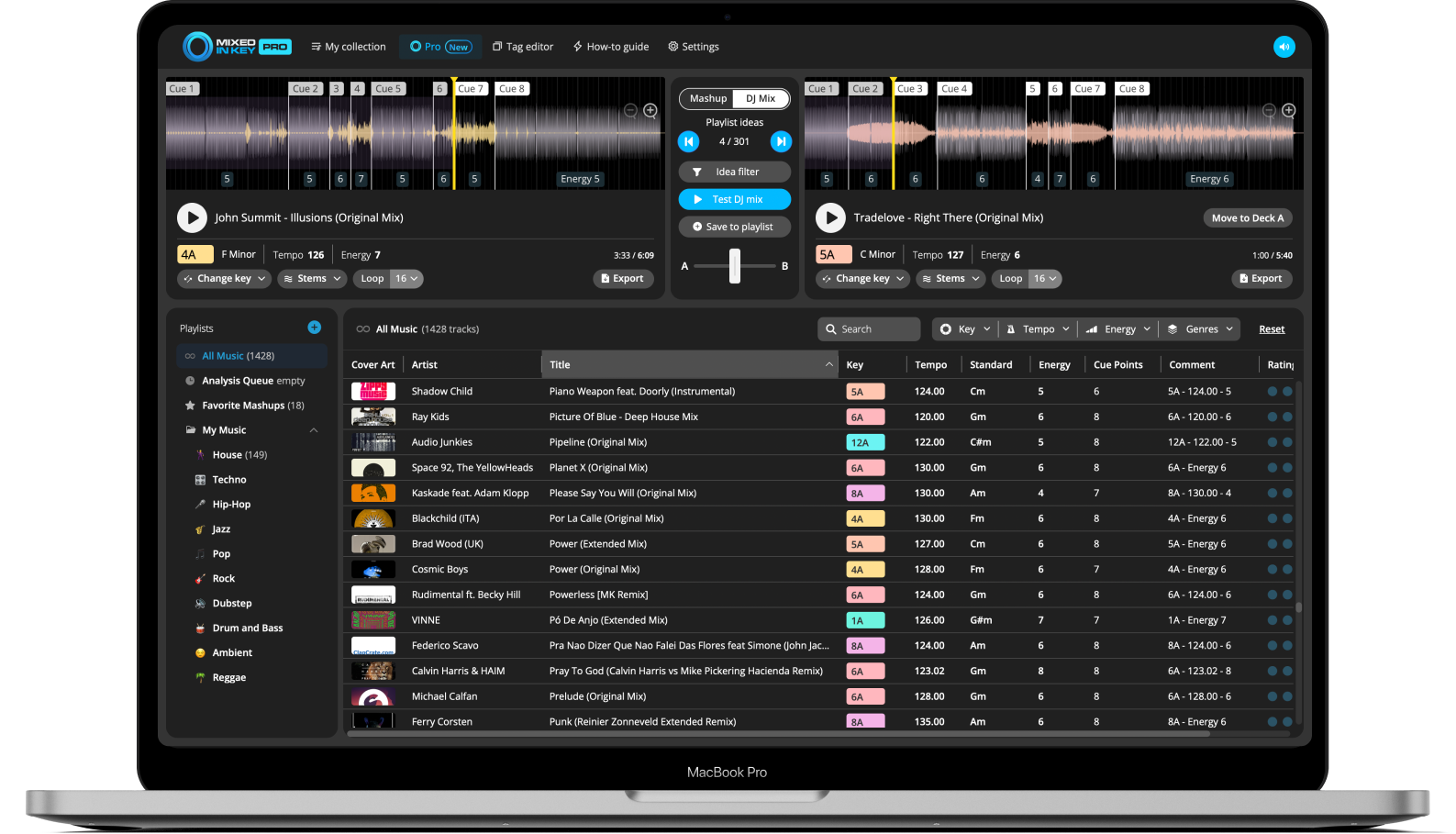
Mixed In Key Pro can help you prepare open-format playlists with DJ Mix Mode. Choose a starting track, then explore songs that may work well together based on Key, Energy Level, and BPM.
Idea Filter is especially useful for open-format DJs because you can limit suggestions to a specific playlist, genre folder, new music batch, or gig prep crate.
Find useful next-song ideas faster
Use DJ Mix Mode when you want to test what could come next from a focused part of your library.
For example, you can filter to a “New Music” playlist, a “Latin Peak” playlist, or a “House 124–128 BPM” playlist and build ideas from that specific group.
How to prepare a library for open-format DJing
Collect and clean up your music
Start with high-quality files, clean artist and title fields, and remove duplicate or low-quality tracks from your main performance library.
Analyze your library in Mixed In Key
Analyze your tracks so you can see Key, BPM, Energy Level, and Cue Points.
Set your Tag Options
Choose how Mixed In Key should write Key, BPM, Energy Level, and other metadata into your files.
Organize by genre and subgenre
Create broad genre playlists, then add subfolders or playlists for subgenres, edits, warmups, peak-time tracks, and classics.
Create BPM range playlists
Group songs into useful tempo ranges so you can move between genres and sections more easily.
Sort by Energy Level
Build warmup, groove, build, peak-time, and reset playlists using Energy Level as a guide.
Use Key to find smoother transitions
Use compatible keys when melodic sections will overlap. For a deliberate genre or tempo switch, rehearse a suitable transition method and listen to the result; open-format sets do not need every adjacent track to share a harmonic relationship.
Test transition points with Cue Points
Use Cue Points to test intros, breakdowns, drops, and mix-out sections before adding a track to your performance playlists.
Build open-format playlists for different moments
Keep crates for warmup, familiar singalongs, peak time and resets, plus bridge tracks between tempo zones. Include alternate clean or extended versions where useful, and test the intro and mix-out sections you expect to use.
Use DJ Mix Mode for playlist ideas
In Mixed In Key Pro, use DJ Mix Mode and Idea Filter to test next-song ideas from focused parts of your library.
Example open-format playlist structure
Your exact structure should fit your gigs, but these examples can help you organize your library into practical sections.
By genre
House, hip-hop, pop, Latin, disco, classics, edits, remixes, and transition tools.
By BPM
70–85, 86–100, 100–115, 115–125, 126–130, and 130+ BPM playlists.
By Energy Level
Warmup, groove, build, peak-time, reset, and closing playlists.
By purpose
New music, requests, singalong moments, bridge tracks, emergency options, and venue-specific playlists.
Common open-format library mistakes
Keeping everything in one giant playlist
Open-format DJing requires fast decisions. Split your library into focused playlists that solve specific problems.
Organizing only by genre
Genre is useful, but BPM, Key, Energy Level, and Cue Points help you make better transitions.
Ignoring Energy Level
Genre changes can feel rough if the energy jump is too sudden. Use Energy Level to control the intensity.
Skipping tag cleanup
Messy artist, title, genre, and comment fields make your library harder to search during a set.
Not preparing bridge tracks
Bridge tracks help you move between genres, tempos, and moods without losing the room.
Not testing new music
Keep new tracks separate until they are analyzed, tagged, and tested with Cue Points.
Frequently asked questions
Open-format DJing means playing across multiple genres, tempos, moods, and eras. It requires a flexible library that lets you find the right song quickly.
Organize by genre, subgenre, BPM range, Key, Energy Level, and set purpose. Use focused playlists instead of one huge folder.
Mixed In Key analyzes Key, BPM, Energy Level, and Cue Points, giving you more ways to search, sort, and prepare songs for different parts of a set.
Yes. Compatible Camelot Keys can make genre changes and tempo changes feel more musical, especially when you also check BPM and Energy Level.
Mixed In Key Pro includes DJ Mix Mode and Idea Filter, which can help you find next-song ideas from focused playlists, genres, or new music folders.
Use Mixed In Key to organize songs for faster, more flexible DJ sets.
Analyze Key, BPM, Energy Level, and Cue Points, then build playlists that help you move across genres with confidence.
Updated