















Mixed In Key 12 PRO

Find mashup ideas and plan your next DJ set

Try tracks together, preview transitions, and shape the blend with stems, key and tempo controls.

Already own Mixed In Key?
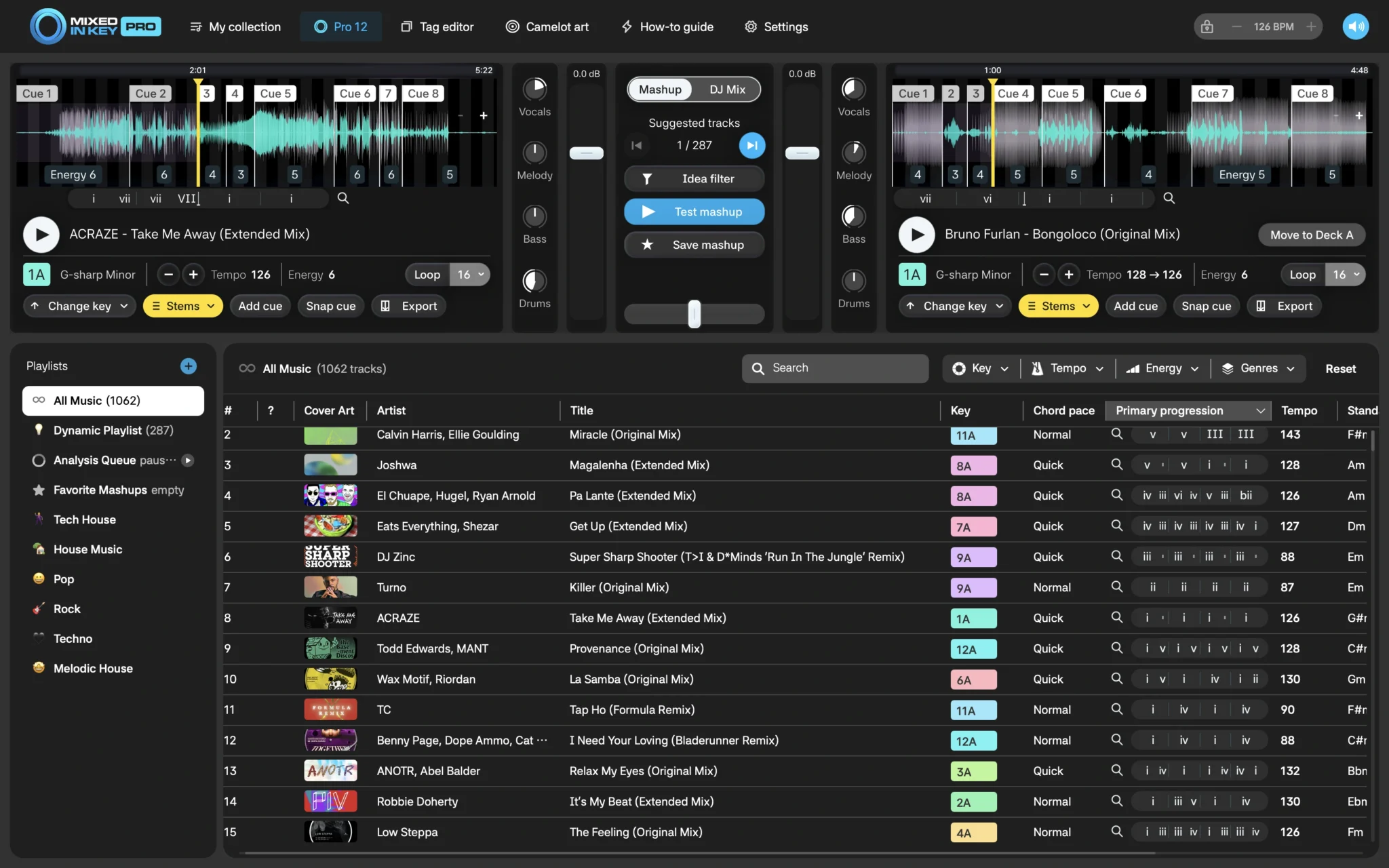
Mixed In Key 12 Pro pairing ACRAZE and Bruno Furlan in Mashup mode, with both waveforms, stem controls and chord progressions visible.

What you can do with Pro

  • Choose a track from your library, audition suggested mashups on two decks, and save your favorites.
  • Compare chord progressions by ear, see how fast the chords change, and export a progression as MIDI.
  • Blend four stems on each deck to hear one track’s vocal over another’s melody, bass and drums.
  • Build a gig playlist. Dynamic Playlist finds tracks that fit by key and energy. Test the transitions in DJ Mix.
  • Add Camelot keys to your cover art so you can spot a track’s key on your CDJ during a set.
Mixed In Key 12 Pro in Mashup mode.

Used by the world’s best DJs

David Guetta
“Mixed In Key 11 is totally insane for mashups with stems and key changes. I just made 4 mashups and I keep making new ones. It’s so so so inspiring wow”

David Guetta

On Mixed In Key 11
Axwell, Swedish House Mafia
“Love this! It’s such a useful software.”

Axwell, Swedish House Mafia

On using Mixed In Key
Kaskade
“Mixed In Key is a huge time saver! I use it for all my DJ mixes these days.”

Kaskade

On using Mixed In Key
DJs From Mars
“This is the perfect Mash-Up machine! It’s so easy to find ideas and combinations and it makes our work way easier and smoother!! For us it’s a game changer!”

DJs From Mars

On using Mixed In Key
Armin van Buuren
“I’m a big fan of Mixed In Key. Keep up the good work!”

Armin van Buuren

Armin is teaching DJs how to use Mixed In Key in Armin’s official MasterClass.On using Mixed In Key
Nicole Moudaber
“I find Mixed In Key very useful especially when I play melodic and vocal tracks.”

Nicole Moudaber

On using Mixed In Key
Alesso
“Mixed In Key is part of my DJ workflow because it’s great for finding mashup ideas.”

Alesso

On using Mixed In Key
Hardwell
“Mixed In Key helps me find tracks and acapellas in the same key.”

Hardwell

On using Mixed In Key
Zedd
“I love Mixed In Key for its simplicity and functionality.”

Zedd

On using Mixed In Key

1 / 9 · David Guetta

Same key, different chords

Play the two examples. Both tracks are in D minor. Over four bars, “A Part Of” sits on one chord while “Get Up” keeps changing. Which would leave more room for your vocal?

Pro shows the chord progression and how quickly it changes. If you hear a pattern you want to work with, export it as MIDI to your DAW.

A Part Of

7A

Larse · Riva Starr Extended Saturn Mix

Normal chord pace

Get Up

7A

Eats Everything, Shezar · Extended Mix

Quick chord pace
Play the piano
Tap a key to play, or use ← → and Space.Examples · 120 BPM

What goes with the track playing now?

Load a track and Dynamic Playlist pulls up records from your collection that fit its key and energy. Pick one for the warm-up, load it, and the suggestions update around it.

This collection has 29 matches for the loaded track.

Inside the two decks

Choose Mashup to try two records together, or DJ Mix to hear the handoff between them. Select a marker to see how it works.

Mixed In Key 12 Pro in Mashup mode with both decks and the track library

Take a favorite track somewhere new

Load it on Deck A. Pro suggests records from your collection for Deck B, including pairings you might have passed over while browsing.

Your starting record on Deck A.

Make room for the vocal

If one record buries the other, bring their levels closer until you can hear what each contributes.

Match the levels by ear.

A place for every new record

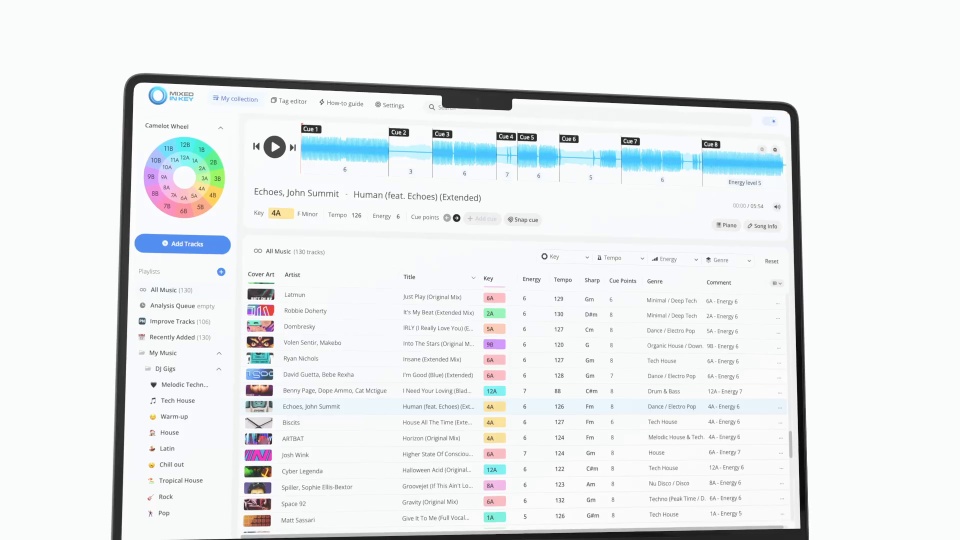
When you bring new music home, analyze its key and energy, mark where you want to mix in, and tidy up the tags. The Mixed In Key library tools are all here in Pro.

Current Mixed In Key overview

Read the key
right on the deck

Put the Camelot key on your cover art so you can read it on the player while you’re mixing.

Choose a style in Standard or Pro, or keep the sleeve you already recognize.

Choose a style and zoom in for a closer look.

32 tracks in five minutes

Listen to Shane 54 weave between records in compatible keys. Follow the bass as a new vocal comes in. How soon can you hear the next track?

Listen on SoundCloud

Play in the DJ software you know

Prep your music in Mixed In Key, then play your set in the DJ software you already use.

Choose your edition

Pro

For DJs who want to discover mashups and try a set before the gig.

Buy Pro
  • Everything in Standard
  • Find mashup partners and hear them on two decks
  • Blend vocals, melody, bass and drums from either track
  • Compare chord changes and export a progression as MIDI
  • Find your next track by key and energy with Dynamic Playlist
  • Try transitions and save playlists in DJ Mix
  • Try key changes, set loops and adjust the tempo on each deck
  • Optional Camelot album artwork, or keep original covers

Standard

For DJs who want their collection keyed, tagged and ready to play.

Buy Standard
  • Key detection
  • Energy level analysis
  • Cue point creation
  • Tag editing
  • Optional Camelot album artwork, or keep original covers

Frequently asked questions

What does Mixed In Key 12 Pro do?

Pick a track from your library and Pro suggests others to try with it. In Mashup mode, you can hear how the vocal from one song sounds over the drums or bass from another. In DJ Mix, you can try transitions and build a playlist for your next gig.

When should I use Mashup mode or DJ Mix?

Use Mashup to try parts of two songs together, like a vocal from one over the bassline from the other. Use DJ Mix to hear the transition between two tracks and decide where they belong in your set.

What’s new in Mixed In Key 12 Pro?

You can mix four stems on each deck and try a transition at the tempo you’ll play it. Dynamic Playlist suggests what to play next based on key and energy. You can also see how a track’s chords change, export the progression as MIDI and add its Camelot key to the cover art.

How does Dynamic Playlist pick the next track?

Load a track and Dynamic Playlist suggests others in your collection that match its key and energy. Load another track and the suggestions update. You choose what to play next.

I’m new to Mixed In Key. Where should I start?

Analyze a few songs you know and check their keys and energy levels. Load a favorite onto a deck, then listen to a few suggestions with it. You can also set cue points and edit tags as you get your library ready.

Can I upgrade from an earlier version of Mixed In Key?

Sign in to your Mixed In Key account with the email address you used to buy the software. You’ll see the upgrade options for your license. If your purchase is missing, email [email protected].

Can I keep my original album covers?

Yes. In Mixed In Key 12 Standard and Pro, adding Camelot keys to your artwork is optional. You can keep the original covers.

Can I try Pro before I buy it?

There’s no free trial or demo. Your purchase comes with a 30-day money-back guarantee, so you can try Pro with your own music and request a refund within 30 days.

Which features can I use offline?

You need an internet connection to analyze tracks, export cue points, or edit tags. Once you’ve analyzed your tracks, you can use Mashup and DJ Mix offline to try tracks together and prepare playlists. You can also separate stems offline.

Search the Mixed In Key FAQ. If your question isn’t covered, you can email our team.

Still have a question? Email our team.