


How to Find Songs That Work Well Together
Use the analysis to shortlist a pair. The real test is how the two tracks sound during the transition you plan to play.
How to Find Songs That Work Well Together
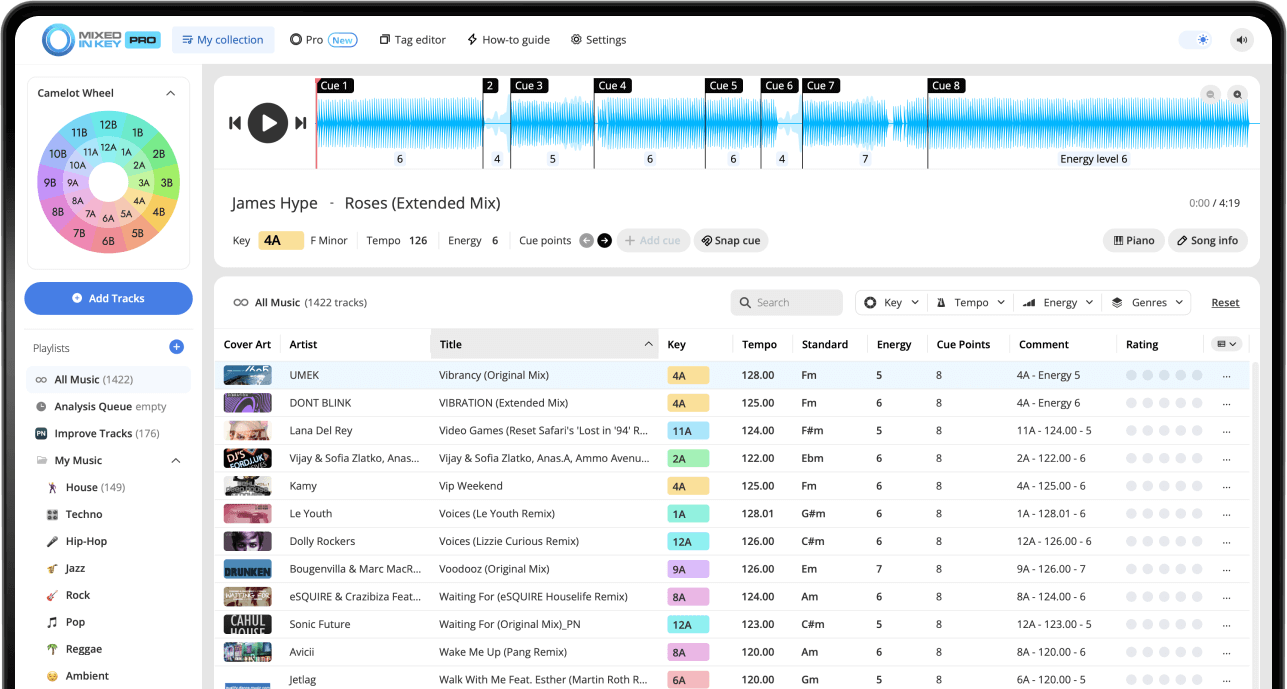
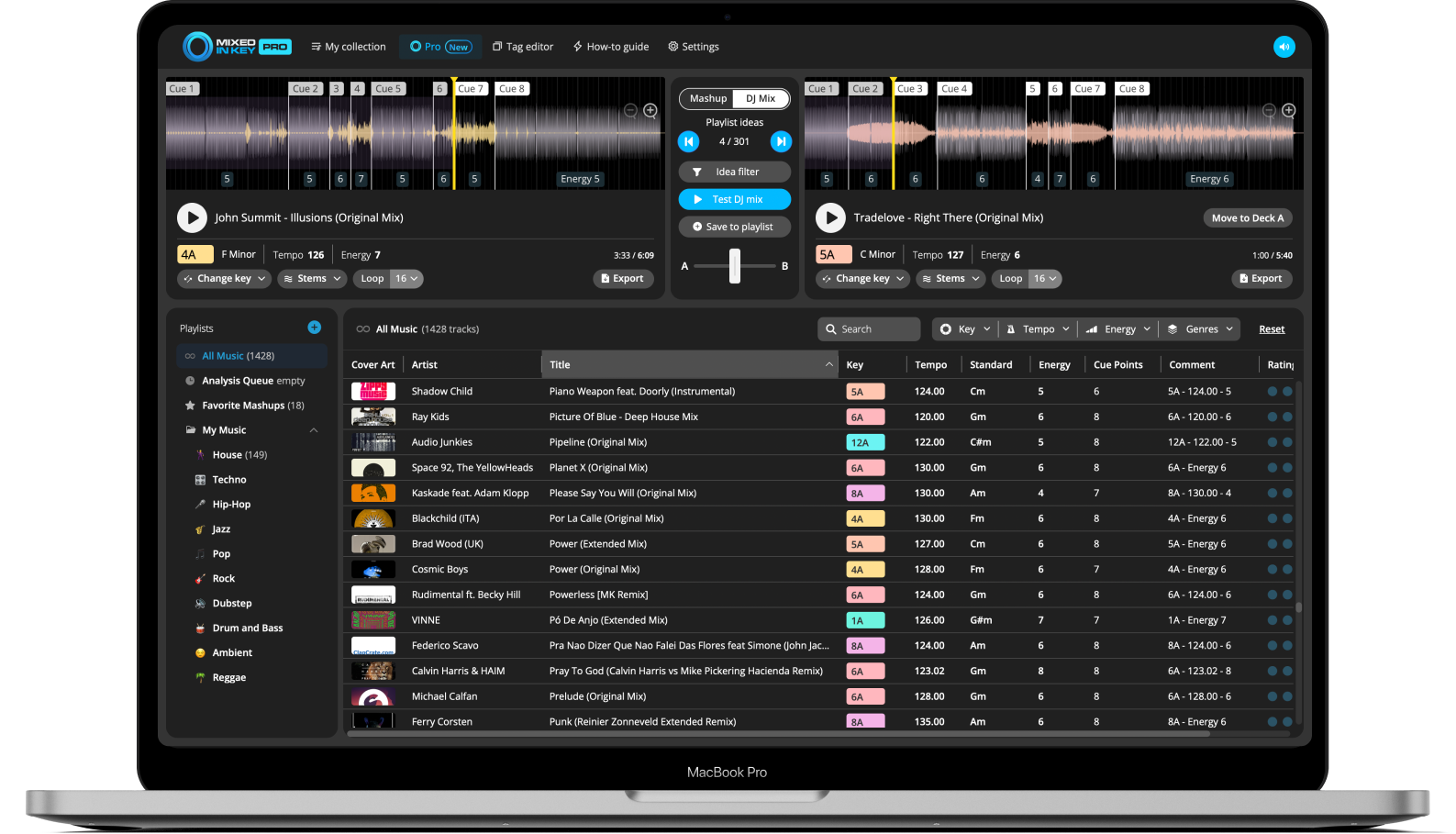
Compare key, BPM and energy in Mixed In Key 11, then listen to the sections that will overlap. Check phrase lengths, competing vocals and whether the basslines leave room for each other. Standard and Pro share the analysis; Pro’s DJ Mix Mode can suggest further pairings, which still need an audition.
Key, BPM, energy and automatic Cue Points are included in Standard and Pro. Mashup suggestions, deck players, stems and key changes require Pro. Compare Standard and Pro.
What makes two songs work well together?
Two songs usually work well together when they make sense musically, rhythmically, and emotionally. They do not need to be identical, but they should feel like they belong in the same moment of the set.
Mixed In Key helps you narrow down the search by showing important information about each track. Instead of scrolling through your library and guessing, you can look for songs that fit in terms of Key, BPM, and Energy Level.
Good song combinations often share:
- Compatible musical Keys
- A realistic BPM range
- A similar or intentional Energy Level
- Sections that can be mixed cleanly
- A mood that makes sense for the set
Mixed In Key helps you check:
- Key
- BPM
- Energy Level
- Cue Points
- Clean and organized track metadata
Use Key to find harmonically compatible songs
Key is one of the fastest ways to find songs that may sound smooth together. Mixed In Key analyzes your tracks and shows the musical Key in Camelot notation, such as 8A or 9B.
On the Camelot Wheel, A means minor and B means major. If your current song is 8A, you can start by looking for songs in 8A, 7A, 9A, or 8B.
Start with simple Camelot matches
The easiest starting point is to look for songs with the same Camelot notation, one number higher, one number lower, or the matching A/B position.
This gives you a useful shortlist of songs that may work together harmonically. From there, check BPM, Energy Level, and how the tracks actually sound together.

Use BPM to keep the tempo movement realistic
BPM helps you understand the tempo of each song. Songs do not always need to have the exact same BPM, but the tempo difference should make sense for the style of set you are building.
When you are building a playlist, try grouping songs by tempo range. This makes it easier to move naturally through the set instead of jumping too far too quickly.
When BPM is close
Songs with similar BPM values are often easier to test together because the tempo movement feels more natural.
When BPM is different
Larger BPM changes can still work, but they usually need more planning. You may use a breakdown, a tempo transition, or a change in energy to make the move feel intentional.
Use Energy Level to shape the flow of the set
Energy Level helps you understand how intense a track feels. This is useful because two songs can have compatible Keys and similar BPM, but still feel wrong together if the energy jump is too extreme for that moment.
Use Energy Level to decide whether the next song should lift the room, maintain the groove, create contrast, or reset the mood before building again.
Build energy
Choose a song with a higher Energy Level when you want the set to feel bigger, more intense, or more exciting.
Hold the groove
Choose a song with a similar Energy Level when you want to maintain the same feeling without changing the room too much.
Create contrast
A different Energy Level can work when you want a noticeable change in mood, tension, or direction.
Reset the room
A lower Energy Level can help you create space before building into the next section of the set.
Use Cue Points to test song combinations faster
Once you find songs that look compatible, Cue Points help you test them faster. Instead of listening through the entire track every time, you can jump to useful sections and hear how the songs feel together.
Cue Points can help you prepare important sections such as intros, breakdowns, drops, and mix-out sections.
Use Cue Points to check:
- Where the intro starts
- Where the breakdown happens
- Where the drop lands
- Where the mix-out section begins
Why this helps
- Test ideas faster
- Compare more song combinations
- Find better transition sections
- Prepare your playlist more efficiently
Use DJ Mix Mode to discover song ideas
Mixed In Key Pro makes this workflow faster with DJ Mix Mode. Instead of manually searching your entire library, DJ Mix Mode helps you find songs that could work well together based on Key, Energy Level, and BPM.
This is especially useful when building playlists for your next gig, DJ set, livestream, radio show, recorded mix, or practice session.
Find combinations you might miss manually
DJ Mix Mode helps you explore your library and find possible song combinations more quickly. Once you find a pair that looks promising, you can preview it, save it to your favorites, and continue building your setlist.
This makes Mixed In Key Pro useful for discovering playlist ideas, not just checking individual tracks.
How to find songs that work well together
Analyze your tracks in Mixed In Key
Start by analyzing your music so you can see Key, BPM, Energy Level, and Cue Points. This gives you a better starting point for finding compatible songs.
Start with compatible Keys
Look for songs with the same Camelot notation, one number higher, one number lower, or the matching A/B position. These are useful starting points for harmonic mixing.
Check BPM
Compare the BPM of the songs you are considering. Similar tempos are often easier to test together, while bigger tempo changes may need more planning.
Compare Energy Level
Check whether the Energy Level fits the moment. Decide if you want to build energy, maintain the groove, create contrast, or reset the mood.
Use Cue Points to test important sections
Jump to the intended intro and mix-out section, then audition the overlap at your planned tempo. Check phrase alignment, bass changes and vocal overlap. A pair that works during a drum intro may clash during the chorus.
Use DJ Mix Mode for more ideas
In Mixed In Key Pro, use DJ Mix Mode to discover songs that could work well together based on Key, Energy Level, and BPM. Save your favorite combinations as you build your playlist or setlist.
Preview and make the final decision
Rehearse the transition in your DJ setup, with the same tempo and key-lock settings you will use. Keep the pair if the arrangement and groove work, even when another option has a closer analysis match.
Example ways to find songs that fit
Same Key, similar BPM
This is one of the safest starting points. If two songs have the same Camelot notation and similar BPM, they may be easy to test together.
Compatible Key, higher Energy Level
Use this when you want the next song to lift the set while still staying harmonically compatible.
Compatible Key, lower Energy Level
Use this when you want to create space, reset the mood, or move into a smoother section.
Same Energy Level, different mood
This can help you keep the room moving while changing the emotional direction of the set.
Common mistakes when matching songs
Only matching by Key
Key is important, but it is not the only factor. Also check BPM, Energy Level, arrangement, genre, and how the songs actually sound together.
Ignoring Energy Level
Two songs can be in compatible Keys but still feel wrong together if the energy jump does not make sense for that moment.
Forgetting to test the arrangement
A song combination may look good in your library, but the intro, breakdown, drop, or mix-out section still needs to work in context.
Not using your ears
Analysis helps you find better starting points, but your ears should always make the final decision.
Frequently asked questions
Songs often work well together when they have compatible Keys, a realistic BPM range, a useful Energy Level relationship, and sections that can be mixed cleanly.
No. Key is a strong starting point, but you should also check BPM, Energy Level, arrangement, genre, and how the songs sound together.
Mixed In Key Pro includes DJ Mix Mode, which helps you discover songs that could work well together based on Key, Energy Level, and BPM. You can preview combinations and save favorites as you build a playlist or setlist.
Not always. Songs with similar BPM values are often easier to test together, but larger BPM changes can also work when they are planned intentionally.
Cue Points help you jump to useful sections such as intros, breakdowns, drops, and mix-out sections. This makes it faster to test whether two songs feel right together.
Use Mixed In Key to build stronger playlists.
Analyze your tracks, compare Key, BPM, and Energy Level, use Cue Points to test important sections, and use Mixed In Key Pro DJ Mix Mode to discover songs that work well together.
Updated