


How to Find Similar Songs in Your DJ Library
Find tracks with a similar tempo or intensity, then check the musical feel. Matching analysis values does not mean two songs sound the same.
How to Find Similar Songs in Your DJ Library
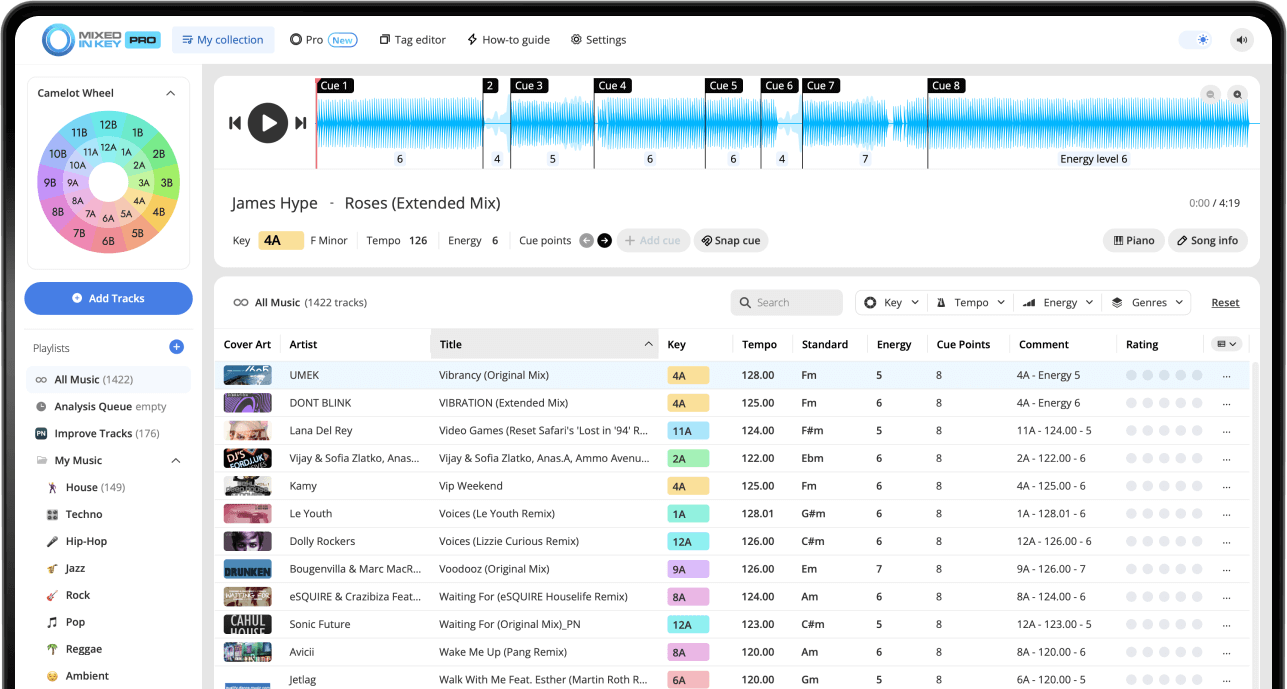
Choose a reference track and use Mixed In Key 11’s key, BPM and energy results to narrow your library. Compare the shortlisted tracks by ear for groove, mood, vocals and arrangement. Standard supports this analysis-led search; Pro also offers DJ Mix Mode and Mashup Mode suggestions for combinations from your own library.
Key, BPM, energy and automatic Cue Points are included in Standard and Pro. Mashup suggestions, deck players, stems and key changes require Pro. Compare Standard and Pro.
What does “similar” mean in a DJ library?
Similar songs are not always songs from the same artist or genre. For DJs, a similar song is a song that can support the same moment in a set, work in a transition, fit a playlist, or create a useful mashup idea.
Two songs can be similar because they share a BPM range, have compatible Keys, sit at a similar Energy Level, have a similar groove, or use arrangements that work well together.
Songs can be similar by:
- Key
- BPM
- Energy Level
- Genre or subgenre
- Groove and rhythm
- Mood or atmosphere
- Arrangement and structure
Use similar songs to:
- Build stronger playlists
- Find the next song faster
- Create harmonic sections
- Prepare mashup ideas
- Replace a song that does not fit
- Build backup options for live sets
Analyze your library before searching for similar songs
Before you can reliably find similar songs, analyze your library in Mixed In Key. This gives you Key, BPM, Energy Level, and Cue Points for each track.
Once your library is analyzed, you can make better decisions than simply browsing by artist, genre, or release date.
Mixed In Key helps you compare:
- Key
- BPM
- Energy Level
- Cue Points
- Camelot notation
Before searching:
- Analyze your tracks
- Set your Tag Options
- Refresh or reload tags in your DJ software
- Make Key, BPM, and Energy visible
- Organize tracks into useful playlists
Find similar songs by Key and Camelot compatibility
Key is one of the best starting points for finding songs that can work together musically. Mixed In Key shows Key in Camelot notation, which makes it easier to browse for compatible songs.
On the Camelot Wheel, A means minor and B means major. If your reference song is 8A, start by looking for songs in 8A, 7A, 9A, or 8B.
Use compatible Keys as your first filter
Songs in compatible Camelot Keys are often easier to test together because the melodies and harmonies are less likely to clash.
Once you find songs in compatible Keys, narrow the list further by BPM, Energy Level, genre, and Cue Points.

Find similar songs by BPM
BPM helps you find songs that live in the same tempo range. This is useful when you want a smooth mix, a consistent playlist, or a section of your set that stays in the same groove.
BPM does not tell the whole story, but it is an important filter. A song with the right Key may still feel difficult to use if the tempo jump is too large for that moment.
Use close BPM for:
- Smooth transitions
- Genre-specific playlists
- Longer blends
- Warmup sections
- Steady groove playlists
Use wider BPM ranges for:
- Open-format sets
- Energy resets
- Genre changes
- Creative transitions
- Planned contrast
Find similar songs by Energy Level
Energy Level helps you find songs with similar intensity. Two songs can have the same BPM but feel completely different if one is smooth and the other is aggressive.
Use Energy Level when you want to find songs that hold the same mood, lift the energy slightly, or create a controlled reset.
Same Energy Level
Useful when you want to hold the groove and keep the room in the same feeling.
One level higher
Useful when you want to lift the set gradually without making the change feel too sudden.
One level lower
Useful when you want a gentle reset or a smoother transition into a less intense section.
Bigger change
Useful when you want a deliberate contrast, but it should feel intentional.
Use Cue Points to compare song structure
Key, BPM, and Energy Level can help you create a strong shortlist. Cue Points help you test whether the songs actually work together inside a real transition.
Use Cue Points to jump to intros, breakdowns, drops, and mix-out sections. This helps you compare the structure of two songs quickly.
Compare sections like:
- Intro to intro
- Intro to mix-out section
- Breakdown to breakdown
- Drop to drop
- Mix-out section to next intro
Listen for:
- Do the sections feel compatible?
- Does the energy match?
- Does the next song enter naturally?
- Are both songs too busy at the same time?
- Does the transition support the playlist?
Use DJ Mix Mode to find similar next-song ideas
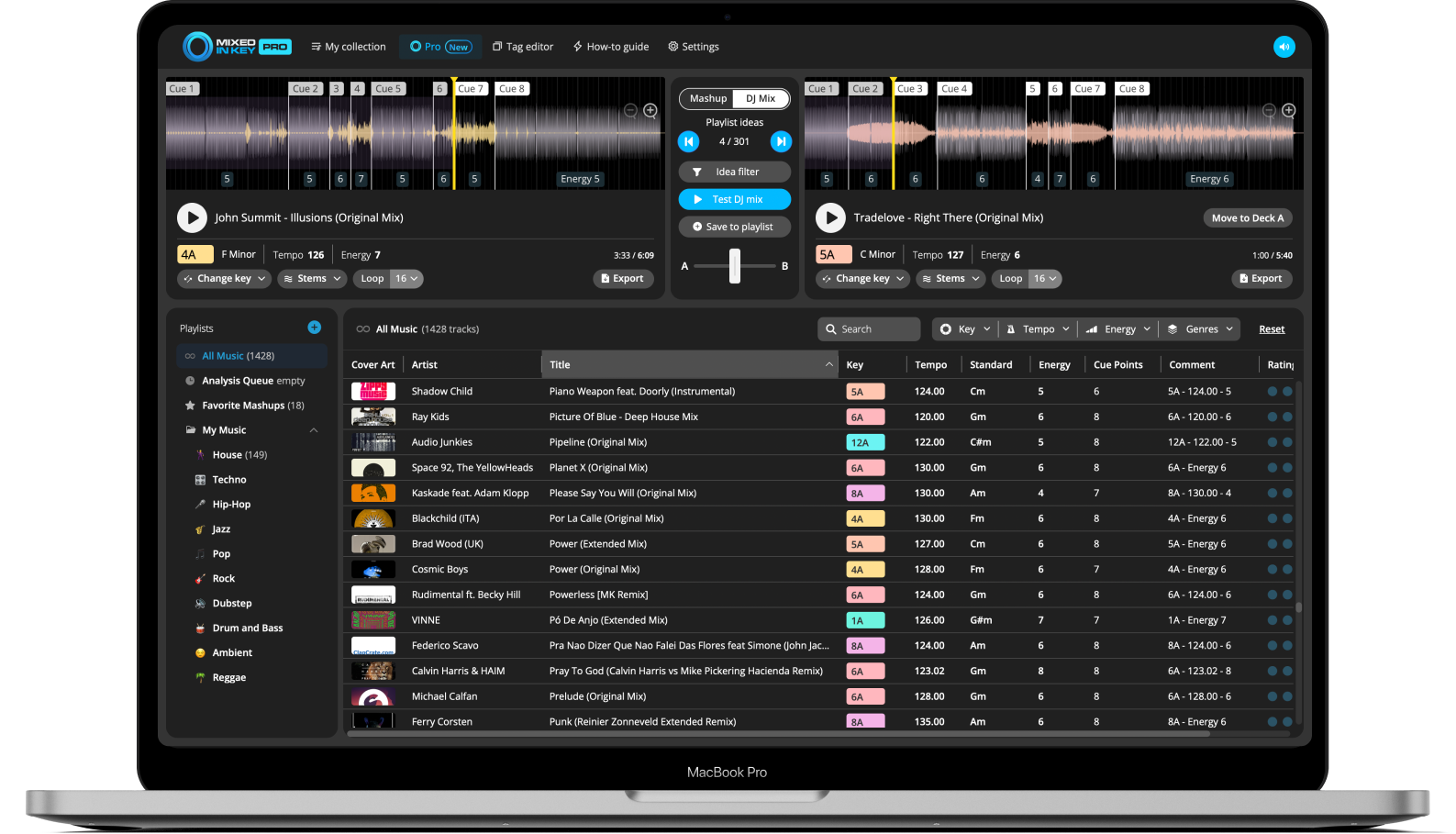
Mixed In Key Pro can help you find similar songs faster with DJ Mix Mode. Choose a starting track, and DJ Mix Mode suggests songs from your library that could work well together based on Key, Energy Level, and BPM.
This is useful when you want to find the next song in a set, build a playlist, or discover tracks that fit the same musical direction.
Find songs that fit the current track
DJ Mix Mode helps you start with one song and explore what could come next. You can test suggestions, save combinations, and continue building a playlist from your own library.
This can help you learn your music faster and build better playlists from tracks you already own.
Use Mashup Mode to find similar songs for mashups
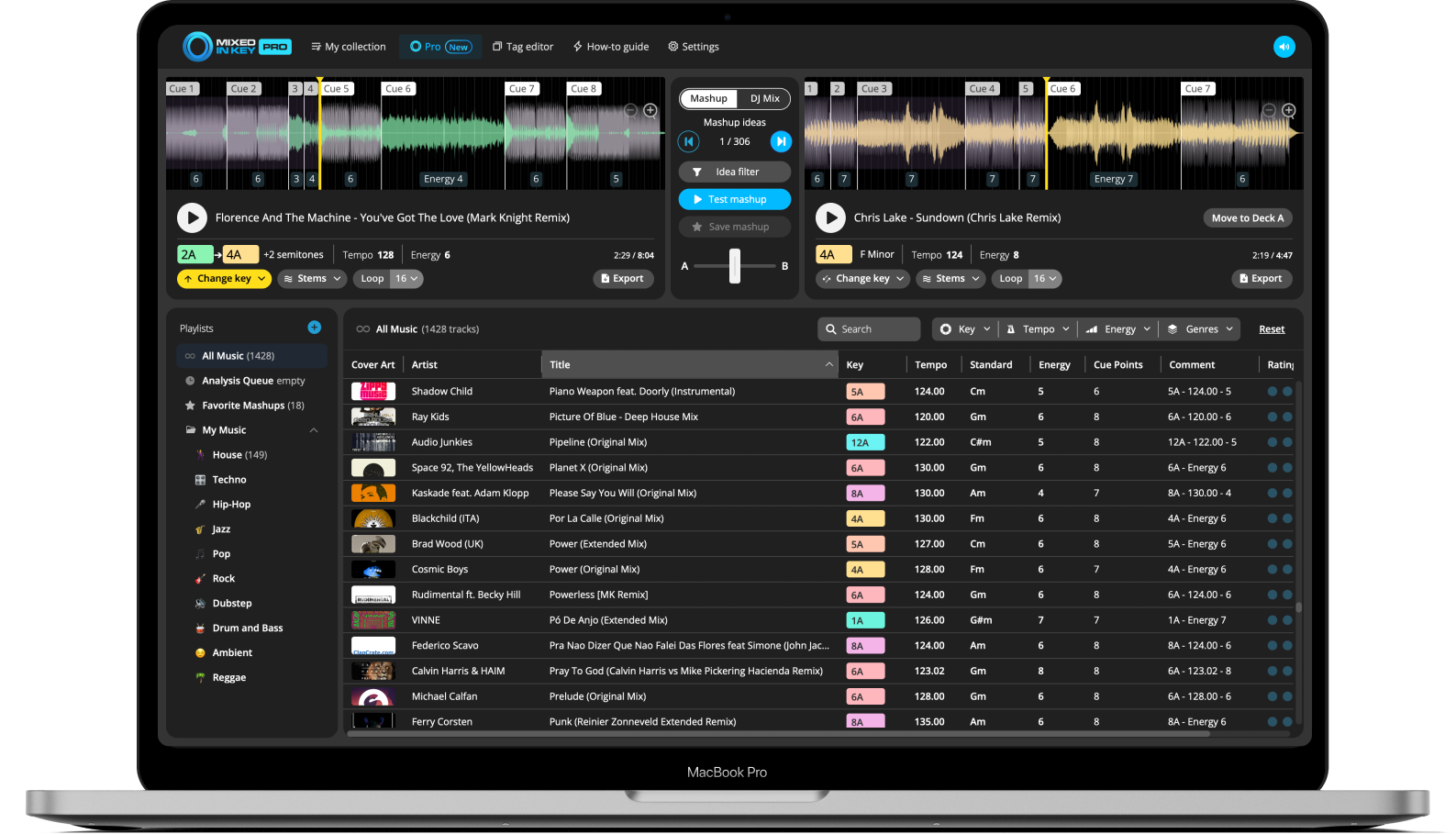
If your goal is to find songs that could work as mashups, use Mashup Mode. Load a track into Deck A and let Mixed In Key Pro suggest possible matches from your library.
You can test two songs together, jump between Cue Points, use stems, change Key, and save your favorite ideas.
Find creative song pairings
Mashup Mode is helpful when you want to find songs that are similar enough to work together, but different enough to create something new.
Use it to test vocals over instrumentals, compare energy, and discover combinations you might not find by browsing manually.
Use Idea Filter to search inside a smaller part of your library
If your library is large, it can be useful to narrow where suggestions come from. Idea Filter lets you control the source of suggestions in Mixed In Key Pro.
For example, you can filter suggestions to a playlist of new downloads, a specific genre, or a folder of tracks you want to learn before a gig.
Use Idea Filter for:
- New music playlists
- Genre-specific sets
- Gig preparation playlists
- Tempo-focused folders
- Small groups of tracks you want to learn
Why it helps
Similar-song discovery is more useful when the suggestions come from a focused group of tracks instead of your entire library.
How to find similar songs in your library
Analyze your music in Mixed In Key
Analyze your tracks so you can see Key, BPM, Energy Level, and Cue Points.
Choose a reference song
Decide what you want to keep from the reference: tempo, groove, intensity or harmonic direction. Mixed In Key’s key, BPM and energy results are useful filters; judge genre, vocal style and mood by listening and your own library organization.
Check Key, BPM, and Energy Level
Look at the reference song’s Camelot Key, BPM, and Energy Level.
Search compatible Camelot Keys
Start with the same Camelot Key, one number up, one number down, or the matching A/B position.
Narrow by BPM
Choose songs with a tempo range that makes sense for your transition, playlist, or mashup idea.
Narrow by Energy Level
Look for songs with the same Energy Level, one level higher, or one level lower, depending on the direction you want.
Test sections with Cue Points
Use Cue Points to jump to intros, breakdowns, drops, and mix-out sections and compare how the songs work together.
Use DJ Mix Mode or Mashup Mode
In Mixed In Key Pro, use DJ Mix Mode for next-song and playlist ideas, or Mashup Mode for creative mashup pairings.
Save the best matches
Save the tracks that suit your intended use, rather than every track with matching numbers. This workflow is about useful musical alternatives; it is not a duplicate-file detector or a promise that matching values imply the same sound.
Examples of similar-song searches
Use these examples as starting points when searching your own library.
Reference song: 8A, 124 BPM, Energy 6
Search for songs around 124 BPM in 8A, 7A, 9A, or 8B with Energy Level 6 or 7.
Find a warmer version
Keep the Key compatible, stay near the same BPM, and search for one Energy Level lower.
Find a bigger version
Keep the Key compatible, stay near the same BPM, and search for one Energy Level higher.
Find a mashup candidate
Use Mashup Mode to test similar or compatible songs, then use stems and Cue Points to hear whether the idea works.
Common mistakes when searching for similar songs
Searching by genre only
Genre is helpful, but Key, BPM, Energy Level, and Cue Points give you more precise ways to compare songs.
Ignoring Energy Level
Two songs can share a Key and BPM but feel completely different in intensity.
Assuming similar means identical
A similar song should fit the same musical context. It does not need to copy the reference song.
Not checking Cue Points
Cue Points help you test whether the songs actually work together in real sections.
Using the whole library every time
Use Idea Filter or focused playlists when you want more relevant suggestions.
Ignoring your ears
Similarity data helps you find candidates faster, but listening should decide the final match.
Frequently asked questions
Choose a reference track, then look for songs with compatible Camelot Keys, close BPM, similar Energy Level, and sections that work well together when tested with Cue Points.
Not always. The same Key can be useful, but compatible Camelot Keys can also work. For example, if your reference song is 8A, you can try 8A, 7A, 9A, or 8B.
Mixed In Key Pro can suggest songs that may work well together based on Key, Energy Level, and BPM using DJ Mix Mode and Mashup Mode.
It depends on your goal. Use BPM when tempo is the main concern. Use Energy Level when you want to match intensity. For the best results, combine BPM, Energy Level, and Key.
Cue Points help you compare song structure. You can jump to intros, breakdowns, drops, and mix-out sections to test whether two songs actually work together.
Use Mixed In Key to discover similar songs inside your own library.
Analyze Key, BPM, Energy Level, and Cue Points, then use Mixed In Key Pro to find DJ mix and mashup ideas faster.
Updated