


How to Find the Next Song in Your DJ Set
Decide whether to hold the groove, build or change direction. Then choose a track you can bring in cleanly at the current tempo.
How to Find the Next Song in Your DJ Set
Start with the current track and the direction you want the set to take. Use Mixed In Key 11’s key, BPM and energy results to shortlist options, then check the incoming phrase and the crowd response. Prepare this information before the gig; perform and make the final selection in your DJ software.
Key, BPM, energy and automatic Cue Points are included in Standard and Pro. Mashup suggestions, deck players, stems and key changes require Pro. Compare Standard and Pro.
What makes a good next song?
A good next song fits the musical, rhythmic, and emotional direction of the set. It should make sense with the track that is playing now, but it should also support where you want the set to go next.
The next song does not always need to be smoother, bigger, or more obvious. Sometimes the right choice is a lift. Sometimes it is a reset. Sometimes it is a song that holds the groove and gives the crowd more time in the same feeling.
A good next song usually fits:
- The current song’s Key
- The current BPM range
- The current Energy Level
- The direction of the set
- The moment in the room
The next song can:
- Hold the groove
- Lift the energy
- Create contrast
- Reset the mood
- Move into a new section of the set
Start with the song that is playing now
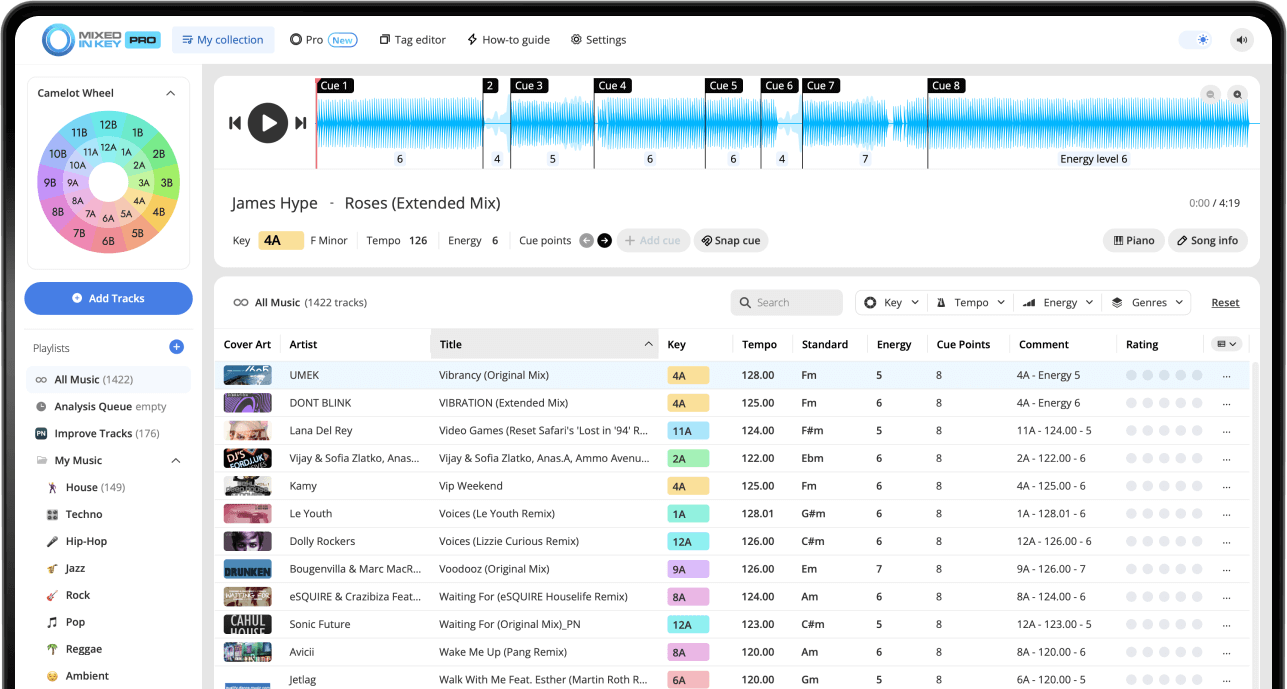
The best next-song search starts with the current track. Before looking through your library, identify the current song’s Key, BPM, Energy Level, and structure.
Mixed In Key gives you this information before the set, so you can make better decisions while preparing playlists or choosing the next track live.
Check the current song’s:
- Key
- Camelot notation
- BPM
- Energy Level
- Cue Points
Then decide:
- Should the next song feel smoother?
- Should the next song lift the room?
- Should the next song reset the mood?
- Should the next song stay in the same vibe?
- Should the set move in a new direction?
Use Key to find harmonic next-song options
Key is one of the fastest ways to narrow your next-song options. Mixed In Key shows each song’s Key in Camelot notation, which makes it easier to find songs that are likely to work together harmonically.
On the Camelot Wheel, A means minor and B means major. For a smooth next-song choice, start with the same Camelot notation, one number higher, one number lower, or the matching A/B position.
Example: current song is 8A
If your current song is 8A, start by looking for songs in 8A, 7A, 9A, or 8B. These are strong starting points for harmonic next-song choices.
After you find compatible Keys, narrow the list by BPM and Energy Level so the next song also fits the tempo and intensity of the set.

Use BPM to keep the next song practical
Once you have a shortlist of compatible Keys, check BPM. A song can be harmonically compatible but still feel difficult to use if the tempo jump is too large for that moment.
The right BPM range depends on your genre, set style, and transition approach. The goal is not always to keep BPM identical. The goal is to choose a tempo movement that feels intentional.
Use similar BPM when:
- You want a smooth blend
- You are holding the same groove
- You are building a consistent section
- You want the transition to feel natural
Use bigger BPM changes when:
- You are changing genres
- You are creating a reset
- You are using a transition tool or edit
- You want a deliberate shift in the set
Use Energy Level to choose the right intensity
Energy Level helps you decide whether the next song should hold, lift, or reset the set. Mixed In Key shows Energy Level on a 1 to 10 scale, giving you a quick way to compare song intensity.
A useful rule is to move by one Energy Level when you want a smooth change. For example, Energy Level 5 into Energy Level 6 can create a natural lift. Jumping from Energy Level 9 down to Energy Level 5 can feel like a major drop unless you are doing it intentionally.
Hold the groove
Choose a next song with the same or similar Energy Level when you want the room to stay in the same feeling.
Lift the room
Choose a next song one Energy Level higher when you want the set to rise without shocking the crowd.
Reset the mood
Choose a lower Energy Level when you want to create space before building again.
Create contrast
Choose a more noticeable Energy Level change when the set needs a deliberate shift.
Use Cue Points to test the next song quickly
Key, BPM, and Energy Level help you find strong candidates. Cue Points help you test whether the next song actually works in the transition.
Use Cue Points to jump to intros, breakdowns, drops, and mix-out sections. This helps you hear whether the next song enters at the right moment and supports the direction of the set.
Use Cue Points to test:
- Intro over outro
- Breakdown into next section
- Drop timing
- Mix-out sections
- Where the next song should enter
Listen for:
- Melodic clashes
- Energy lift or drop
- BPM comfort
- Phrasing problems
- Whether the transition feels natural
Choose the next song based on where the set should go
The best next song is not always the most compatible song on paper. It is the song that supports the direction of the set.
Before choosing, decide what the next track should do. Do you want to keep people locked into the same groove, lift the dancefloor, change mood, introduce a new genre, or give the room a reset?
If you want to hold the groove
Look for similar Energy Level, compatible Key, and a BPM range that keeps the set steady.
If you want to build
Look for a compatible Key, similar BPM, and an Energy Level that is one step higher.
If you want to reset
Look for a lower Energy Level, a cleaner arrangement, or a section that gives the room space before the next build.
If you want to surprise the room
You can choose a more dramatic shift, but test the transition carefully and make sure it still feels intentional.
Use DJ Mix Mode to find next-song ideas faster
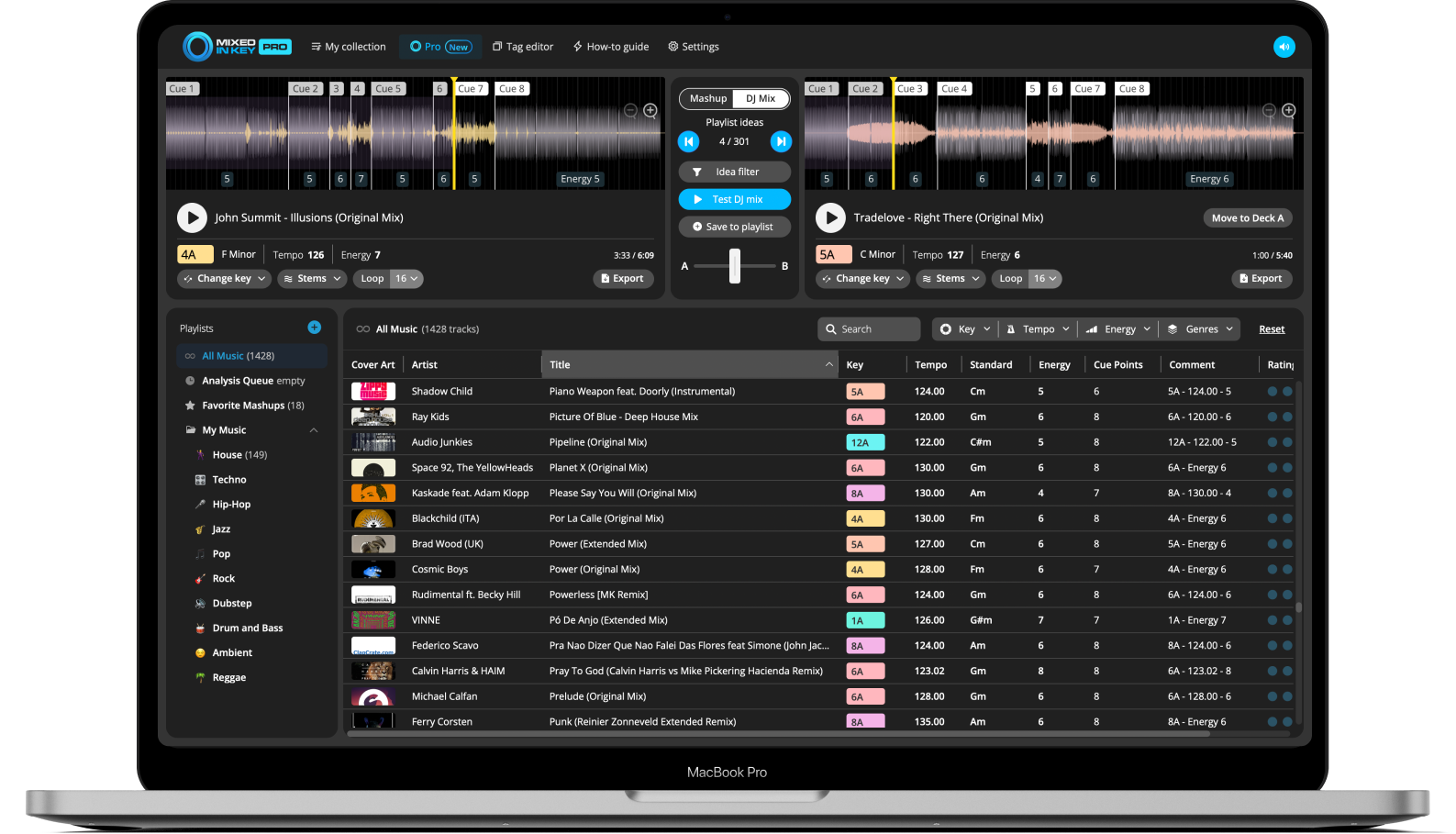
Mixed In Key Pro can help you find the next song faster with DJ Mix Mode. It suggests songs that could work well together based on Key, Energy Level, and BPM.
This is useful when you have a current track and want to quickly find possible next songs from your own music library.
Start with the song you are playing
Use DJ Mix Mode to find songs that support the current track. You can look for options that hold the groove, lift the energy, create a reset, or continue a harmonic path.
Preview promising combinations, save your favorites, and use your ears to choose the final next song.
How to find the next song in your DJ set
Analyze your music in Mixed In Key
Analyze your library so you can see Key, BPM, Energy Level, and Cue Points before building playlists or choosing songs during practice.
Check the current track
Look at the current song’s Camelot Key, BPM, Energy Level, and structure.
Choose the direction of the set
Choose whether to hold the groove, lift the intensity or reset the room. Use the crowd, time slot and tracks already played to guide that choice. An energy score is a browsing aid, not a guarantee of the room’s response.
Find compatible Camelot Keys
Start with the same Camelot Key, one number up, one number down, or the matching A/B position.
Narrow by BPM
Choose songs with a BPM range that makes sense for the transition or set direction.
Choose the right Energy Level
Use Energy Level to decide whether the next song should keep the same intensity, lift the room, or reset the mood.
Test with Cue Points
Jump to intros, breakdowns, drops, and mix-out sections to test whether the next song works in the actual transition.
Use DJ Mix Mode for more ideas
In Mixed In Key Pro, use DJ Mix Mode to find more next-song options based on Key, Energy Level, and BPM.
Make the final decision by listening
Audition the incoming section and rehearse the transition at the current tempo. Check phrase timing and melodic overlap, then keep a backup choice ready. You can deliberately change key or genre when the transition method supports it.
Example next-song choices
These examples show how Key, BPM, and Energy Level can guide your next-song decisions.
Current track: 8A / Energy 6
For a smooth move, try 8A, 7A, 9A, or 8B with a similar BPM and Energy Level 6.
To lift the room
Choose a compatible Camelot Key and move from Energy Level 6 to Energy Level 7.
To hold the groove
Choose a similar BPM, compatible Key, and the same Energy Level.
To reset the mood
Choose a lower Energy Level and use Cue Points to make the transition feel intentional instead of like an accidental drop.
Common mistakes when choosing the next song
Choosing only by BPM
BPM matters, but two songs with similar BPM can still clash harmonically or feel wrong in energy.
Ignoring Energy Level
A compatible Key can still feel wrong if the next song drops or jumps in energy too suddenly.
Forcing a Key match
Key compatibility is useful, but the song still needs to fit the set direction, crowd, and arrangement.
Mixing busy sections together
Even compatible Keys can sound messy if both songs have strong melodic sections playing at the same time.
Not preparing backup options
Have multiple next-song choices ready so you can adapt if the room changes direction.
Ignoring your ears
Mixed In Key helps you find stronger candidates faster, but listening should always make the final decision.
Frequently asked questions
Check Key, BPM, Energy Level, Cue Points, and the direction of the set. A good next song should fit musically, rhythmically, and emotionally.
Start with the same Camelot notation, one number higher, one number lower, or the matching A/B position. For example, from 8A, try 8A, 7A, 9A, or 8B.
It depends on the set direction. Use the same Energy Level to hold the groove, one level higher to lift the room, or a lower Energy Level when you want a deliberate reset.
Mixed In Key Pro includes DJ Mix Mode, which can help you find next-song ideas based on Key, Energy Level, and BPM from your own music library.
Both matter. Key helps with harmonic compatibility, while BPM helps with tempo flow. Energy Level and Cue Points also matter when deciding whether the next song really fits.
Use Mixed In Key to choose songs that fit the moment.
Analyze Key, BPM, Energy Level, and Cue Points, then use Mixed In Key Pro DJ Mix Mode to find next-song ideas faster.
Updated