


How to Analyze Your Music Library
Analyze new tracks or a whole music library in Mixed In Key, review Key, BPM and Energy Level, then prepare the results for your DJ software.
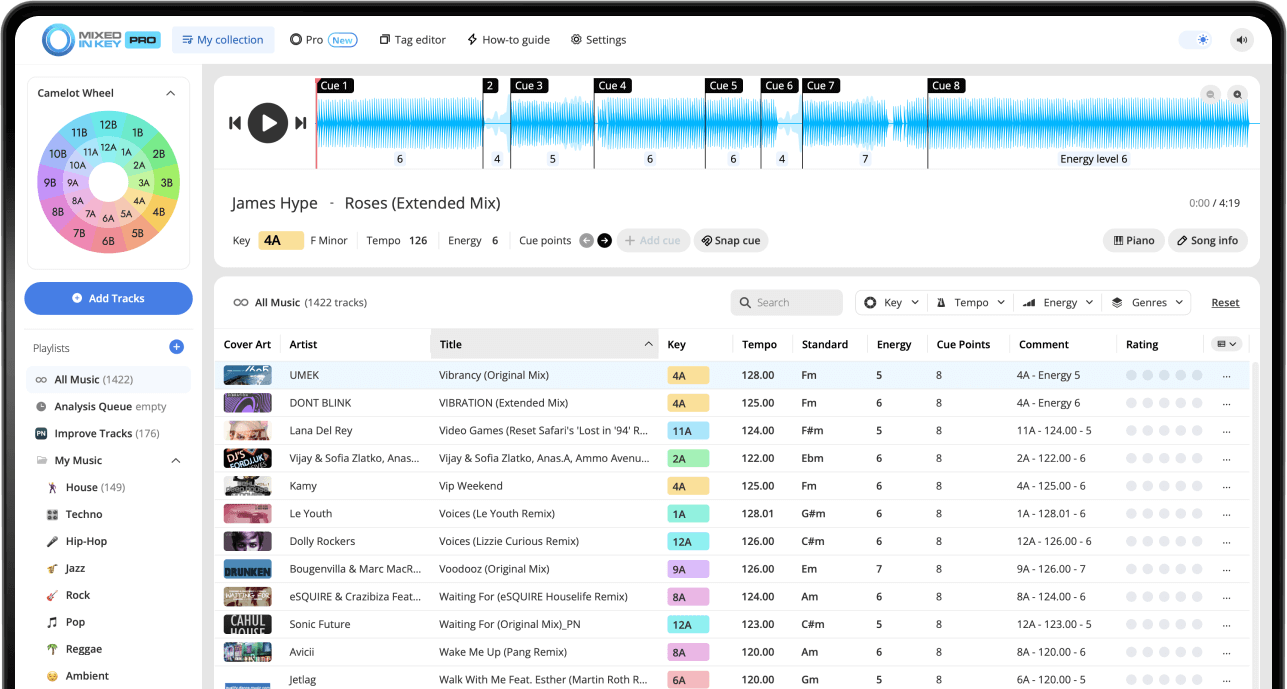
What does it mean to analyze your music library?
Add your local music files or folders to Mixed In Key and let the analysis finish. Review the detected Key, BPM and Energy Level, then follow the integration guide for your DJ app to use those results in your library. Cue Point export depends on the supported integration.
Start with a small batch of tracks so you can check the results and your DJ app’s settings before processing the rest of your library. Next, set up Key and BPM tags so the information appears where you browse your music.
Why DJs analyze their music library
A large music library can be hard to use if you do not know what is inside it. You may have hundreds or thousands of songs, but without clear Key, BPM, energy, and Cue Point information, it can take longer to find the right track at the right moment.
Mixed In Key helps turn your library into something more organized and performance-ready. Instead of guessing which songs might work together, you can use musical information to prepare smoother transitions and better playlists.
Analyzing your library helps you:
- Find songs that mix well together
- Prepare harmonic DJ transitions
- Organize tracks by Key, BPM, and Energy Level
- Build playlists faster
- Reduce guessing while preparing a set
It is especially useful for:
- New music downloads
- Large DJ libraries
- Open-format sets
- Harmonic mixing
- Preparing crates before a gig
What Mixed In Key detects
Mixed In Key analyzes your tracks and gives you useful information for DJ preparation. These results help you understand your music before you start building playlists or testing transitions.
Key
Mixed In Key detects the musical Key of your track and shows it in Camelot notation, such as 8A or 9B. A means minor, and B means major.
BPM
BPM helps you understand the tempo of each track, making it easier to find songs that can be mixed smoothly in your DJ software.
Energy Level
Energy Level helps you compare the intensity of tracks so you can decide whether the next song should lift, maintain, or lower the energy of the set.
Cue Points
Cue Points help you prepare useful places inside each track, such as intros, breakdowns, drops, and mix-out sections. This makes it easier to navigate your music and test transitions faster in your DJ software.
Use analysis as your preparation layer
Mixed In Key gives you a clear view of your music before you start DJing. Key tells you what is harmonically compatible, BPM helps with tempo matching, Energy Level helps with flow, and Cue Points help you navigate your tracks.
The result is a library that is easier to search, organize, and use during set preparation.
How to analyze your music library with Mixed In Key
Choose the music you want to prepare
Start with the tracks, folders, or playlists you want to analyze. This could be your full music library, a new batch of downloads, or a specific crate you are preparing for a set.
If you are working with a large library, you can start with your newest or most-used tracks first, then analyze the rest of your collection over time.
Add your tracks to Mixed In Key
Open Mixed In Key and add the files or folders you want to analyze. Mixed In Key will scan the tracks and generate useful DJ information for each song.
This is the main preparation step before you use the results in playlists, crates, or DJ software.
Review the Key, BPM, Energy Level, and Cue Points
After analysis, review the results for each track. Look at the Camelot Key, BPM, Energy Level, and Cue Point information so you understand how each song can fit into your DJ workflow.
This helps you spot songs that could work together before you even test them in a mix.
See the results in your DJ software
Use the integration instructions for your DJ app, such as rekordbox, Serato or Traktor. Tag display and Cue Point export have different setup requirements; check what your specific integration supports.
Mixed In Key includes integration tutorials inside the software. Follow the tutorial for your specific DJ app to make sure your tags and Cue Points appear where you expect them.
Organize tracks by Key, BPM, and Energy Level
Once your tracks are analyzed, use the results to organize your library. You can create playlists or crates around similar BPM ranges, compatible Camelot keys, or energy levels.
This makes it easier to find the right track when you are preparing a set or practicing transitions.
Use the results to prepare better transitions
When you are building a playlist or planning a set, look for songs that make sense together musically and rhythmically. Use Camelot Key for harmonic compatibility, BPM for tempo range, Energy Level for the direction of the set, and Cue Points to find useful mix-in and mix-out moments.
Cue Points can help you jump to important parts of a track, such as intros, breakdowns, drops, and mix-out sections. This makes it easier to test combinations quickly and prepare transitions before you perform.
See your Mixed In Key results where you DJ
Analyzing your music is most useful when the results are available in your normal DJ workflow. Mixed In Key includes integration tutorials inside the software to help you set up the right workflow for your DJ app.
Prepare in Mixed In Key, perform in your DJ software
Use the integration instructions for your DJ app, such as rekordbox, Serato or Traktor. Tag display and Cue Point export have different setup requirements; check what your specific integration supports.
Once the results are visible where you DJ, you can browse songs by Key, compare tempo and energy, and use Cue Points to move through your tracks more confidently.

Tips for organizing your analyzed library
Once Mixed In Key has analyzed your tracks, the next step is turning that information into a library that is easier to use.
Create key-friendly playlists
Group tracks that are close on the Camelot Wheel. This gives you a quick starting point when you want to build a harmonic section of a set.
Use BPM ranges
Keep tracks with similar tempos near each other. This makes it easier to build playlists that feel natural instead of jumping too far in tempo too quickly.
Sort by Energy Level
Energy Level helps you plan the shape of your set. You can build momentum, hold a steady groove, or create a smoother reset by choosing tracks with the right intensity.
Review new music regularly
A clean library is easier to use when new tracks are analyzed before they get added to your main crates. Make analysis part of your weekly music prep routine.
Common library analysis mistakes
Only analyzing right before a gig
It is better to analyze new music as part of your regular prep routine. That way, your tracks are ready before you need them.
Ignoring Energy Level
Key and BPM are important, but Energy Level helps you understand how a track feels in a set. Use it to plan momentum, not just compatibility.
Not checking your DJ software workflow
Make sure your Mixed In Key results are visible in the DJ software you use. Follow the integration tutorials inside Mixed In Key so your tags and Cue Points appear where you expect them.
Forgetting to listen
Analysis gives you better information, but your ears still matter. Always test important transitions before relying on them in a set.
Frequently asked questions
Analyzing your music library gives you useful DJ information such as Key, BPM, Energy Level, and Cue Points. This helps you prepare playlists, find compatible songs, and make better transition decisions.
Mixed In Key can show useful information such as Camelot key, BPM, Energy Level, and Cue Point information, depending on your workflow and settings.
Yes. Use the integration instructions for your DJ app, such as rekordbox, Serato or Traktor. Tag display and Cue Point export have different setup requirements; check what your specific integration supports. Follow the integration tutorials inside Mixed In Key for the correct setup.
You can analyze your full library, but you can also start with your newest downloads, most-used playlists, or tracks you are preparing for a specific gig.
No. Key is useful for harmonic compatibility, but you should also check BPM, Energy Level, genre, groove, vocals, and arrangement before choosing the next track.
Analyze your tracks with Mixed In Key.
Find Key, BPM, Energy Level, and Cue Point information so your music library is easier to organize, search, and use in your DJ sets.
Updated