


How to Build a Harmonic DJ Set
Analyze your crate, choose the direction of the set, and test each transition. Standard provides the analysis; Pro adds tools for auditioning the next track.

How do you prepare a harmonic DJ set?
Analyze the tracks you intend to play, choose an opening track, and shortlist compatible keys. Narrow the choices by BPM and Energy Level, then test the mix-in and mix-out sections. Keep alternatives in the crate so you can respond to the room rather than follow a fixed order.
Standard and Pro both provide Key, BPM, Energy Level and Cue Points. DJ Mix Mode is a Pro feature for trying next-track ideas from your library. See the Standard and Pro comparison.
What is a harmonic DJ set?
A harmonic DJ set is a set where the songs are arranged with musical Key compatibility in mind. The goal is to reduce clashing notes and make transitions feel more natural.
Harmonic mixing does not mean every song must sound the same. It means you use Key as one important part of the decision-making process, along with BPM, Energy Level, arrangement, genre, and the overall mood of the set.
A harmonic set can help you:
- Create smoother transitions
- Reduce musical clashes
- Build sections that feel connected
- Move between moods more intentionally
- Find better song combinations faster
But you should still check:
- BPM
- Energy Level
- Arrangement
- Genre and groove
- How the songs sound together
Use the Camelot Wheel to choose compatible Keys
Mixed In Key makes harmonic mixing easier by showing each song’s Key as a Camelot notation, such as 8A or 9B. On the Camelot Wheel, A means minor, and B means major.
If your current track is 8A, you can start by looking for songs in 8A, 7A, 9A, or 8B. These are simple starting points for finding songs that may work well together harmonically.
Start with reliable Camelot moves
The easiest harmonic moves are staying in the same Camelot Key, moving one number up, moving one number down, or switching between A and B on the same number.
After you find compatible Keys, check BPM and Energy Level to decide whether the song actually fits the moment in your set.
Use Energy Level to shape the emotional flow
A harmonic set should not only be musically compatible. It should also have a clear energy direction. Energy Level helps you decide whether the next song should lift the set, maintain the groove, create contrast, or reset the mood.
Two songs can be in compatible Keys and have similar BPM, but still feel wrong together if the Energy Level change does not make sense.
Build upward
Choose songs with gradually higher Energy Levels when you want the set to feel like it is growing.
Hold a groove
Choose songs with similar Energy Levels when you want to keep the same feeling and avoid changing the room too quickly.
Create contrast
Use a noticeable Energy Level change when you want a new moment, different mood, or stronger shift in the set.
Reset before building again
Move to a lower Energy Level when you want to create space before the next build.
Use BPM to keep the set moving naturally
BPM helps you plan how the tempo moves through the set. Songs do not need to have the exact same BPM, but the tempo movement should make sense for the style of mix you are building.
When building a harmonic DJ set, start with songs that are compatible in Key, then use BPM to narrow the list to tracks that are easier to place together.
Small BPM changes
Small BPM changes usually feel easier to manage and can help the set move naturally from one track to the next.
Larger BPM changes
Larger BPM changes can still work, but they usually need a planned moment, such as a breakdown, a genre shift, or a change in energy.
Use Cue Points to test the important sections
Cue Points help you move through each song faster while preparing your set. They make it easier to jump to the parts that matter most when testing song combinations.
Use Cue Points to check intros, breakdowns, drops, and mix-out sections before deciding where a song belongs in your harmonic set.
Use Cue Points to test:
- Where the intro begins
- How the breakdown feels
- Where the drop lands
- Where the mix-out section starts
Why it helps
- Test combinations faster
- Find better transition moments
- Prepare important sections before a gig
- Spend less time searching through each track
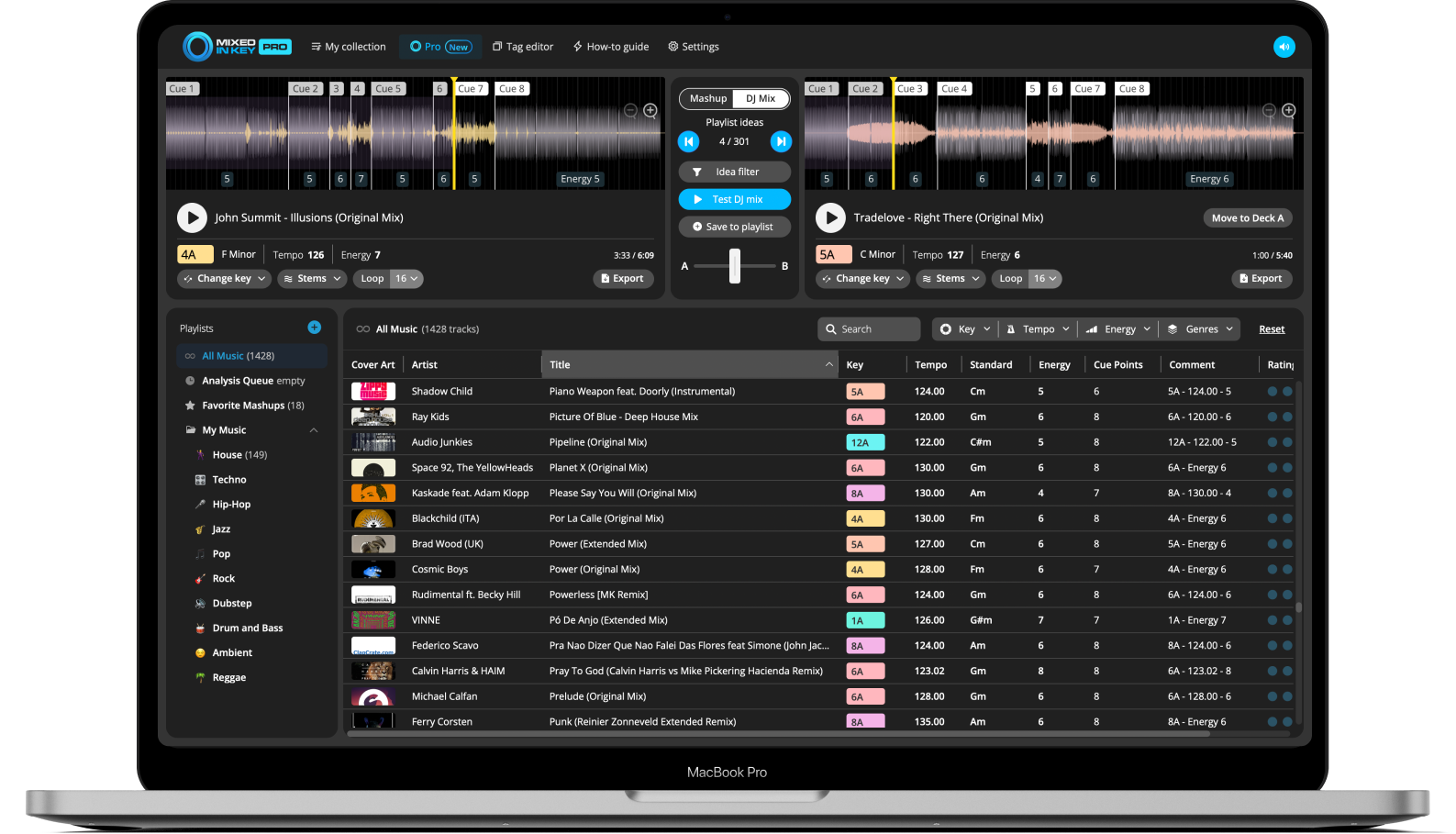
Use DJ Mix Mode to build harmonic playlist ideas
Mixed In Key Pro can help you build harmonic playlists faster with DJ Mix Mode. Instead of manually searching your entire library, DJ Mix Mode helps you discover songs that could work well together based on Key, Energy Level, and BPM.
This makes it useful when preparing a playlist for a gig, DJ set, livestream, radio show, recorded mix, or practice session.
Find harmonic combinations faster
DJ Mix Mode gives you ideas for songs that may work together, then lets you preview promising combinations and save your favorites as you build the setlist.
Use it when you want to move beyond manual searching and find more options from your own music library.
How to build a harmonic DJ set
Analyze your tracks in Mixed In Key
Start with the crate you are preparing, rather than waiting to analyze an entire library. Review Key, BPM and Energy Level in Standard or Pro. Use your DJ app’s supported integration for tags and Cue Points.
Choose a starting track
Pick a track that sets the mood, tempo, and Energy Level you want for the beginning of the set. This gives you a clear starting point for the rest of the playlist.
Find songs with compatible Camelot Keys
Look for songs in the same Camelot Key, one number higher, one number lower, or the matching A/B position. These are strong starting points for harmonic compatibility.
Compare BPM and Energy Level
Narrow your options by checking BPM and Energy Level. Choose songs that fit the tempo range and energy direction you want for that part of the set.
Use Cue Points to test sections
Jump to intros, breakdowns, drops, and mix-out sections so you can quickly test whether the songs feel right together.
Arrange the playlist into a set flow
Put the songs in an order that makes musical and emotional sense. You can build gradually, maintain a groove, create contrast, or reset the mood before building again.
Use DJ Mix Mode for more ideas
If you use Pro, audition next-track suggestions in DJ Mix Mode and keep the useful combinations. This is an optional preparation step; you can build the set from Standard’s analysis in your DJ software.
Preview the set and make final decisions
Test the transitions at the tempo you will play, with the intended key-lock setting. Check phrasing, competing vocals and bass overlap. Keep a few alternate tracks for each section of the set.
Example harmonic set structure
Here is a simple example of how you might structure a harmonic set using Camelot Key, BPM, and Energy Level.
Start smooth
Begin with a track in 8A at a moderate Energy Level. Look for another 8A track or a nearby Camelot Key to keep the opening section connected.
Build gradually
Move from 8A to 9A or 7A while increasing Energy Level. This can help the set feel like it is growing without a harsh musical jump.
Add contrast
Switch to the matching major or minor position, such as 8A to 8B, when you want a mood change that still feels musically connected.
Reset and rebuild
Use a lower Energy Level or smoother breakdown to create space before building into the next section of the set.
Common mistakes when building a harmonic set
Only following the Camelot Wheel
The Camelot Wheel is a guide, not the whole set. Always check BPM, Energy Level, genre, arrangement, and how the songs feel together.
Ignoring Energy Level
Compatible Keys do not always mean compatible energy. Make sure the next song fits the emotional direction of the set.
Forgetting about arrangement
A harmonic match can still fail if the intro, breakdown, drop, or mix-out section does not work with the previous track.
Not previewing the final order
Mixed In Key helps you find strong starting points, but you should still listen to the key combinations before finalizing your set.
Frequently asked questions
A harmonic DJ set is a set where songs are arranged with musical Key compatibility in mind. The goal is to create smoother transitions and reduce clashing notes between songs.
No. Songs can work well together in the same Camelot Key, nearby Camelot Keys, or related major and minor positions. The Camelot Wheel helps you find those relationships.
No. Key is important, but you should also check BPM, Energy Level, arrangement, genre, and how the songs sound together.
Mixed In Key Pro includes DJ Mix Mode, which helps you discover songs that could work well together based on Key, Energy Level, and BPM. This can make playlist and setlist building faster.
Yes. Mixed In Key helps you find better starting points, but your ears should always make the final decision before you perform or record the set.
Use Mixed In Key to plan smoother DJ sets.
Analyze your tracks, use Camelot Key for harmonic compatibility, compare BPM and Energy Level, prepare Cue Points, and use DJ Mix Mode in Mixed In Key Pro for more playlist ideas.
Updated