


How do you use the Camelot Wheel in a DJ set?
Read the Camelot notation of the track playing now, then shortlist the same key, one number either side with the same letter, or the same number with the other letter. From 8A, start with 8A, 7A, 9A or 8B.
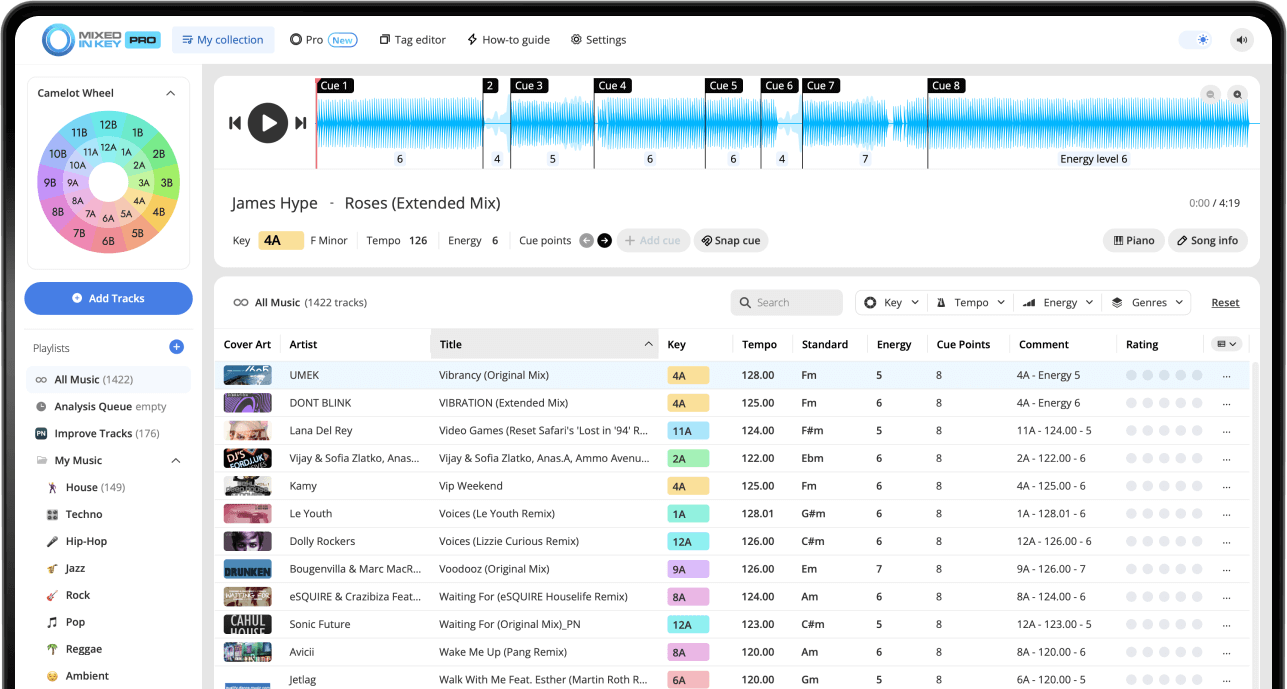
Audition the sections you plan to overlap. Key compatibility helps you choose candidates, but phrasing, vocals, tempo changes and the track’s actual harmony still decide whether the transition works. Mixed In Key shows Camelot notation alongside BPM and Energy Level so you can make that shortlist.
Watch harmonic mixing and the Camelot Wheel explained
This video gives a clear overview of harmonic mixing, the Camelot Wheel, and how DJs can use compatible keys to create smoother transitions.
What the Camelot Wheel shows you
The Camelot Wheel organizes musical keys into a simple circle. Each key gets a number and a letter. The number shows where the key sits on the wheel, while the letter tells you whether the key is minor or major: A means minor, and B means major.
For the full key-name mapping, open the Camelot Wheel reference page. In a set, use the number-and-letter relationships to shortlist tracks, then check the transition by ear.

Why DJs use it
- It makes compatible keys easier to understand
- It helps you find smoother transitions
- It works even if you do not know music theory
- It helps with playlist planning and set building
What Mixed In Key adds
- Key detection for your music library
- Camelot notation for each analyzed track
- BPM and Energy Level information
- Cue points and DJ software integration workflows
The three basic Camelot Wheel moves
Start with these three moves, then listen to the actual overlap. They are useful starting points for harmonic mixing; they do not guarantee every pair will blend.

Stay in the same key
If your current track is 8A, another 8A track is usually the safest harmonic match. Same number, same letter is the most direct Camelot move.
Move up or down
From 8A, try 7A or 9A. Moving one number up or down keeps you close on the Camelot Wheel and often creates a smooth transition.
Move across
From 8A, try 8B. Moving across keeps the same Camelot number while switching from the minor side of the wheel to the major side.
How to use the Camelot Wheel with Mixed In Key
Analyze your music in Mixed In Key
Add your tracks or music folders to Mixed In Key. After analysis, Mixed In Key shows useful DJ information such as Camelot key, BPM, Energy Level, and cue points.
This gives you the information you need before you start building playlists or planning transitions.
See the results in your DJ software
Bring the key, BPM, Energy Level, and cue point information into your DJ software workflow, such as Rekordbox, Serato, Traktor, and others.
Mixed In Key includes integration tutorials inside the software. Follow the tutorial for your specific DJ app to make sure your tags and cue points appear where you expect them.
Start with the key of your current track
Look at the Camelot key of the song you are currently playing or planning around. For example, your current song might be 8A.
That key becomes your starting point on the wheel.
Choose a compatible next key
Use the basic Camelot moves to find candidates. From 8A, try 8A, 7A, 9A, or 8B. These are strong options for smooth harmonic transitions.
You can use this approach while browsing playlists, crates, or search results in your DJ software.
Check BPM and Energy Level
A track can be harmonically compatible but still feel wrong for the moment. Compare BPM, groove, and Energy Level before choosing the next song.
Test the transition with your ears
Load both songs and test the blend. Listen to the vocals, bassline, chords, melodies, and breakdowns. The Camelot Wheel helps you find good candidates, but your ears should make the final decision.
Use Camelot results inside your DJ software
Mixed In Key is most useful when the results are available where you actually DJ. After analysis, use the integration tutorials inside Mixed In Key to connect the results with your DJ software.
Prepare once, use it while you DJ
Your key, BPM, Energy Level, and cue point information can become part of your normal DJ workflow. This makes it easier to browse compatible songs, build playlists, and prepare smoother transitions.
Follow the integration tutorial inside Mixed In Key for your software, such as Rekordbox, Serato, Traktor, or Engine DJ.
Advanced Camelot Wheel techniques
Once you understand the basic Camelot moves, you can use more advanced techniques to create bigger moments in your DJ sets. These moves are more dramatic, so use them intentionally and test them with your ears.
Energy Boost mixing
Energy Boost mixing is a way to give the dance floor a quick lift. Instead of moving one number up or down, try moving two numbers higher on the same side of the Camelot Wheel.
This can add excitement, but it works best in moderation. Use it when the room is ready for a lift, not on every transition.
Learn Energy Boost mixing →Jaws Mix
The Jaws Mix is a bold -5 move on the Camelot Wheel. It creates a surprise effect that can snap the dance floor to attention when used at the right moment.
This is not a normal smooth-mixing move. Treat it like a dramatic transition for peak moments, breakdowns, build-ups, or moments where you want the crowd to notice the change.
Learn the Jaws Mix →Pay Attention Mix
The Pay Attention Mix uses a -3 or +9 move on the Camelot Wheel. It is designed to create surprise while still using harmonic thinking as the foundation.
Use this when your set feels too predictable and you want a transition that feels intentional, energetic, and different.
Learn the Pay Attention Mix →Power Block mixing
Power Block mixing combines fast transitions with same-key groups. You can build a block of tracks in the same Camelot key, then mix between recognizable sections quickly.
This works especially well when cue points help you jump to the most exciting parts of each track instead of waiting through long intros.
Learn Power Block mixing →Common Camelot Wheel mistakes
Thinking the wheel guarantees a perfect mix
The Camelot Wheel helps you find compatible keys, but it does not replace listening. Arrangement, vocals, basslines, and energy still matter.
Ignoring Energy Level
A compatible key can still feel wrong if the energy does not match the room. Use Energy Level to decide whether the next track should lift, maintain, or reset the mood.
Using advanced moves too often
Energy Boost, Jaws Mix, and Pay Attention Mix are powerful because they stand out. If every transition is dramatic, the impact disappears.
Forgetting your DJ software setup
Make sure your Mixed In Key results are visible in your DJ software. Follow the integration tutorials inside Mixed In Key so your tags and cue points are ready when you need them.
Frequently asked questions
The Camelot Wheel is a DJ-friendly system that turns musical keys into simple number and letter codes, such as 8A or 9B. It helps DJs find tracks that are likely to sound good together.
A simple starting point is to use the same key, one number up, one number down, or the same number with the opposite letter. For example, from 8A, try 8A, 7A, 9A, or 8B.
A means the key is in a minor scale, and B means the key is in a major scale. For example, 8A is a minor key, while 8B is its related major key on the Camelot Wheel.
Energy Boost mixing is an advanced Camelot technique where you move two numbers higher on the same side of the wheel, such as 8A to 10A, to create a lift in energy.
The Jaws Mix is an advanced -5 Camelot move, such as 8A to 3A. It creates a dramatic change and should be used sparingly for moments where you want the transition to stand out.
No. The Camelot Wheel is a guide, not a rulebook. It helps you find compatible options, but you should still consider BPM, Energy Level, genre, arrangement, vocals, and the mood of the room.
Use the Camelot Wheel inside your DJ workflow.
Analyze your music library with Mixed In Key, find compatible keys faster, compare BPM and Energy Level, and prepare smoother DJ transitions.