


How to Mix in Key
Use compatible keys when the melodies overlap. Match the phrases and check the blend at the tempo you plan to play.

How to Mix in Key
Analyze your tracks in Mixed In Key 11 and use Camelot notation to shortlist harmonic pairings. From 8A, start with 8A, 7A, 9A or 8B. Compare tempo, energy and phrasing, then audition the sections that overlap. Key compatibility helps with melodic blends; it does not replace beatmatching or guarantee that two busy arrangements will fit.
Key, BPM, energy and automatic Cue Points are included in Standard and Pro. Mashup suggestions, deck players, stems and key changes require Pro. Compare Standard and Pro.
Watch harmonic mixing explained
This video gives a clear overview of harmonic mixing, the Camelot Wheel, and how DJs can use compatible keys to create smoother transitions.
What mixing in key means
Every song has a musical key. When two songs are in compatible keys, they usually blend more smoothly during a DJ transition. When the keys clash, the mix can feel tense, messy, or musically uncomfortable, even if the beatmatch is perfect.
Mixing in key gives you a practical way to avoid those clashes. It helps you choose the next track based on how the music sounds together, not just based on tempo or genre.
Mixing in key helps with:
- Smoother transitions between songs
- More musical blends and overlays
- Better playlist and set planning
- Avoiding obvious key clashes
- Choosing a next track faster
It works best when you also consider:
- BPM and tempo range
- Energy Level
- Genre and groove
- Vocals, melodies, and breakdowns
- The emotional direction of the set
Why DJs mix in key
DJs mix in key because it gives them another layer of control. BPM tells you whether two songs can be beatmatched. Key tells you whether the musical notes are likely to sound good together.
This is especially useful when you are mixing tracks with vocals, melodies, pads, piano chords, long breakdowns, or musical intros and outros. In those moments, harmonic compatibility can make the difference between a clean transition and a mix that feels off.
How Mixed In Key helps you mix in key
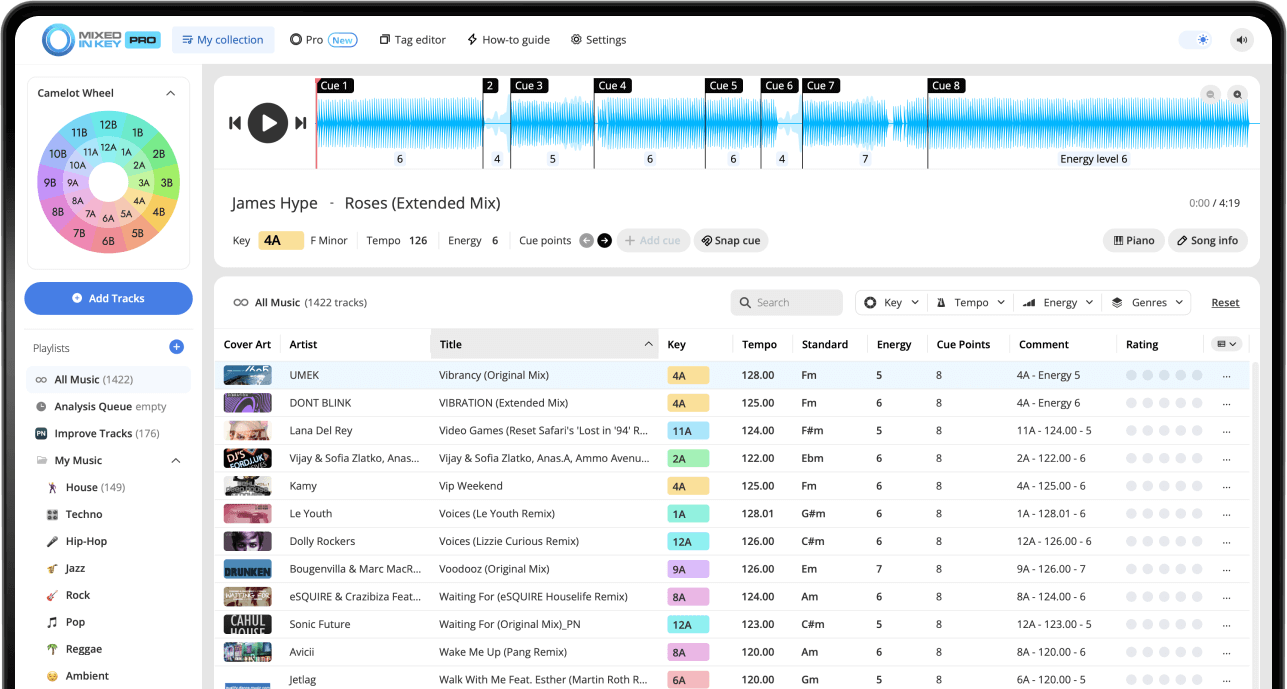
Mixed In Key analyzes your music library and detects useful DJ information such as key, BPM, and Energy Level. It can show keys in Camelot notation, making it faster to understand which tracks are harmonically compatible.
Analyze once, prepare faster later
After your tracks are analyzed, you can use key, BPM, and Energy Level while building playlists, preparing sets, or choosing the next song during practice.
The goal is not to replace your ears. The goal is to give you better information before you make a mixing decision.
Basic Camelot rules for mixing in key
The Camelot Wheel turns musical keys into simple numbers and letters. This makes it easier to spot compatible songs quickly, even if you do not know music theory.
Stay in the same key
If your current track is 8A, another 8A track is usually a safe harmonic match. Same number, same letter is the simplest move.
Move up or down the wheel
From 8A, try 7A or 9A. Moving one number up or down keeps you close on the Camelot Wheel and often creates a smooth transition.
Move across the wheel
From 8A, try 8B. Moving across keeps the same Camelot number while switching between the minor and major side of the wheel.

Key tells you what fits. Energy tells you where to go.
Harmonic compatibility is only one part of a good DJ transition. Two tracks can be in compatible keys but still feel wrong if the energy, groove, or mood does not fit the moment.
Use key to avoid clashes
The Camelot key helps you find songs that are likely to sound musical together. This is especially useful for long blends, vocals, breakdowns, and melodic transitions.
Use Energy Level to shape the set
Energy Level helps you decide whether the next song should lift the room, maintain the current feeling, or bring the set down into a smoother moment.
How to mix in key with Mixed In Key
Analyze your tracks in Mixed In Key
Start by adding your music files or folders to Mixed In Key. After analysis, Mixed In Key shows useful information such as musical key, BPM, Energy Level, and cue points.
This gives you the foundation for making harmonic mixing decisions before you start preparing or performing in your DJ software.
See the analysis results to your DJ software
Follow the integration guide for your DJ app to write and refresh tags. Check one local file and display the relevant key and comments columns. Transfer Cue Points using the app-specific route separately.
Check the Camelot key of your current track
Look at the Camelot key of the song you are currently playing or planning around. For example, the current song might be labeled 8A.
This becomes your starting point for finding the next compatible song.
Find songs with compatible Camelot keys
Search for tracks with the same key, one number up, one number down, or the same number with the opposite letter. If your current song is 8A, good starting options are 8A, 7A, 9A, and 8B.
These options are not strict rules, but they give you reliable places to start when choosing the next track.
Compare BPM and Energy Level
After you find harmonically compatible songs, check BPM and Energy Level. A song may be in a compatible key, but still feel wrong if the tempo, rhythm, or energy does not fit the moment.
Test the transition with your ears
Rehearse the intended phrases with your performance tempo and key-lock settings. Listen for competing vocals, basslines and chord changes. Use a shorter overlap or another pairing if the arrangement clashes, even when the key labels look compatible.
Save the best combinations
When you find songs that mix well together, save them in a playlist, crate, or set list. Over time, this builds a library of reliable transitions you can use in future sets.
This is where Mixed In Key becomes especially useful: it helps you discover combinations faster, then you can organize the best ones for performance.
Common harmonic mixing mistakes
Only looking at key
Two songs can be harmonically compatible but still feel wrong together. Always check BPM, Energy Level, groove, genre, and vocal placement too.
Ignoring Energy Level
A compatible key does not automatically mean the transition fits the moment. Energy Level helps you decide whether the next track lifts, maintains, or lowers the mood.
Forcing every mix to be harmonic
Not every transition needs to follow Camelot rules. Sometimes a quick cut, drum-only transition, or creative switch works better.
Not testing the blend
The final test is always how the songs sound together. Use key compatibility as a guide, then trust your ears.
Frequently asked questions
Mixing in key means choosing songs with compatible musical keys so transitions sound smoother and less dissonant.
No. Mixing in key is a helpful technique, not a strict rule. It is especially useful for melodic transitions, vocals, breakdowns, and long blends, but quick cuts and creative transitions can still work outside the key rules.
The Camelot Wheel is a DJ-friendly way to understand compatible musical keys. It uses simple labels like 8A or 9B so DJs can find harmonic matches quickly.
A simple starting point is to mix with the same key, one number up, one number down, or the same number with the opposite letter. For example, from 8A, try 8A, 7A, 9A, or 8B.
No. The Camelot Wheel helps you find compatible keys, but a good DJ transition also depends on BPM, Energy Level, groove, vocals, arrangement, and timing.
Yes. Mixed In Key can show useful track information such as key, BPM, and Energy Level, which can help you prepare playlists and DJ sets.
Prepare smoother DJ transitions with Mixed In Key.
Analyze your music library, find compatible keys, compare BPM and Energy Level, and build better harmonic DJ sets.
Updated