Included Software:
It’s important to make sure that your Mixed In Key results show up in iTunes correctly. This tutorial will make sure that you get the right results in iTunes.
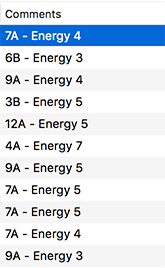
This is how Mixed In Key results should look in iTunes:
If everything is set up correctly, you should see the “Key + Energy” in your iTunes Comments column.
NOTE: For iTunes on Windows:
To enable Mixed In Key to import playlists from iTunes on Windows, an option needs to be activated in iTunes – ‘Share iTunes Library XML with other applications’. This can be found under Edit > Preferences > Advanced. The setting is set to OFF by default.
We’re DJs too, and we’re happy to help you. You can always email us directly: [email protected]. Do you have ideas on what else we should explain? Let us know, and we’ll respond to you and update this tutorial.
-Yakov and the Mixed In Key team